


Copy Page Setup and Print Settings to Other Sheets...
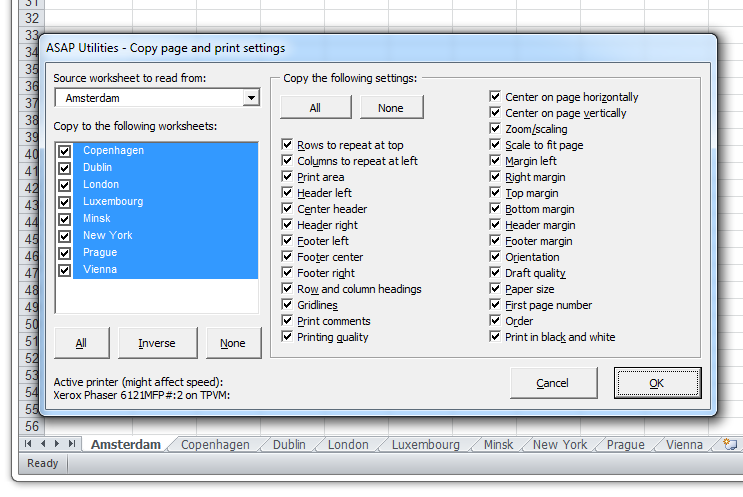
This tool lets you quickly copy some or all page setup and print settings from one worksheet to multiple other sheets in your workbook.
It helps ensure consistent formatting for printed reports, exports, and PDF outputs, saving time and reducing errors.
You can choose from the following settings:
- Rows to repeat at top
- Columns to repeat at left
- Print area
- Header left
- Header right
- Footer left
- Footer center
- Footer right
- Margin left
- Right margin
- Center header
- Top margin
- Bottom margin
- Header margin
- Footer margin
- Row and column headings
- Gridlines
- Printing quality
- Center on page horizontally
- Orientation
- Draft quality
- Paper size
- Print comments
- First page number
- Print in black and white
- Order
- Zoom/scaling
- Center on page vertically
- Scale to fit page
The All, Invert, and None buttons allow you to quickly choose which settings to copy.
Note:
Due to an Excel limitation, this tool or any macro cannot copy images inserted into headers or footers. Microsoft recommends selecting all target sheets manually and inserting images via the Insert Picture dialog. The original image file is required.
Performance may vary depending on your system's default printer driver, which affects how quickly Excel applies print settings.
Starting this tool
Specify a Keyboard Shortcut: ASAP Utilities › My Tools & Shortcuts › Manage My Tools & Shortcuts...
Additional keywords to help you find this tool:
Apply print settings to all worksheets, Copy print area to other sheets, Copy header footer settings, Apply page setup across workbook, Duplicate page layout to multiple worksheets, Copy page formatting, Print settings for multiple Excel sheets, Replicate print setup, Apply same page setup to all tabs, Copy margins and orientation, Batch update print settings, Copy print layout to other sheets, Consistent page setup, Copy worksheet header footer settings, Sync print settings across Excel workbook, Print setup template for all sheets, Apply header footer to all sheets
Tip:Alt+P for the previous tool.
Tip: Alt+N for the next tool.

Save Time in Excel. The Easy Way.
ASAP Utilities helps you save time and do what Excel alone can't.
You can get started right away. No training needed.
Most users start with a few tools. Many end up using ASAP Utilities daily.
Used by teams in 28,500+ organizations.
Get Started with ASAP Utilities
Start saving time in Excel with practical tools you can use right away.
-
No sign-up required.
-
-
Free 90-day trial