


Info & List
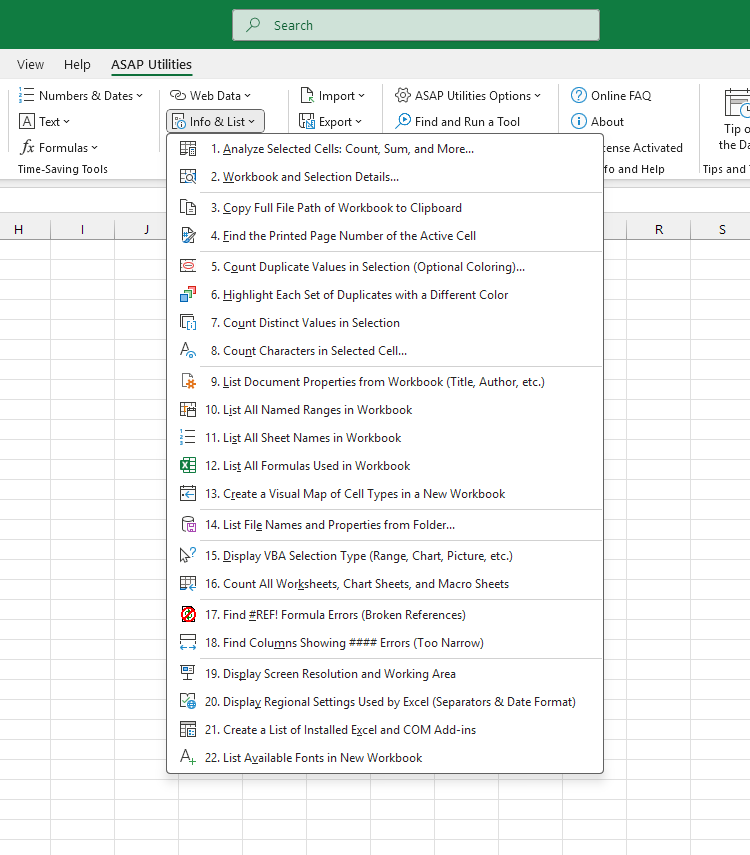
These tools help you analyze selected cells, view detailed workbook and sheet stats, identify duplicates, and generate lists such as all formulas, named ranges, sheet names, document properties, or installed fonts. You can also check screen settings and detect issues such as too narrow columns, broken links, or #REF! errors.
Starting this tool
Click ›
Specify a Keyboard Shortcut: ASAP Utilities › My Tools & Shortcuts › Manage My Tools & Shortcuts...
Additional keywords to help you find this tool:
Directory
Tip:Alt+P for the previous tool.
Tip: Alt+N for the next tool.

Save Time in Excel. The Easy Way.
ASAP Utilities helps you save time and do what Excel alone can't.
You can get started right away. No training needed.
Most users start with a few tools. Many end up using ASAP Utilities daily.
Used by teams in 28,500+ organizations.
Get Started with ASAP Utilities
Start saving time in Excel with practical tools you can use right away.
-
No sign-up required.
-
-
Free 90-day trial