


Insert Multiple Sheets Using Cell Values as Names...
Quickly create multiple worksheets using the values from your selected cells as sheet names.
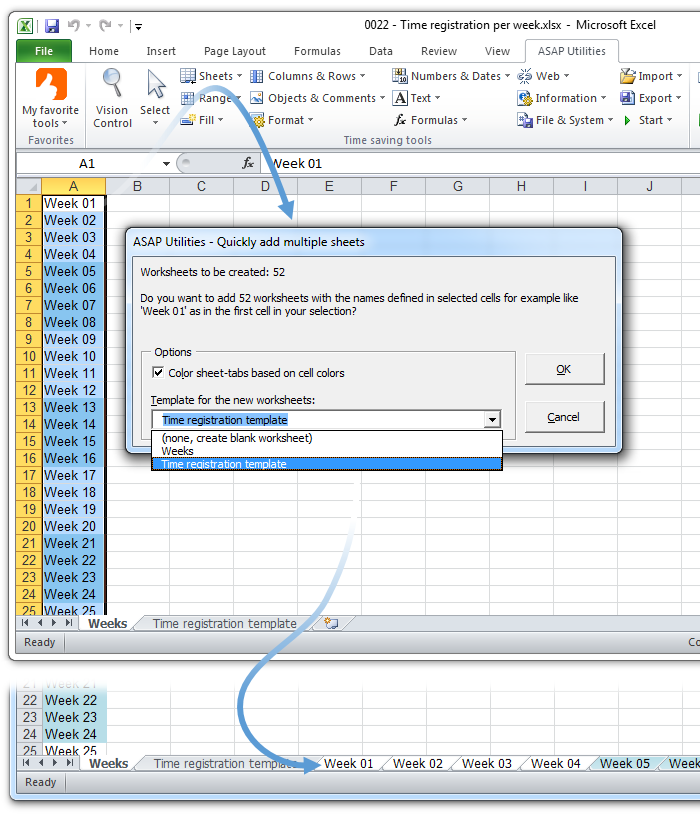
Each cell in your selection creates a new worksheet, using the cell's content as its name. Optionally, the new sheet's tab color matches the cell's color for better organization.
Options:
- Use an existing worksheet in your workbook as a template so all new sheets start with the same layout.
- Apply the cell's background color to the sheet tab for easy identification.
How to use:
- Select a range of cells containing the names for your new sheets.
- Run this tool, choose your options, and each cell in your selection creates a new worksheet.
Tip: To quickly create a list of names that you can use for the worksheets, use ASAP Utilities' 'Auto Numbering and Labeling of Selected Cells...' or Excel's built-in tools, such as Fill Series, Flash Fill, Auto Fill, or the SEQUENCE function.
Starting this tool
Specify a Keyboard Shortcut: ASAP Utilities › My Tools & Shortcuts › Manage My Tools & Shortcuts...
Additional keywords to help you find this tool:
Create worksheets from a list in Excel, Automatically generate multiple sheets, Insert multiple worksheets with specific names, Excel tool to create sheets from cell values, Generate new sheets based on cell data, Bulk create worksheets in Excel, Create multiple sheet tabs at once, Insert multiple sheets and name them, Copy one worksheet to many new sheets, Duplicate a template worksheet multiple times, What is the fastest way to insert and name multiple worksheets in Excel?
Tip:Alt+P for the previous tool.
Tip: Alt+N for the next tool.

Save Time in Excel. The Easy Way.
ASAP Utilities helps you save time and do what Excel alone can't.
You can get started right away. No training needed.
Most users start with a few tools. Many end up using ASAP Utilities daily.
Used by teams in 28,500+ organizations.
Get Started with ASAP Utilities 9
Start saving time in Excel with practical tools you can use right away.
-
No sign-up required.
-
-
Free 90-day trial