We're proud to officially announce the new version of ASAP Utilities! New exiting tools have been added and several improvements have been made. Do you often work with Excel's Filters or AutoFilters? Do you need to export your worksheets as separate workbooks? Did you ever wanted to change your conditional formatting to static formatting (like [...]
Posted on October 26th, 2011 by Bastien
Filed under: ASAP Utilities | No Comments »
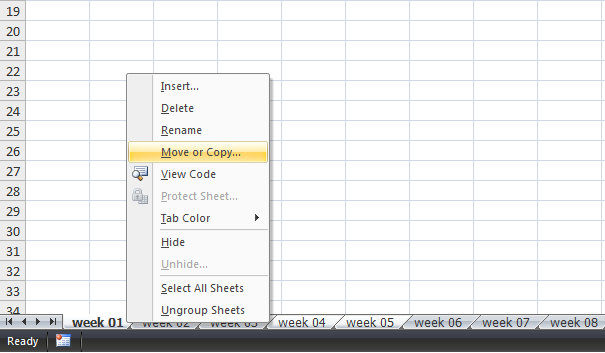
In addition to my post for yesterday that demonstrated how to save worksheets as separate workbooks, this article will show how how to save several worksheets together in a single new workbook. To save several sheets from your workbook together in a new file, you can do the following in Excel: First select the sheets [...]
Posted on October 21st, 2011 by Bastien
Filed under: How to | Comments Off
I just received the following question from Azad from Australia: Hi, Is it possible to select a number of worksheets and export as a single workbook? As you probably already know, Excel itself doesn't have a option for this. It can be a time consuming job to save each worksheet as a separate workbook. Fortunately [...]
Posted on October 20th, 2011 by Bastien
Filed under: ASAP Utilities, how to with ASAP Utilities | 3 Comments »
We're proud to mention that the free ASAP Utilities Home&Student edition was featured in the January 2011 edition of the German PC Welt in an article about apps (addins) for Microsoft Office. English Translation: "Useful extensions for Microsoft Excel....ASAP Utilities is a collection of Excel macros with several hundred commands for formatting worksheets and highlight [...]
Posted on October 18th, 2011 by Bastien
Filed under: ASAP Utilities | Comments Off
We're proud to mention that the free ASAP Utilities Home&Student edition is featured in the October 2011 edition of the Dutch PC Magazine in an article about apps (addins) for Microsoft Office. English Translation: "Firefox and Crome are well known for it, but Microsoft Office can also be improved with the use of extensions or [...]
Posted on October 15th, 2011 by Bastien
Filed under: ASAP Utilities | Comments Off
Quite frequently people ask us how to remove all content before or after a certain character. This is easy to do this with Excel's built-in Find and Replace. In this article I'll show you how. Hi! Does your software have a functionality to remove all content BEFORE a symbol in a column? For example: This: [...]
Posted on October 14th, 2011 by Bastien
Filed under: How to | Comments Off