


ASAP Utilities Options
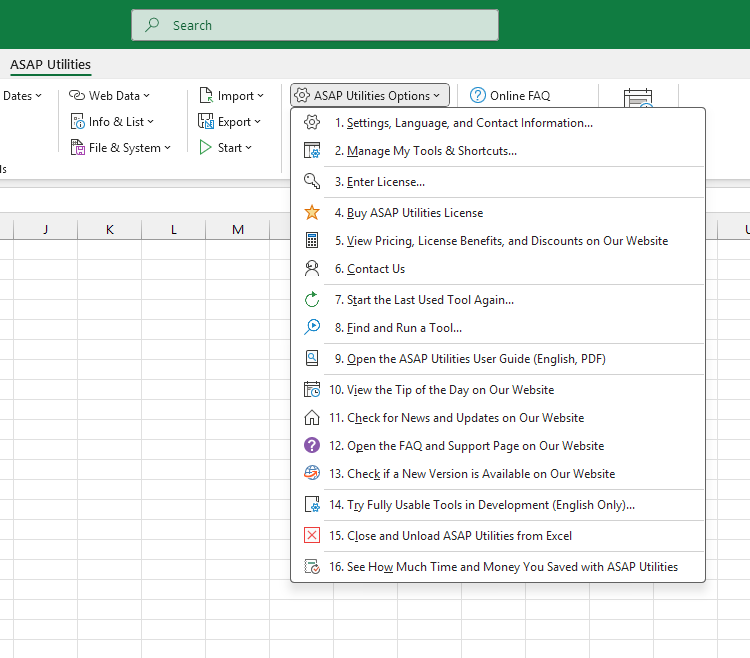
These tools let you customize and manage how ASAP Utilities works in Excel. You can adjust settings, change the language, manage shortcuts, enter or buy a license, check for updates, or open the user guide. You can also repeat your last used tool, search for tools, and explore experimental ones. There's even a report that shows how much time and money you've saved by using the tools.
Starting this tool
Click ›
Specify a Keyboard Shortcut: ASAP Utilities › My Tools & Shortcuts › Manage My Tools & Shortcuts...
Tip:Alt+P for the previous tool.
Tip: Alt+N for the next tool.

Save Time in Excel. The Easy Way.
ASAP Utilities helps you save time and do what Excel alone can't.
You can get started right away. No training needed.
Most users start with a few tools. Many end up using ASAP Utilities daily.
Used by teams in 28,500+ organizations.
Get Started with ASAP Utilities
Start saving time in Excel with practical tools you can use right away.
-
No sign-up required.
-
-
Free 90-day trial