24/7 Order Support via our reseller 2Checkout/Verifone
24/7 Order Support via our reseller 2Checkout/Verifone
 All orders and payments are handled by our reseller/partner 2Checkout/Verifone.
This enables us to offer you a wide variety of online and offline payment methods, making it easier to complete transactions from anywhere in the world. With clients in over 140 countries, this system also simplifies global TAX/VAT administration, allowing us to concentrate on both developing ASAP Utilities and supporting our clients.
24/7 Customer Service Center for ordering related questions
For questions regarding your order or if you need help with the ordering system, please contact the 2Checkout/Verifone 24/7 Shopper Support.
Instant delivery
The license is sent as soon as the payment is received, which is fully automated and usually within 5-30 minutes when you pay online such as with a creditcard.
For offline payments, such as check or bank/wire transfer, the speed depends on the speed of the banks, and it can then take a few working days before your money is received and the license is sent. In such a case you can already start using ASAP Utilities by downloading our fully functional 90-day trial.
Official invoice/receipt: PDF via email
You receive an invoice/receipt in PDF format in your mailbox after the order is completed.
This document contains all the required legal information for your administration.
In case you no longer have it, you can download a copy via: https://www.2co.com/.
Banking details for wire transfer
2Checkout's bank details may vary per country and are shown on the invoice that you receive after placing the order.
Sales tax in a few U.S. States
To be compliant with laws and regulations, 2Checkout (now Verifone) is required to collect sales tax in a few U.S. states.
If you are Tax Exempt in the USA and have been charged Sales Tax, please e-mail pay@2checkout.com, within 90 days of the purchase, with your order reference number and tax exemption certificate and they will refund the collected tax.
Legal information and W-8/W-9 forms
The following page shows their company details and W-8 and W-9 forms: https://www.2checkout.com/legal/legal-notice/
Contact the ASAP Utilities Support Team if you need a copy of your license
If you've lost your license details, don't worry. We can easily look them up and send you a copy. Just send your order number—or if you don't have that, your name, organization, and the email address used at the time of purchase—to our support team. This information will help us locate your license.
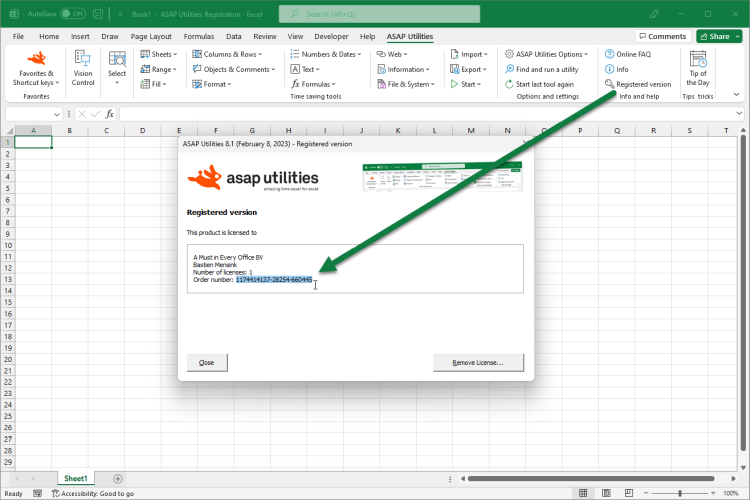
You can also find and copy your order number via: Excel › ASAP Utilities › Registered version