


Ländereinstellungen des Computers anzeigen
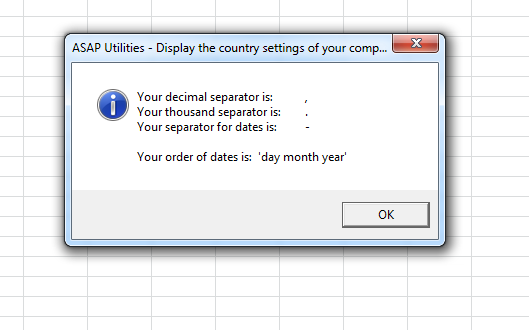
Dieses Tool zeigt einige der Ländereinstellungen Ihres Computers an.
Es zeigt die folgenden von Ihrem Computer verwendeten Einstellungen an:
- Dezimaltrennzeichen
- 1000er-Trennzeichen
- Datumstrennzeichen
- Datumsformat (z. B. Tag-Monat-Jahr oder Monat-Tag-Jahr usw.).
Wir haben dieses Tool für Sie entwickelt, damit Sie sich diese Angaben schnell ansehen können. Oft lassen diese Informationen sich auf einem Computer, wo diese Einstellungen von der IT-Abteilung blockiert wurden, nicht leicht finden.
Starten des Tools
Klicken Sie auf › Informationen › 20. Ländereinstellungen des Computers anzeigen
Tastenkombination angeben: ASAP Utilities › Favoriten & Tastenkombinationen › Bevorzugte Tools und Tastenkombinationen bearbeiten...
Tipp: Alt+P für das vorherige Tool.
Tipp: Alt+N für das nächste Tool.

Zeit sparen in Excel. Schnell und einfach.
ASAP Utilities hilft Ihnen, Zeit zu sparen und Dinge zu tun, die mit Excel allein nicht möglich sind.
Sie können sofort loslegen. Keine Schulung erforderlich.
Die meisten Nutzer beginnen mit wenigen Tools. Viele nutzen ASAP Utilities schließlich täglich.
Vertraut von Teams in über 28.500 Organisationen.
Erste Schritte mit ASAP Utilities 9
Sparen Sie Zeit in Excel mit praktischen Tools, die sofort einsatzbereit sind.
-
Keine Registrierung nötig.
-
-
90 Tage kostenlos testen