


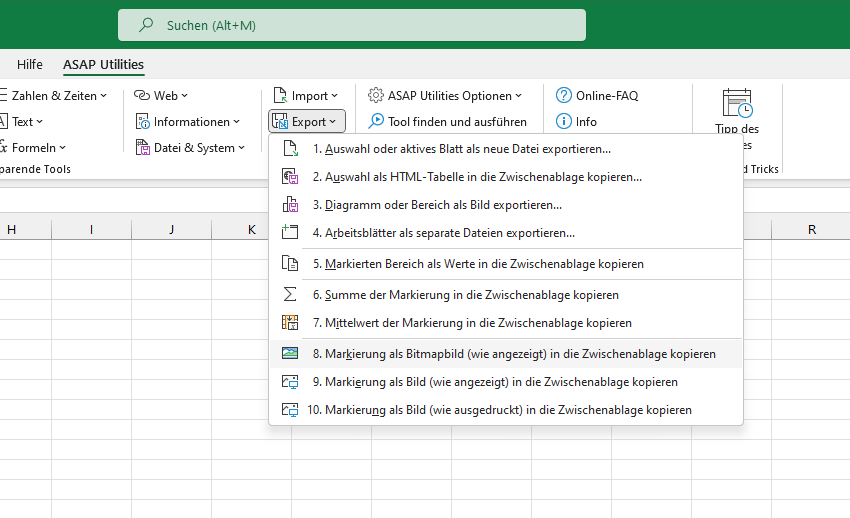
Markierung als Bitmapbild (wie angezeigt) in die Zwischenablage kopieren
Dieses Tool legt die Markierung so wie sie auf dem Bildschirm zu sehen ist als Bitmapbild in der Zwischenablage ab.
Sie können das Bild dann in einem Programm wie Word oder einem Fotobearbeitungsprogramm einfügen.
Dies ist auch in Excel selbst möglich, aber ASAP Utilities hat den Vorteil, dass weniger Handlungen erforderlich sind und dass Sie der Aktion eine Tastenkombination zuweisen können.
Starten des Tools
Tastenkombination angeben: ASAP Utilities › Favoriten & Tastenkombinationen › Bevorzugte Tools und Tastenkombinationen bearbeiten...
Tipp: Alt+P für das vorherige Tool.
Tipp: Alt+N für das nächste Tool.

Zeit sparen in Excel. Schnell und einfach.
ASAP Utilities hilft Ihnen, Zeit zu sparen und Dinge zu tun, die mit Excel allein nicht möglich sind.
Sie können sofort loslegen. Keine Schulung erforderlich.
Die meisten Nutzer beginnen mit wenigen Tools. Viele nutzen ASAP Utilities schließlich täglich.
Vertraut von Teams in über 28.500 Organisationen.
Erste Schritte mit ASAP Utilities 9
Sparen Sie Zeit in Excel mit praktischen Tools, die sofort einsatzbereit sind.
-
Keine Registrierung nötig.
-
-
90 Tage kostenlos testen