


Markierung invertieren...
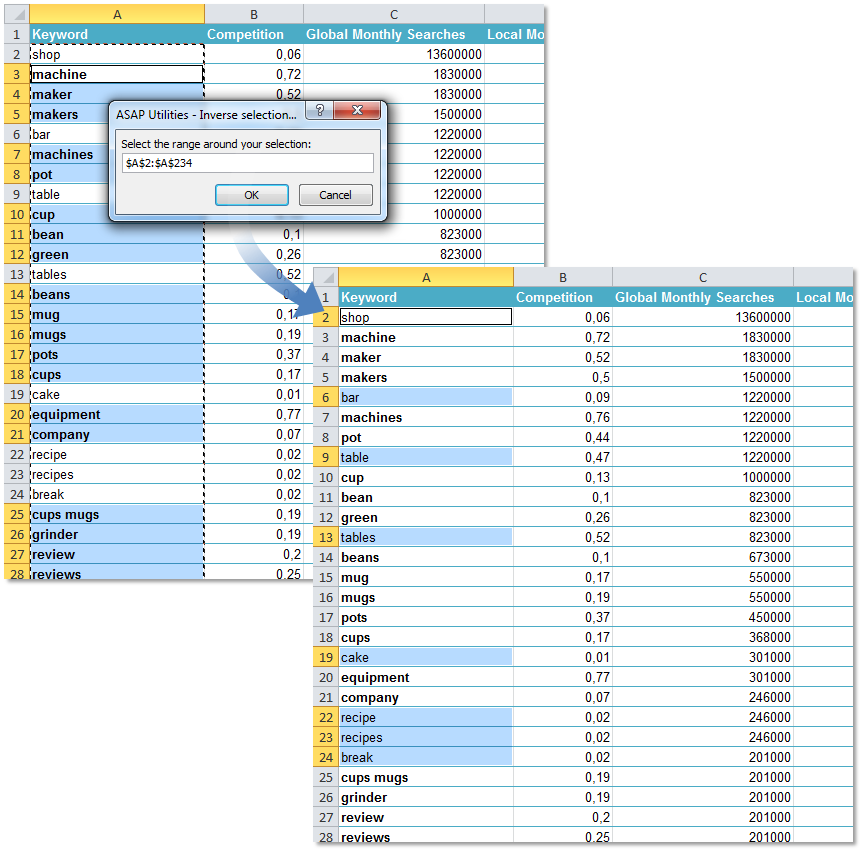
Mit diesem Tool wird die Markierung umgekehrt.
Sie werden dazu aufgefordert, einen Bereich zu markieren und Ihre aktuelle Markierung daraus zu extrahieren. Zurück bleibt eine Bereich, die aus den neuen Zellen, jedoch ohne die ursprüngliche Markierung, besteht.
Das kann z. B. praktisch sein, wenn Sie eine Menge Zellen mit Ausnahme einiger weniger Zellen markieren möchten. Dieses Tool ist mehr oder weniger das Gegenteil des Tools 'Zellen demarkieren'.
Starten des Tools
Klicken Sie auf › Auswählen › 5. Markierung invertieren...
Tastenkombination angeben: ASAP Utilities › Favoriten & Tastenkombinationen › Bevorzugte Tools und Tastenkombinationen bearbeiten...
Tipp: Alt+P für das vorherige Tool.
Tipp: Alt+N für das nächste Tool.

Zeit sparen in Excel. Schnell und einfach.
ASAP Utilities hilft Ihnen, Zeit zu sparen und Dinge zu tun, die mit Excel allein nicht möglich sind.
Sie können sofort loslegen. Keine Schulung erforderlich.
Die meisten Nutzer beginnen mit wenigen Tools. Viele nutzen ASAP Utilities schließlich täglich.
Vertraut von Teams in über 28.500 Organisationen.
Erste Schritte mit ASAP Utilities 9
Sparen Sie Zeit in Excel mit praktischen Tools, die sofort einsatzbereit sind.
-
Keine Registrierung nötig.
-
-
90 Tage kostenlos testen