Questa pagina è attualmente disponibile solo in inglese.
When I start Excel I get an message about the installation of VB Express or Visual Studio.
Question
"When I start Excel I get an error message about the installation of Visual Basic "Please wait while Windows configures Microsoft Visual Basic...."
or "Please wait while Windows configures Visual Studio Professional.."
Browsing to the appropriate folder doesn't solve the problem.
Answer
This is a very uncommon problem, but still we want to address this in the FAQ here.
It seems to be caused by a bug in VB Express/Visual Studio or more precise, the Windows Installer.
Solution 1
This can be solved by doing a repair of your MS Office installation.
Windows 10, 8, 7 and Vista
- Close Excel if it is open.
- In the Control Panel choose "Programs and Features"
- Select Microsoft Office in the list
- Click on the Repair button at the top. If you only see a "change" button, then choose this and then in the next screen choose "repair".
Windows XP and Windows 2000:
- In the Control Panel choose "Add or Remove Programs"
- Select Microsoft Office in the list and click on the Change button.
- Choose "Repair"
Solution 2
In December 2014 we've got the following solution reported from one of our users who got the message "Please wait while Windows configures Visual Studio Professional 2013" whenever he started Excel:
This seem to be a problem particular to 64-bit versions of Windows
I've done a bit more looking online and, after trying several unsuccessful suggestions, found a solution which was to simply create the following folder:
C:\WINDOWS\Microsoft.NET\Framework\URTInstallPath_GAC
So I don't think the problem had anything to do with ASAP. Maybe it just triggered the error when it was installed. But useful information if you have any users in the future with the same problem.
And this solution seems to work for more people:
https://social.msdn.microsoft.com/Forums/lync/en-US/1635e7d4-c3c3-4210-9ba5-747108a88ef6/every-time-i-start-word-or-excel-it-says-its-configuring-vs-studio-2013?forum=vssetup
Solution 3 - Excel 2010 and later
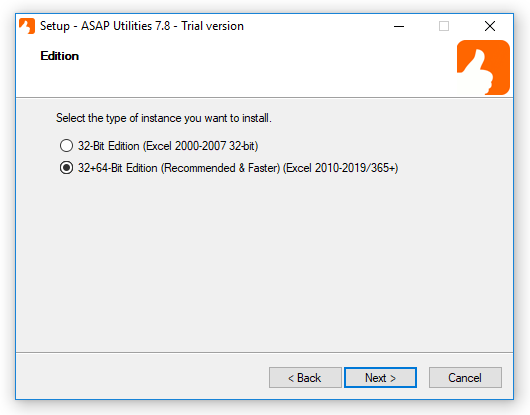
During the setup, if asked, choose to install the "32-Bit and 64-Bit Edition":