


このページは現在、英語版のみ利用できます。
Automation error Element not found.
Question
With certain workbooks I receive the following error:
Error -2147319765: Automation errorElement not found
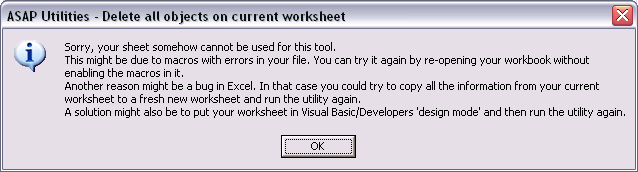
Or an error like ' Sorry, your sheet cannot be used for this tool...'
Answer
This error can occur if your workbook contains a Visual Basic project with macro errors or if it contains a lot of ActiveX components, such as buttons or checkboxes. In such a case the workbook (worksheet) might not be accessible via a macro.
You might be able to reproduce the problem by executing the following macro on such a sheet, which normally shouldn't produce an error:
MsgBox "The name of the selected sheet is: " & ActiveSheet.Name, vbInformation
End Sub
Solutions
You can use the following workaround to make the utilities work on these files:
Solution 1
This might be due to macros with errors in your file. You can try it again by re-opening your workbook without enabling the macros in it. However this doens't always seem to solve the problem in Excel 2007.
Solution 2
Put Excel in 'Design mode' and then run the utility:
Excel 2000, 2002 and 2003
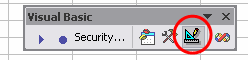
On the Visual Basic commandbar click on the 'Design mode' button.
To make the commandbar visible, right click on the Excel menu, and then check the 'Visual Basic' option.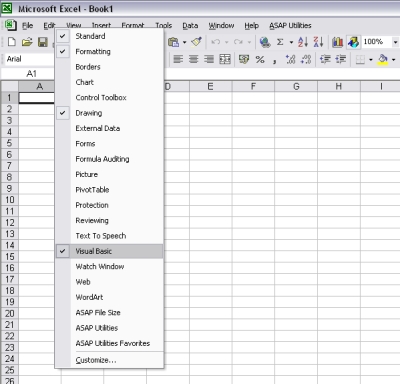
Excel 2007
A solution might also be to put your worksheet in Visual Basic/Developers 'design mode' and then run the utility again.
In the Developer tab (click here if it is not visible) click on the 'Design Mode' button: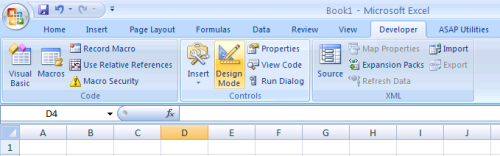
Solution 3
Another reason might be a bug in Excel.
In that case you could try to copy all the information from your worksheet to a fresh new worksheet and run the utility again.