


このページは現在、英語版のみ利用できます。
Version 4.2.0 - September 24, 2007
September 24, 2007
New in this version
- General
ASAP Utilities ribbon tab in Excel 2007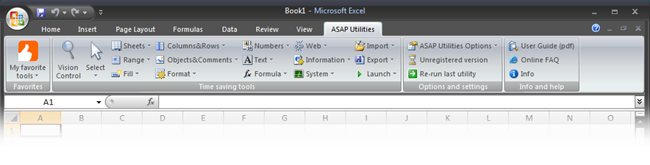
- Select » Conditional select cells...
Added the option to select cells with a certain number format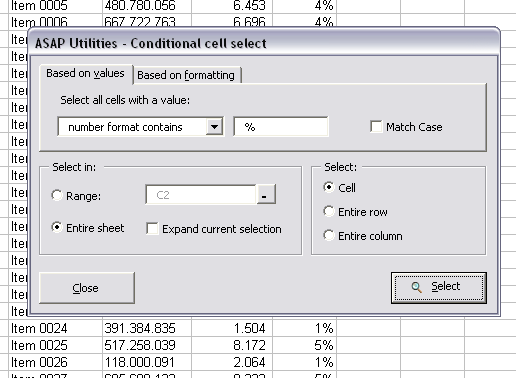
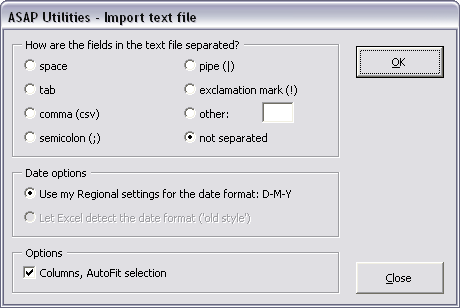
- Import » Insert (delimited) text file...
Insert a (delimited) text file at the position of the selected cells.
This new import utility has several options you can set but right now the main purpose is that the dates can be imported using your windows regional settings.
- Fill » Insert current date and time with seconds
Insert the current date and time into the active cell. Unlike Excel's built in shortcut "Control+:" this utility also inserts the seconds. (timestamp)
By default this utility can be started with the shortcut Control+Shift+D
- Fill » Insert current time with seconds
Insert the current time into the active cell. Unlike Excel's built in shortcut "Control+;" this utility also inserts the seconds. (timestamp)
By default this utility can be started with the shortcut Control+Shift+T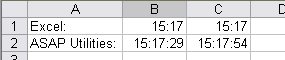
- Export » Export selected chart or range as image (file)...
New option to open the exported image in your default image-viewer immediately after the export.
The default filename to save the image is now the name of the selected chart or the address of the selected range.
The default proposed filename now contains the name of your workbook and the selected sheet. If you have chosen to export a range of cells instead of the entire sheet, the proposed filename also contains the address of your selection:
- Sheets » Freeze panes on multiple sheets at once
Freeze panes on all or all selected sheets at once, based on your current selection.
Normally in Excel you can only do this one sheet at a time. With this utility you can now for example freeze the first row on all sheets at once. - Sheets » Unfreeze panes on multiple sheets at once
Unfreeze panes on all or all selected sheets at once.
Bugs fixed
- Format » The paper saver (split columns)...
Fixed the error on start. - Fill » List filenames in folder...
Error fixed when reading files from cd-rom or DVD (Last Accessed date not available). - Export » Export selection as HTML table to clipboard...
Fixed 'Runtime error 91: Object variable or With block variable not set. - Numbers » Convert "textnumbers" to numbers
Fixed a bug where fractions such as 1/2 were converted to dates. Fractions will now be detected and converted to fractions you can calculate with. - Export » Export selected chart or range as image (file)...
Several minor improvements. Fixed the bug in combination with Excel 2007. The image quality however in Excel 2007, especially in combination with Windows Vista still needs some improvement compared to previous Excel version. I'm working on a solution for this. - Numbers » Round numbers (not formatting, but changing)...
Fixed a bug that appears in combination with the Norwegian and Czech regional settings. Somehow Excel/ASAP Utilities didn't see the numbers as actual numbers and therefore the utility ignored them. (I could only reproduce this bug with these two regional language settings). - Improved worksheet functions
ASAPSumByCellColor()
ASAPCountByCellColor()
ASAPSumByFontColor()
ASAPCountByFontColor()
If you work with more than 2 decimals the utility isn't 100% accurate after the fifth decimal of the result. This is corrected in this version.
These functions can now use a cell-address to specify the color in stead of only using the colorindex. Furthermore the accuracy of these functions is improved.
So for example if you have a range of cells with 10 green cells you want to sum you can use the formula either as
=ASAPSumByCellColor(A1:E24;4)
or if cell D4 contains the color you can use:
=ASAPSumByCellColor(A1:E24;D4)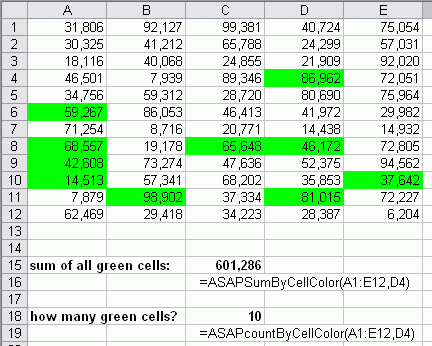
- Improved the progress bar of the utilities
- Small improvements in the "Organize your favorite tools..." utility
- Several minor bugfixes