


概数 (書式設定ではなく、変更)...
ASAP Utilities › 数値と日付 › 11. 概数 (書式設定ではなく、変更)...
このユーティリティは、選択したセルの数字を四捨五入します。
このユーティリティは、セルの書式設定を使用して数字を四捨五入するのではなく、セルの中の値を実際に変更します。
ユーティリティは、Excel の =ROUND() 関数と同様に、数字を四捨五入するかを尋ねてきます (次の指定値を参照)。
-
正の数字:数字は、指定した小数点以下の桁数に四捨五入されます。
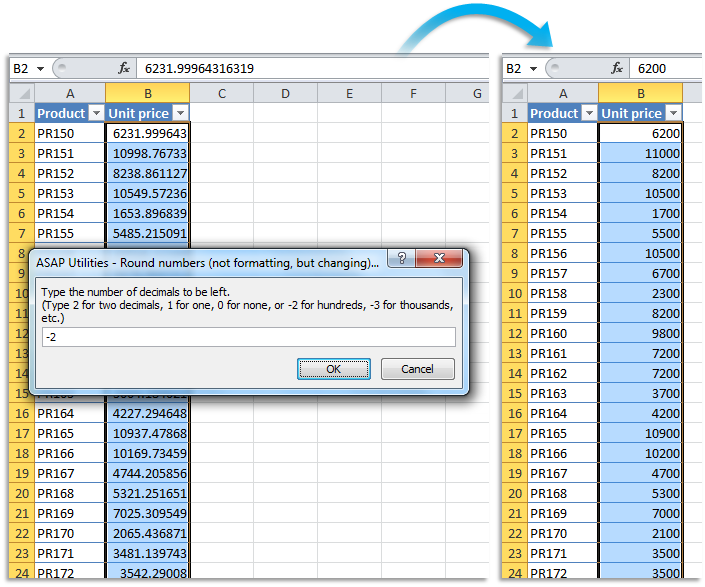
-ゼロ:値は、最も近い整数に四捨五入されます。 - 負の数字:この場合、この数字は、小数点の左側の桁数 (10 の位、100 の位、千の位) を表わします。
たとえば、値「105.326」は、指定値が 1 の場合は「105.3」、指定値が 0 の場合は「105」、指定値が -1 の場合は「110」になります。
このツールの起動方法
クリック › 数値と日付 › 11. 概数 (書式設定ではなく、変更)...
ショートカット キーの指定: ASAP Utilities › マイツールとショートカットキー › マイツールとショートカットキーの管理...
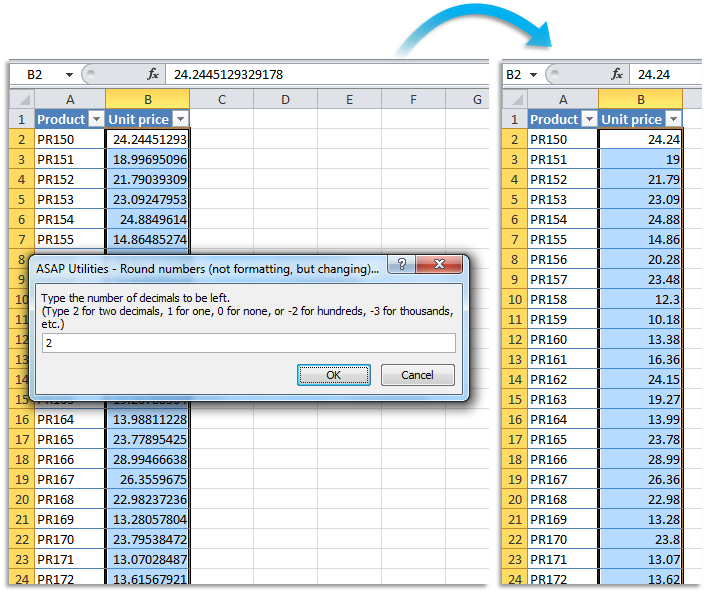
スクリーンショット例: B Round the selected numbers to the nearest integer (zero decimal places) (英語版はこちらです。)

スクリーンショット例: C Round the selected numbers to the nearest multiple of 100 (英語版はこちらです。)
このツールを見つけるための追加の検索キーワード:
数値の小数点以下の桁数を制限
Tip:Alt+P for the previous tool.
ヒント: Alt+N で次のツールを開きます。