


Daten und Formatierung bereinigen...
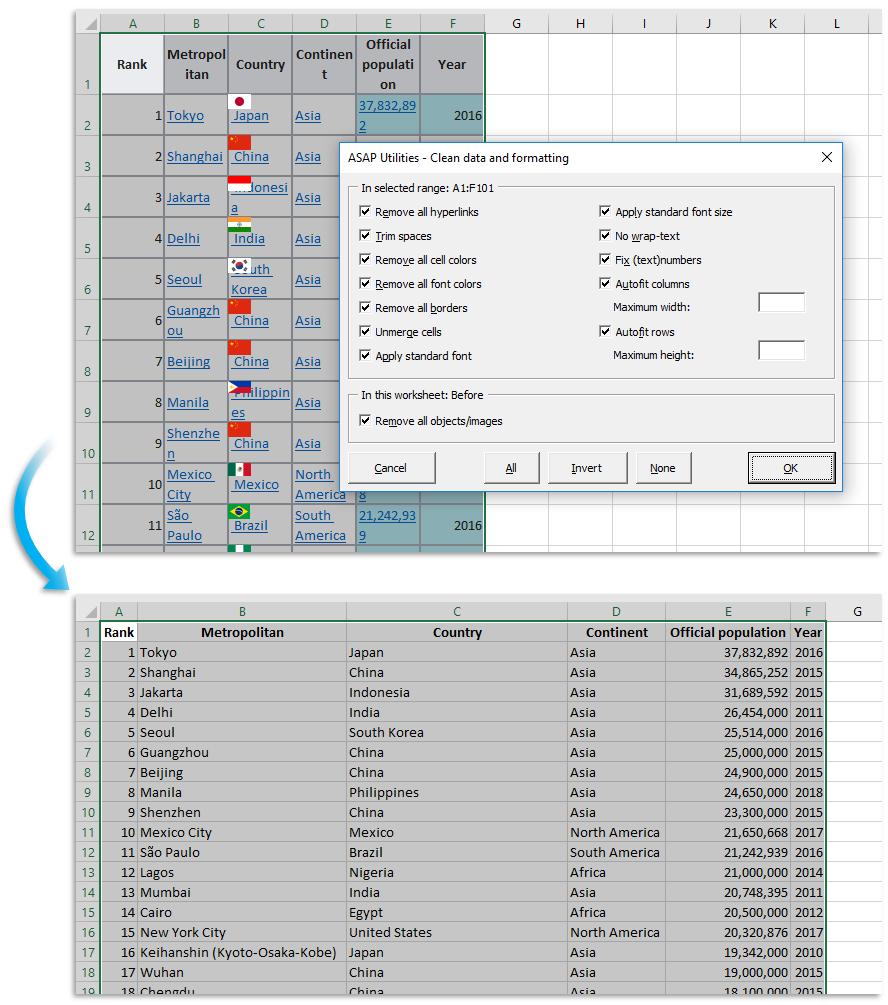
Mit diesem Tool können Sie Informationen, die Sie in Excel kopiert haben, optimieren und bereinigen.
Die folgenden Bearbeitungsmöglichkeiten stehen zur Auswahl:
- Alle Hyperlinks entfernen
- Zurechtschneiden (führende und nachlaufende Leerzeichen löschen)
- Alle Zellfarben entfernen
- Alle Schriftfarben entfernen
- Alle Ränder entfernen
- Zellverbund aufheben
- Standardschriftart anwenden
- Standardschriftgrad anwenden
- Keine Zeilenumbrüche
- Text/Zahlen reparieren
- Spaltenbreite automatisch anpassen
- Zeilenhöhe automatisch anpassen
- Alle Objekte/Grafiken aus dem Arbeitsblatt entfernen
Die zuletzt verwendeten Einstellungen werden gespeichert.
Starten des Tools
Klicken Sie auf › Text › 13. Daten und Formatierung bereinigen...
Tastenkombination angeben: ASAP Utilities › Favoriten & Tastenkombinationen › Bevorzugte Tools und Tastenkombinationen bearbeiten...
Zusätzliche Suchbegriffe, die Ihnen helfen, dieses Tool zu finden:
Tabellenblatt, aus dem web kopierte informationen bereinigen
Tipp: Alt+P für das vorherige Tool.
Tipp: Alt+N für das nächste Tool.

Zeit sparen in Excel. Schnell und einfach.
ASAP Utilities hilft Ihnen, Zeit zu sparen und Dinge zu tun, die mit Excel allein nicht möglich sind.
Sie können sofort loslegen. Keine Schulung erforderlich.
Die meisten Nutzer beginnen mit wenigen Tools. Viele nutzen ASAP Utilities schließlich täglich.
Vertraut von Teams in über 28.500 Organisationen.
Erste Schritte mit ASAP Utilities
Sparen Sie Zeit in Excel mit praktischen Tools, die sofort einsatzbereit sind.
-
Keine Registrierung nötig.
-
-
Kostenlose 90-Tage-Testversion