


このページは現在、英語版のみ利用できます。
Version 9.1 - September 17, 2025
August 22, 2025
Designed to simplify your work
We are working with great enthusiasm, for over 25 years already, to ensure that ASAP Utilities continues to evolve and stay one of the world's most useful and popular add-ins for Excel users.
Finished
On September 17, 2025 the new version 9.1 has been released.
New
Word count for ExcelExcel does not include a built-in word count. Many clients asked for it, so we built it.
Our new =ASAPCOUNTWORDS() function gives you a reliable word count in any cell or range and works across nearly all languages worldwide.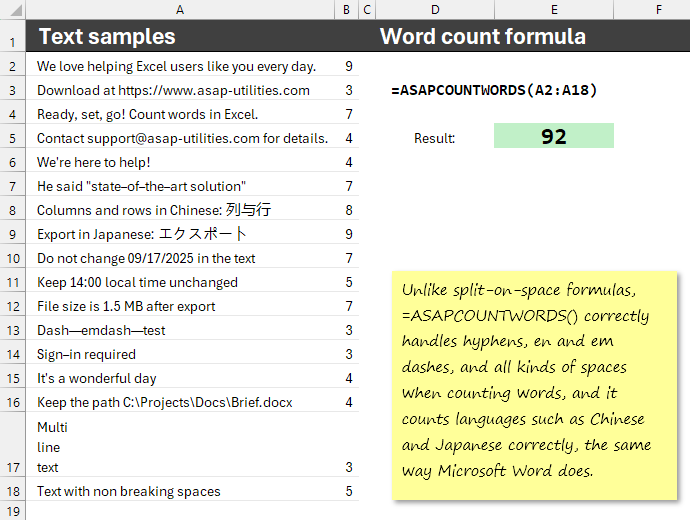
Unlike split-on-space formulas, ASAPCOUNTWORDS() correctly handles hyphens, en and em dashes, and all kinds of spaces when counting words, and it counts languages such as Chinese and Japanese correctly, the same way Microsoft Word does.
Example =ASAPCOUNTWORDS(A2:A100) counts the words in the sentences in A2:A100.
=ASAPCOUNTWORDS(text_or_range, optional count_by_display = true, optional text_cells_only = false, optional skip_error_cells = true, optional count_cjk_punct_as_words = true)Returns the number of words in a text value, cell, or range.
Works across nearly all languages worldwide, including but not limited to English, Dutch, German, French, Spanish, Italian, Portuguese (Brazil), Russian, Chinese (Simplified), Japanese, as well as Arabic, Hindi, Bengali, Korean, and Vietnamese.
Follows Microsoft Word style rules. Because Microsoft has not published the full rules, slight differences may appear in rare cases. We avoid known overcounts, for example, in Korean, where Word may treat each Hangul syllable as a word.
For Chinese and Japanese, or any text that uses CJK (Chinese, Japanese, and Korean) ideographic punctuation such as 、 (ideographic comma), , (fullwidth comma), and 。 (ideographic full stop) count as words.
Parameterstext_or_range = A single cell, a text value, or a range. Non-adjacent references are supported by wrapping areas in an extra pair of parentheses, for example: =ASAPCOUNTWORDS((B2:B50;D2:D50)) or =ASAPCOUNTWORDS((B2:B50,D2:D50)) depending on your regional list separator.
count_by_display = Optional, default is True. When TRUE, numbers and dates are counted by what is displayed in the cell. Example: a date shown as Tuesday, December 23, 2025 counts as 4 words.
When FALSE, each numeric or date cell counts as 1 word.text_cells_only = Optional, default is False. When TRUE, numbers, dates, and logical values are skipped and only text cells are counted.
skip_error_cells = Optional, default is True. When TRUE, cells with errors such as #DIV/0! are ignored. When FALSE, each error cell counts as 1 word.
count_cjk_punct_as_words = Optional, default is TRUE. Controls whether common CJK (Chinese, Japanese, and Korean) punctuation is counted as words.
When TRUE: the following characters are each counted as one word, just as Microsoft Word does, even when adjacent with no spaces:
、 (Ideographic Comma), 。 (Ideographic Full Stop), , (Fullwidth Comma), . (Fullwidth Full Stop), : (Fullwidth Colon), ; (Fullwidth Semicolon), ? (Fullwidth Question Mark), ! (Fullwidth Exclamation Mark), ・ (Katakana Middle Dot), · (Middle Dot), 〜 (Wave Dash).
When FALSE: these characters act only as separators and do not count as words.
Improved
- Insert Function from the ASAP Utilities Library › =ASAPRANDOMPASSWORD()
The default password length has been increased from 8 to 16 characters to align with modern international security standards.
Global security guidelines, including those from ISO/IEC, NIST, and CISA, recommend using longer passwords to better defend against today's threats. With this change, ASAP Utilities helps you generate stronger and more future-proof passwords while maintaining broad compatibility.
Export › Export Worksheets as Separate Files (Excel, PDF, TXT, CSV, etc.)...
By default, named ranges are no longer included in exported Excel files.
You can choose whether to keep workbook-level or worksheet-level named ranges in the exported file. We recommend leaving these unchecked unless you specifically need them.Fixed an issue after the Excel 365 version 2508 update. A change in VBScript Regular Expressions could show a Microsoft Visual C++ Runtime Library error that starts with "Assertion failed!" when using =ASAPREGEXREPLACE(). This is now fixed.
-
General
We fixed some known issues and made a few small improvements.
Supported Excel versions
ASAP Utilities 9 is compatible with Excel 2010 through Excel 2024 and Excel 365 Desktop on any Windows system that meets the system requirements of Excel.
Using your license with version 9
Version 9 is free for all licenses purchased in 2022 or later.
If you have an older license, you can upgrade with a generous 50% discount.
We'd love to hear from you
If you have any tips or suggestions, we'd love to hear from you! Your feedback helps us improve ASAP Utilities for everyone.
With great enthusiasm,
The ASAP Utilities Team