


Объединить данные столбцов (объединить ячейки)...
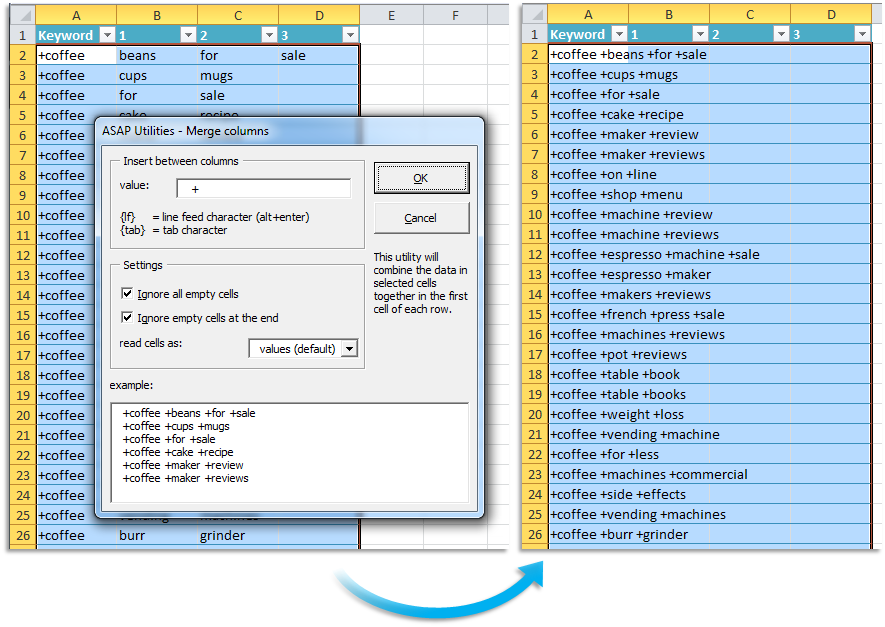
С помощью этой утилиты можно объединить данные из выделенного фрагмента.
Все данные из смежных столбцов будут объединены в первой ячейке каждой строки в пределах выделенного фрагмента.
Вы можете задать следующие параметры:
– Вставить разделитель между значениями ячеек.
– Пропустить пустые ячейки.
– Использовать значение, формулу или отформатированное значения из ячеек.
Вы можете использовать эту утилиту вместо функции Excel =CONCATENATE().
Запуск этой утилиты
Нажмите кнопку › Столбцы и строки › 5. Объединить данные столбцов (объединить ячейки)...
Укажите сочетание клавиш: ASAP Utilities › Избранное и сочетания клавиш › Редактировать избранное и сочетания клавиш...
Дополнительные поисковые термины, которые помогут вам найти этот инструмент:
объединить содержимое ячеек, соединить строки вместе, текст, разделители, объединяет, консолидация, объединить ячейки со сведениями, объединить содержимое нескольких ячеек, сцепить, сцепление, в одну ячейку
Совет: Alt+P для предыдущего инструмента.
Совет: Alt+N для следующего инструмента.

Экономьте время в Excel. Это просто.
ASAP Utilities помогает экономить время и делать то, что невозможно сделать только средствами Excel.
Вы можете начать работу сразу. Обучение не требуется.
Большинство пользователей начинают с нескольких инструментов. Многие в итоге используют ASAP Utilities каждый день.
Используется командами в более чем 28 500 организациях.
Начните работу с ASAP Utilities 9
Начните экономить время в Excel с практичными инструментами, готовыми к использованию.
-
Регистрация не требуется.
-
-
Бесплатная пробная версия на 90 дней