Эта страница в настоящее время доступна только на английском языке.
Where are my "Favorites & Shortcuts" menu settings stored?
Question
- I need to move my copy of Excel and ASAP-Utilities to a new computer. What is the name of the file that contains my "Favorites & Shortcuts" settings and where is that file likely to be located?
- Is there a built-in feature where I could "take" all my shortcuts with me and use them on another computer?
Answer
There is no built-in function to export/import your Favorites & Shortcuts settings. But you can easily share/transfer these settings.
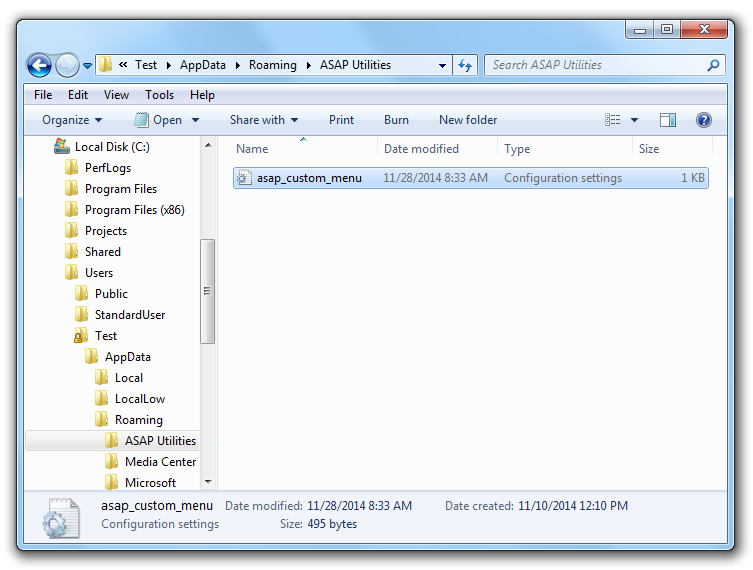
The settings for your favorites menu are stored in an ".ini" textfile. You can copy this "asap_custom_menu.ini" file to another location or computer.
I made it work this way when I used to work on multiple computers. Back then I specified to store the favorites menu on a network path, so that I had the same shortcuts on the various computers I used.
The favorites menu, "asap_custom_menu.ini", is by default stored in your Windows (roaming) Application Data folder.
Depending on your Windows version this is something similar to:
C:\Documents and Settings\Application Data\[UserName]\ASAP Utilities\
C:\Users\[UserName]\AppData\Roaming\ASAP Utilities\
for example:
C:\Documents and Settings\Application Data\Bastien\ASAP Utilities\
C:\Users\Bastien\AppData\Roaming\ASAP Utilities\
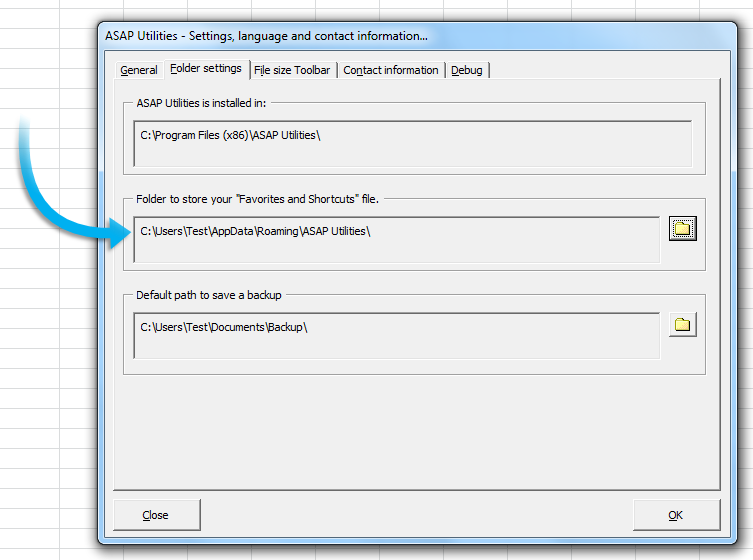
You can see which folder ASAP Utilities uses. In the Excel menu choose:
ASAP Utilities » ASAP Utilities Options » Settings, language and contact information...
then click on the tab 'Folder settings'. You can also change the folder. If you specify a folder without a "asap_custom_menu.ini" file yet, a new settings file will be automatically created with the default settings.