


Эта страница в настоящее время доступна только на английском языке.
Version 5.6 - December 1, 2015
December 1, 2015
Finished
On December 1, 2015 the new version 5.6 is released. Download
Your current license will work with all 4.x and 5.x versions.
All existing 4.x customers will get 5.x free of charge. You can use the same license details.
To upgrade, just install the new version "on top" of the existing version on your computer.
ASAP Utilities will then automatically recognize your settings and license information if you have already entered that previously.
Supported Excel versions
ASAP Utilities 5.6 works with:- Excel 2000
- Excel 2002/XP
- Excel 2003
- Excel 2007
- Excel 2010 (32-bit version)
- Excel 2013 (32-bit version)
- Excel 2016 (32-bit version)
- Excel 365 (32-bit version)
- On both 32- and 64-bit Windows, including the latest Windows 10.
Improved
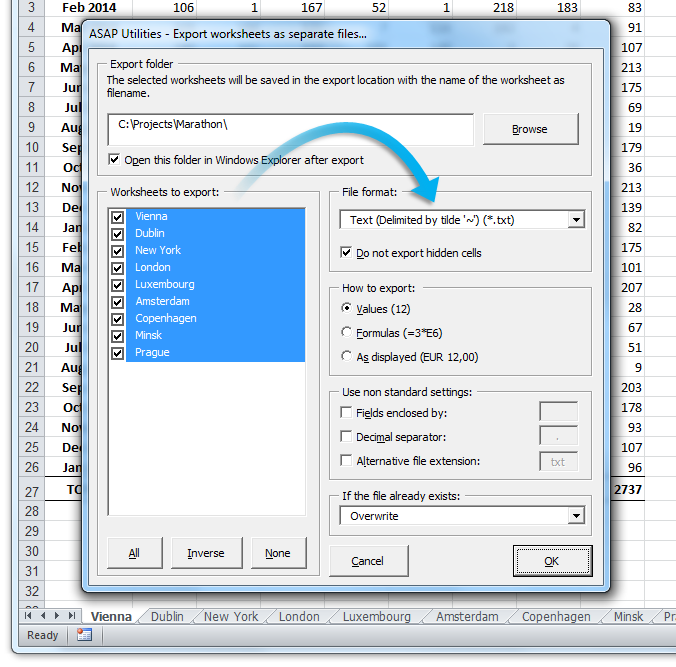
- Export » Export selection as HTML table to clipboard...
The option 'Character encoding' now encodes more characters into their HTML character entities. - Export » Export worksheets as separate files...
By request the following file formats have been added:
- Text (Delimited by tilde '~') (*.txt)
- Text unicode (Delimited by tilde '~') (*.txt)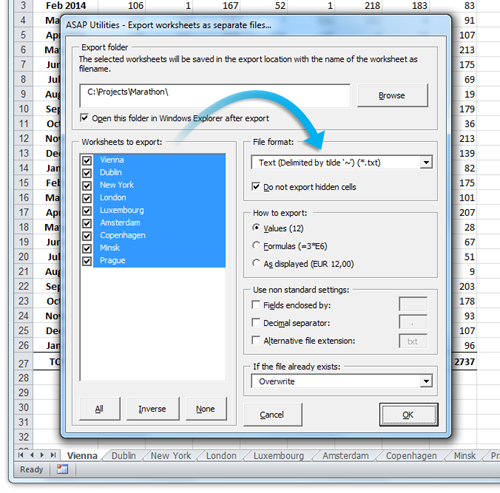
- NEW: Text » Subscript the numbers in Chemical Formulas
This will subscript the numbers in chemical notations such as C8H10N4O2, Al(OH)3, AlF6Li3, AlO2, Al(NO3)3, Au2(SeO4)3, Ca(VO4)2, H6TeO6, KAlMg3Si3O12H2, Ca(NO3)2 · 4H2O, etc.
It automatically detects which numbers should be subscripted.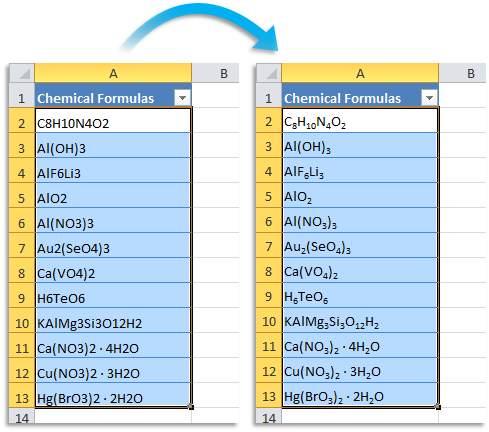
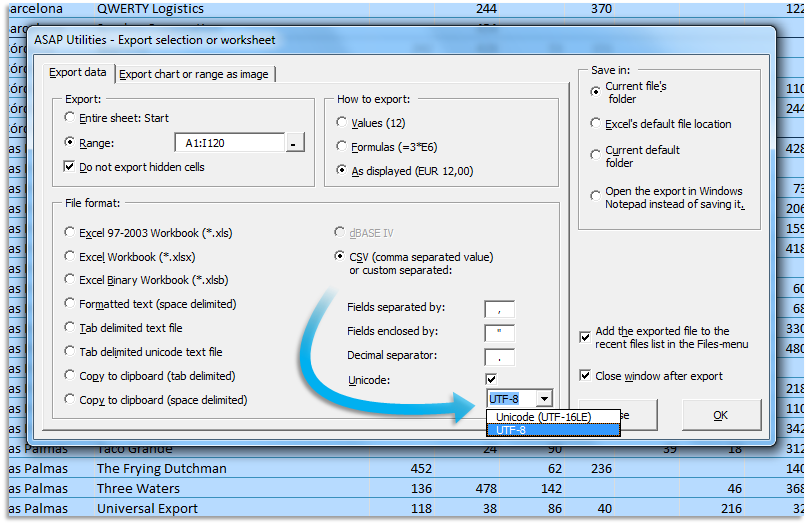
- Export » Export selection or active sheet as new file...
You can now choose the Unicode encoding for the CSV/delimited text file format:
- Unicode (UTF-16LE)
- UTF-8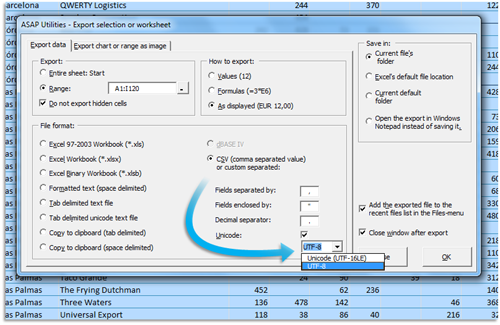
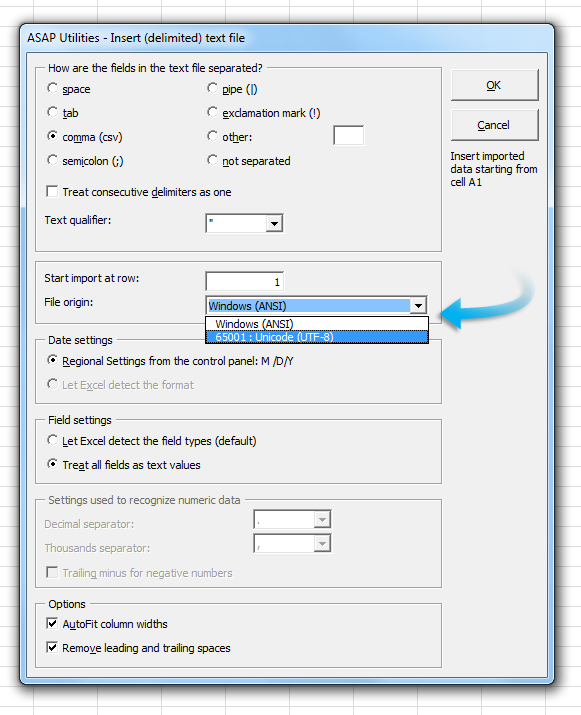
- Improved: Import » Insert (delimited) text file...
You can now choose the "File origin":
- Windows (ANSI)
- 65001 Unicode (UTF-8)
(previously Windows (ANSI) was always used)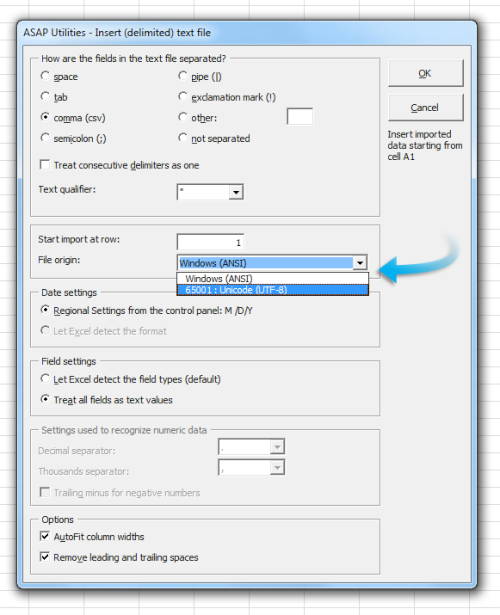
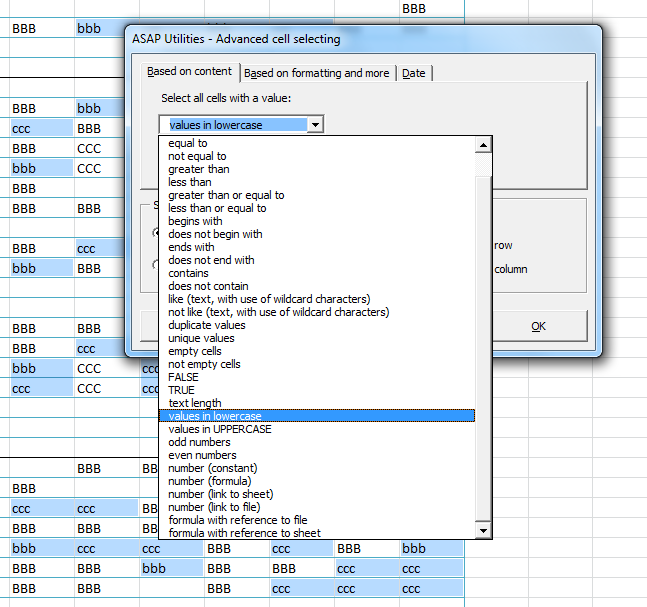
- Select » Select cells based on content, formatting and more...
We've added two new options. This allows you to select cells with values that are in all lowercase or all uppercase.
- values in lowercase
- values in UPPERCASE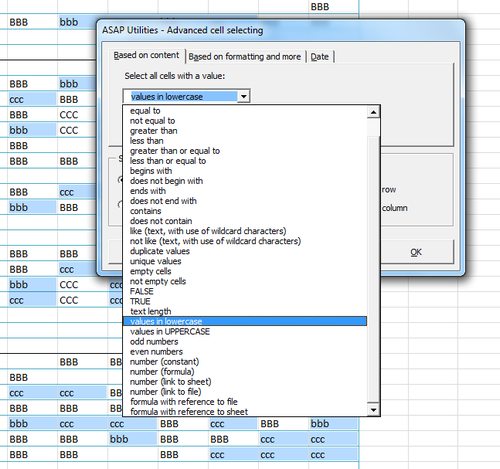
- NEW: Convert long HEX values to ASCII text in selected cells
via ASAP Utilities Options » New tools in development (English only)
This tool converts (long) HEX values in the selected cells to ASCII text.
For example, it converts
"446f6e277420796f75207468696e6b207468617420457863656c2069732067726561743f"
to "Don't you think that Excel is great?"
It converts sets like the following:
- 446f6e277420796f75207468696e6b207468617420457863656c2069732067726561743f
- 44-6f-6e-27-74-20-79-6f-75-20-74-68-69-6e-6b-20-74-68-61-74-20-45-78-63-65-6c-20-69-73-20-67-72-65-61-74-3f
- 44~6f~6e~27~74~20~79~6f~75~20~74~68~69~6e~6b~20~74~68~61~74~20~45~78~63~65~6c~20~69~73~20~67~72~65~61~74~3f
- 44 6f 6e 27 74 20 79 6f 75 20 74 68 69 6e 6b 20 74 68 61 74 20 45 78 63 65 6c 20 69 73 20 67 72 65 61 74 3f
- 44:6f:6e:27:74:20:79:6f:75:20:74:68:69:6e:6b:20:74:68:61:74:20:45:78:63:65:6c:20:69:73:20:67:72:65:61:74:3f - Improved: Favorites & Shortcut keys » Edit your favorite tools and shortcut keys...
Change of default shortcuts for the following tools:Ctrl+Shift+Vis replaced by: Ctrl+Shift+I - Vision Control...
Therefore we have changed these ASAP Utilities shortcuts to new ones.
If you are upgrading then you need to press the "Reset to default values" button to have this changed, or you can manually make the changes if required:
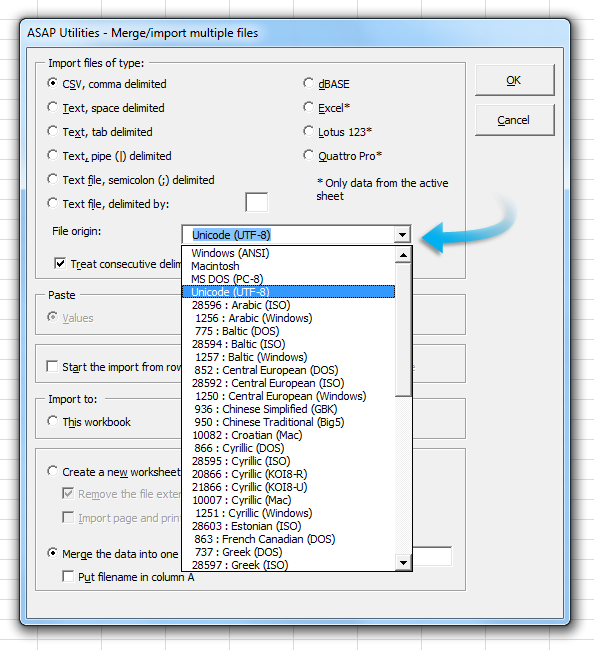
ASAP Utilities » ASAP Utilities Options » Edit your favorite tools and shortcut keys... - Improved: Import » Merge and/or import multiple files...
You can now choose the "File origin", for example to choose if the file is in Windows (ANSI) mode or for example UTF-8 and many more.
Up until now, Windows (ANSI) was always used by this tool.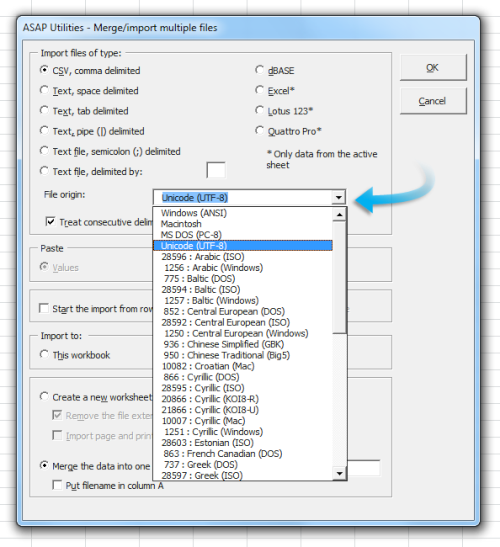
- General
. Better detection if Excel is started in 'embedded' mode. (Such as for example when you edit an embedded Excel table or chart from within Word or Powerpoint.)
. Several small improvements.
Bug fixes
- Information » Count duplicates and give each set of duplicates its own color
Now works on cells with (very) long cell contents too. (Previously you could get an error stating 'type mismatch' on code line 850). - Formulas » Change formula reference style (e.g. A1 to $A1 etc.)...
Fixed the bug that caused array formulas in your selection to change to regular formulas. - File & System » Find and remove external links...
External links to online locations (starting for example with https://) can now be removed too. - Improved compatibility with Excel 2013/2016
We have created some workarounds for a few bugs (some very rare) in Excel 2013/2016 that for example could cause an extra empty Excel window, Excel being confused on what the active workbook was after you started a tool from ASAP Utilities via a shortcut, or that any tools from ASAP Utilities that you've added to the QAT (Quick Access Toolbar) were removed. - Startup, right-click menu
A few users reported an error during the start of ASAP Utilities, similar to
"Sorry, something unexpected went wrong at code line 560:
Adding ASAP Utilities to the right-click menu: CELL
Error -2147467259: Method '~' of object '~' failed"
In version 5.5.1 the most popular tools added are added to the right-click/context menu for:
- cells
- column headings
- row number
- sheet tabs
However, somehow that returned an error on the computers of a few users.
This is now fixed by using a workaround for those situations. - General
A few small improvements and bug fixes.
Начните работу с ASAP Utilities 9
Начните экономить время в Excel с практичными инструментами, готовыми к использованию.
-
Регистрация не требуется.
-
-
Бесплатная пробная версия на 90 дней