A question I received today from Daniel (Mexico City) :
I will like to suggest you the possibility of including in the formula menu a funtion like "Hide Formula Errors" to stop the anoing NA or VALUE?
Thanks for making this kind's of tools for excel, from now on hopefully I will spend less time in making my complex spreadsheets.
Perhaps I should give this a better place in the ASAP Utilities since it is already there, only I've called it a little different:
ASAP Utilities » Range » Custom formula error message
What it actually does is it builds an =IF(ISERROR()) around it.
Say your formula is =VLOOKUP(B3,F1:G11,2,FALSE), but a corresponding value was not found:
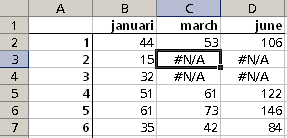
Let's say we want in this case the formula's with an error produce the result zero (0) in stead of the error.
What you can do is build an =IF(ISERROR(old_formula),[value in case of error],old_formula) around it, either manually or with the help of ASAP Utilities.
ASAP Utilities » Range » Custom formula error message
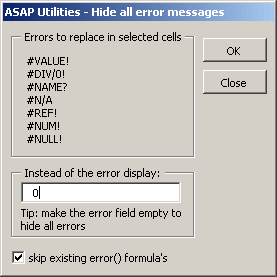
This will replace the original formula with the new error-catching version:
=IF(ISERROR((VLOOKUP(B3,F1:G11,2,FALSE))),0,(VLOOKUP(B3,F1:G11,2,FALSE)))
The main advantage of ASAP Utilities in this case is it's easier and quicker to use because you don't have to type the formula. Plus it can be used in a range of cells with different formula's.
More information about hiding errors on MS Office Online:
http://office.microsoft.com/en-us/assistance/HP030561211033.aspx