


Create Hyperlinks from Cell Values...
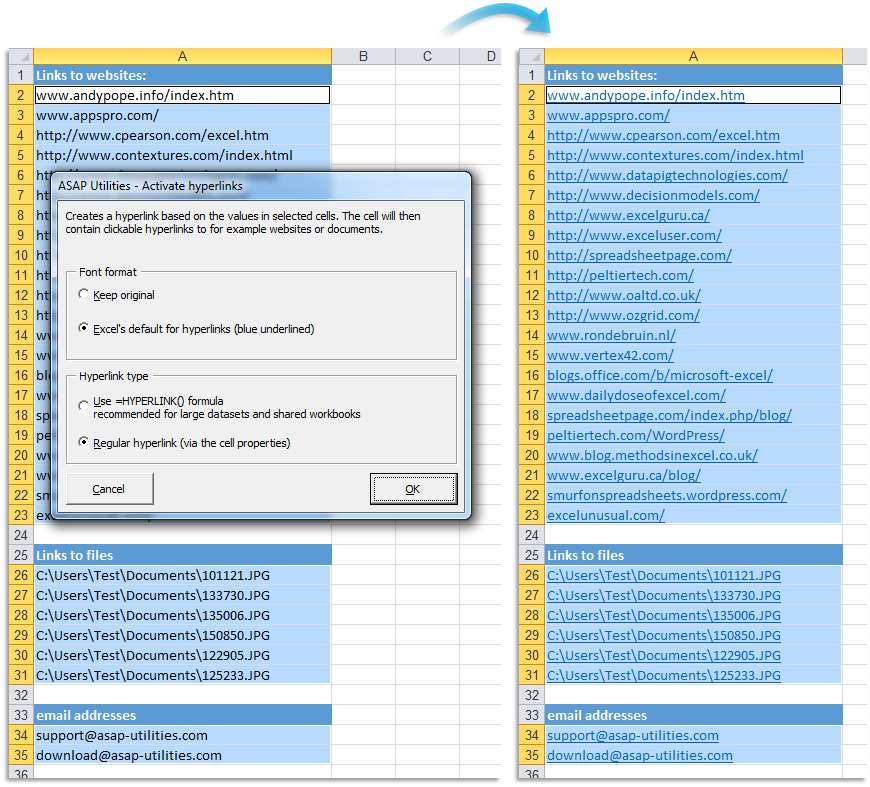
This tool creates clickable hyperlinks from the values in your selected cells.
It's useful when you have a list of website addresses, file paths, or email addresses in Excel that you want to quickly turn into working hyperlinks without adding each hyperlink manually or using extra columns with formulas.
You can configure the following settings:
Font format:
- Keep the existing font formatting in the cells
- Use Excel's default formatting for hyperlinks (blue underlined)
Hyperlink type:
-
Use the =HYPERLINK() formula
- Recommended when working with large datasets or shared workbooks
- Easier to edit later
- Create regular Excel hyperlinks (using the cell properties)
When creating hyperlinks to email addresses, this tool will automatically add "mailto:" in front of the address if missing, so the link works correctly.
When creating hyperlinks to web addresses, this tool automatically adds "https://" in front of the domain name if missing, so the link works correctly.
Your last used settings are automatically remembered for quick reuse.
This tool helps you save time and prevent errors when converting plain text links into clickable hyperlinks in Excel.
Starting this tool
Specify a Keyboard Shortcut: ASAP Utilities › My Tools & Shortcuts › Manage My Tools & Shortcuts...
Additional search terms to help you find this tool:
Create hyperlinks from cell values, Convert text to hyperlink, Turn cell values into hyperlinks, Make clickable hyperlinks, Create hyperlinks from text, Add hyperlinks automatically, Hyperlink multiple cells, Bulk create hyperlinks, Generate hyperlinks from list, Convert email addresses to mailto links, Convert domain names to hyperlinks, Add https automatically in hyperlinks, Create hyperlinks without formulas, Hyperlink without helper column, Convert text to hyperlink without formula, Hyperlink email addresses, Hyperlink website addresses, Activate hyperlinks, Reactivate hyperlinks, Convert hyperlinks
Tip:Alt+P for the previous tool.
Tip: Alt+N for the next tool.

Save Time in Excel. The Easy Way.
ASAP Utilities helps you save time and do what Excel alone can't.
You can get started right away. No training needed.
Most users start with a few tools. Many end up using ASAP Utilities daily.
Used by teams in 28,500+ organizations.
Get Started with ASAP Utilities 9
Start saving time in Excel with practical tools you can use right away.
-
No sign-up required.
-
-
Free 90-day trial