


The Complete Tool Catalog
Discover practical tools many Excel users wish were built into Excel.
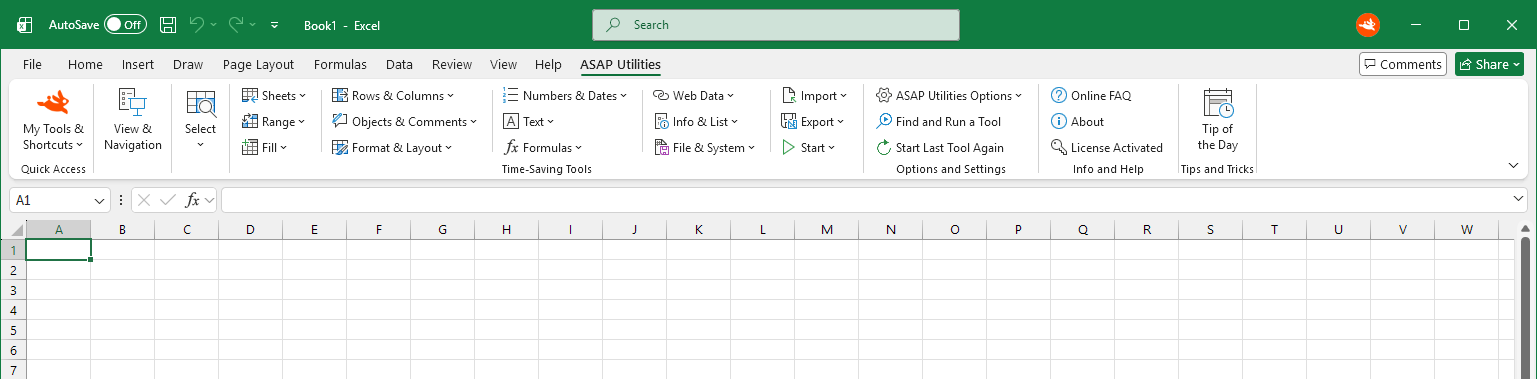
1.
My Tools & Shortcuts
32 items
Quickly find and use your favorite tools in ASAP Utilities. This customizable menu comes with a...
Quickly find and use your favorite tools in ASAP Utilities.
This customizable menu comes with a selection of useful tools and keyboard shortcuts. You can personalize it by adding or removing tools and assigning or changing shortcut keys.
Show tools
Hide tools
My Tools & Shortcuts
32 itemsQuickly find and use your favorite tools in ASAP Utilities. This customizable menu comes with a... Quickly find and use your favorite tools in ASAP Utilities. This customizable menu comes with a selection of useful tools and keyboard shortcuts. You can personalize it by adding or removing tools and assigning or changing shortcut keys.
Quickly navigate between your workbooks and worksheets and adjust their display settings. Any changes you...
3.
Select
20 items
Quickly select cells, ranges, rows, columns, sheets, or objects based on content, formatting, structure, or...
Quickly select cells, ranges, rows, columns, sheets, or objects based on content, formatting, structure, or your own criteria. These tools help you go beyond Excel's built-in selection options for faster, more precise control.
Show tools
Hide tools
Select
20 itemsQuickly select cells, ranges, rows, columns, sheets, or objects based on content, formatting, structure, or... Quickly select cells, ranges, rows, columns, sheets, or objects based on content, formatting, structure, or your own criteria. These tools help you go beyond Excel's built-in selection options for faster, more precise control.
4.
Sheets
28 items
Manage your Excel sheets quickly and efficiently. Insert, rename, sort, split, export, hide, unhide, protect...
Manage your Excel sheets quickly and efficiently. Insert, rename, sort, split, export, hide, unhide, protect, unprotect, and print multiple sheets at once. You can also create an index of all sheets, copy print settings, and simplify other repetitive tasks.
Show tools
Hide tools
Sheets
28 itemsManage your Excel sheets quickly and efficiently. Insert, rename, sort, split, export, hide, unhide, protect... Manage your Excel sheets quickly and efficiently. Insert, rename, sort, split, export, hide, unhide, protect, unprotect, and print multiple sheets at once. You can also create an index of all sheets, copy print settings, and simplify other repetitive tasks.
5.
Range
27 items
Work with cell ranges in Excel more easily and efficiently. Sort not only by values but also by formatting...
Work with cell ranges in Excel more easily and efficiently. Sort not only by values but also by formatting and other criteria, use advanced find and replace, and take advantage of flexible copy and paste options. You can also handle duplicates, copy or move cells without changing formula references, and list or remove named ranges.
Show tools
Hide tools
Range
27 itemsWork with cell ranges in Excel more easily and efficiently. Sort not only by values but also by formatting... Work with cell ranges in Excel more easily and efficiently. Sort not only by values but also by formatting and other criteria, use advanced find and replace, and take advantage of flexible copy and paste options. You can also handle duplicates, copy or move cells without changing formula references, and list or remove named ranges.
6.
Fill
15 items
Quickly fill in missing values, add numbers or text, and automatically number cells. You can also generate...
Quickly fill in missing values, add numbers or text, and automatically number cells. You can also generate number sequences, insert dates and times, and add workbook or sheet information to your cells.
These tools help you complete and prepare your data faster than with Excel alone.
Show tools
Hide tools
Fill
15 itemsQuickly fill in missing values, add numbers or text, and automatically number cells. You can also generate... Quickly fill in missing values, add numbers or text, and automatically number cells. You can also generate number sequences, insert dates and times, and add workbook or sheet information to your cells. These tools help you complete and prepare your data faster than with Excel alone.
7.
Rows & Columns
21 items
Quickly manage rows and columns in Excel: select, hide, delete, color, join, reshape, or clean them up. These...
Quickly manage rows and columns in Excel: select, hide, delete, color, join, reshape, or clean them up. These tools simplify tasks that are difficult to do with Excel alone, especially when working with larger datasets.
Show tools
Hide tools
Rows & Columns
21 itemsQuickly manage rows and columns in Excel: select, hide, delete, color, join, reshape, or clean them up. These... Quickly manage rows and columns in Excel: select, hide, delete, color, join, reshape, or clean them up. These tools simplify tasks that are difficult to do with Excel alone, especially when working with larger datasets.
8.
Objects & Comments
7 items
Easily manage comments, notes, and objects in your worksheets. Extract the contents of comments and notes...
Easily manage comments, notes, and objects in your worksheets. Extract the contents of comments and notes into cells or a report, edit or format multiple notes at once, and add cell values or formulas to notes.
You can also select or delete multiple objects at once, resize pictures and OLE objects, and clean up your worksheets more easily.
Show tools
Hide tools
Objects & Comments
7 itemsEasily manage comments, notes, and objects in your worksheets. Extract the contents of comments and notes... Easily manage comments, notes, and objects in your worksheets. Extract the contents of comments and notes into cells or a report, edit or format multiple notes at once, and add cell values or formulas to notes. You can also select or delete multiple objects at once, resize pictures and OLE objects, and clean up your worksheets more easily.
9.
Format & Layout
24 items
Clean up unwanted formatting, apply consistent formatting, and prepare your sheets for printing or sharing...
Clean up unwanted formatting, apply consistent formatting, and prepare your sheets for printing or sharing.
Do things Excel can't easily do, like copying print settings across sheets, visually separating groups of data, and converting conditional formatting into permanent cell formatting.
Show tools
Hide tools
Format & Layout
24 itemsClean up unwanted formatting, apply consistent formatting, and prepare your sheets for printing or sharing... Clean up unwanted formatting, apply consistent formatting, and prepare your sheets for printing or sharing. Do things Excel can't easily do, like copying print settings across sheets, visually separating groups of data, and converting conditional formatting into permanent cell formatting.
10.
Numbers & Dates
17 items
Clean up and convert numbers and dates in Excel. Fix imported numbers, including numbers stored as text or...
Clean up and convert numbers and dates in Excel. Fix imported numbers, including numbers stored as text or with incorrect negative signs. Perform calculations, round values, and convert text dates into usable Excel dates. You can also insert dates using a calendar.
Show tools
Hide tools
Numbers & Dates
17 itemsClean up and convert numbers and dates in Excel. Fix imported numbers, including numbers stored as text or... Clean up and convert numbers and dates in Excel. Fix imported numbers, including numbers stored as text or with incorrect negative signs. Perform calculations, round values, and convert text dates into usable Excel dates. You can also insert dates using a calendar.
11.
Text
27 items
Edit and clean up text without using formulas. Change text case, remove extra spaces, accents, or unwanted...
Edit and clean up text without using formulas. Change text case, remove extra spaces, accents, or unwanted characters, and add or remove text from cells. These tools help you standardize text values for easier searching, filtering, sorting, and exporting.
Show tools
Hide tools
Text
27 itemsEdit and clean up text without using formulas. Change text case, remove extra spaces, accents, or unwanted... Edit and clean up text without using formulas. Change text case, remove extra spaces, accents, or unwanted characters, and add or remove text from cells. These tools help you standardize text values for easier searching, filtering, sorting, and exporting.
12.
Formulas
13 items
Choose from 38 custom ASAP Utilities worksheet functions for tasks such as counting or summing cells by...
Choose from 38 custom ASAP Utilities worksheet functions for tasks such as counting or summing cells by color, retrieving sheet names, and spelling numbers in multiple languages.
You can also convert formulas to values in one step, copy or transpose formulas without changing cell references, and change reference styles in multiple formulas at once. Other tools let you replace named ranges in formulas with their cell references or display custom messages instead of formula errors.
Show tools
Hide tools
Formulas
13 itemsChoose from 38 custom ASAP Utilities worksheet functions for tasks such as counting or summing cells by... Choose from 38 custom ASAP Utilities worksheet functions for tasks such as counting or summing cells by color, retrieving sheet names, and spelling numbers in multiple languages. You can also convert formulas to values in one step, copy or transpose formulas without changing cell references, and change reference styles in multiple formulas at once. Other tools let you replace named ranges in formulas with their cell references or display custom messages instead of formula errors.
13.
Web Data
9 items
Clean up messy data, decode URLs and encoded text, remove HTML tags, and extract, create, or remove...
Clean up messy data, decode URLs and encoded text, remove HTML tags, and extract, create, or remove hyperlinks.
You can also copy Excel data as HTML tables for websites or content editors. These tools are especially useful when working with content from websites or preparing data for the web.
Show tools
Hide tools
Web Data
9 itemsClean up messy data, decode URLs and encoded text, remove HTML tags, and extract, create, or remove... Clean up messy data, decode URLs and encoded text, remove HTML tags, and extract, create, or remove hyperlinks. You can also copy Excel data as HTML tables for websites or content editors. These tools are especially useful when working with content from websites or preparing data for the web.
14.
Info & List
22 items
These tools help you analyze selected cells, view detailed workbook and sheet statistics, identify...
These tools help you analyze selected cells, view detailed workbook and sheet statistics, identify duplicates, and create lists of formulas, named ranges, sheet names, document properties, or installed fonts.
You can also check screen and regional settings and find problems such as #REF! errors or cells showing #### because their columns are too narrow.
Show tools
Hide tools
Info & List
22 itemsThese tools help you analyze selected cells, view detailed workbook and sheet statistics, identify... These tools help you analyze selected cells, view detailed workbook and sheet statistics, identify duplicates, and create lists of formulas, named ranges, sheet names, document properties, or installed fonts. You can also check screen and regional settings and find problems such as #REF! errors or cells showing #### because their columns are too narrow.
15.
File & System
25 items
This category includes tools to create backup copies with dates and times in their names, rename workbooks...
This category includes tools to create backup copies with dates and times in their names, rename workbooks without closing them, and close multiple files at once.
You can also find and remove external links in formulas, list file names and properties from a folder, and simplify other tasks involving files and folders.
Show tools
Hide tools
File & System
25 itemsThis category includes tools to create backup copies with dates and times in their names, rename workbooks... This category includes tools to create backup copies with dates and times in their names, rename workbooks without closing them, and close multiple files at once. You can also find and remove external links in formulas, list file names and properties from a folder, and simplify other tasks involving files and folders.
16.
Import
11 items
These tools let you bring in data from Excel files, CSV, tab-delimited, pipe-delimited, and other text files...
These tools let you bring in data from Excel files, CSV, tab-delimited, pipe-delimited, and other text files, as well as legacy dBASE (.dbf) files.You can also merge multiple files or list folder contents. It's a quick way to get data into Excel when Power Query feels like overkill or you just want a faster option.
Show tools
Hide tools
Import
11 itemsThese tools let you bring in data from Excel files, CSV, tab-delimited, pipe-delimited, and other text files... These tools let you bring in data from Excel files, CSV, tab-delimited, pipe-delimited, and other text files, as well as legacy dBASE (.dbf) files.You can also merge multiple files or list folder contents. It's a quick way to get data into Excel when Power Query feels like overkill or you just want a faster option.
17.
Export
10 items
Easily export your data, charts, or worksheets in the format you need. Save your selection, full sheet, or...
Easily export your data, charts, or worksheets in the format you need. Save your selection, full sheet, or all worksheets to Excel, PDF, CSV, JSON, or other delimited text formats using a custom separator. You can also export charts or ranges as images (such as PNG or EMF), copy clean values, or turn tables into HTML code for websites or content editors. These tools do things Excel can't, or let you do them faster and with more control.
Show tools
Hide tools
Export
10 itemsEasily export your data, charts, or worksheets in the format you need. Save your selection, full sheet, or... Easily export your data, charts, or worksheets in the format you need. Save your selection, full sheet, or all worksheets to Excel, PDF, CSV, JSON, or other delimited text formats using a custom separator. You can also export charts or ranges as images (such as PNG or EMF), copy clean values, or turn tables into HTML code for websites or content editors. These tools do things Excel can't, or let you do them faster and with more control.
18.
Start
7 items
Quickly open useful Windows tools directly from Excel. Open the folder containing your workbook with the file...
Quickly open useful Windows tools directly from Excel. Open the folder containing your workbook with the file already selected, even in older Excel versions. You can also launch Notepad, Calculator, or File Explorer, use Character Map to find special characters, and view your clipboard contents.
And when you need a break, there's a tool that shows random funny messages to add a bit of humor to your day.
Show tools
Hide tools
Start
7 itemsQuickly open useful Windows tools directly from Excel. Open the folder containing your workbook with the file... Quickly open useful Windows tools directly from Excel. Open the folder containing your workbook with the file already selected, even in older Excel versions. You can also launch Notepad, Calculator, or File Explorer, use Character Map to find special characters, and view your clipboard contents. And when you need a break, there's a tool that shows random funny messages to add a bit of humor to your day.
19.
ASAP Utilities Options
17 items
Change the language, adjust settings, and customize your favorite tools and keyboard shortcuts in...
Change the language, adjust settings, and customize your favorite tools and keyboard shortcuts in ASAP Utilities. Quickly find and run tools, repeat the last tool you used, or try tools in development.
You can also enter your license information, check for updates, and access the user guide and support resources. There's even a report that estimates how much time and money you've saved using ASAP Utilities.
Show tools
Hide tools
ASAP Utilities Options
17 itemsChange the language, adjust settings, and customize your favorite tools and keyboard shortcuts in... Change the language, adjust settings, and customize your favorite tools and keyboard shortcuts in ASAP Utilities. Quickly find and run tools, repeat the last tool you used, or try tools in development. You can also enter your license information, check for updates, and access the user guide and support resources. There's even a report that estimates how much time and money you've saved using ASAP Utilities.
Quickly search for and start the tool you need from ASAP Utilities. This tool searches the names and...
This tool starts the last tool you used from ASAP Utilities again. It lets you quickly repeat the same...
This tool opens the FAQ and Support page on our website (www.asap-utilities.com) in your default internet...
View information about ASAP Utilities, including your installed version, release date, and our contact...
Discover useful tools and features in ASAP Utilities with our Tip of the Day. View today's tip and...
A 14 items
- Add a Border Around the Data on Each Printed Page
- Add Cell's Value or Formula to Comment...
- Add Current File to Recent Files List
- Add Leading Zeros to Reach Specific Length...
- Add Text to Beginning and/or End of Selected Cells...
- Advanced Criteria-Based Cell Selection...
- Advanced Find and Replace...
- Advanced Sorting...
- Analyze Selected Cells: Count, Sum, and More...
- Apply Calculation to Selected Cells...
- Apply Current Range Selection to All Worksheets
- Apply Subscript Formatting to Last Character
- Apply Superscript Formatting to Last Character
- Auto Numbering and Labeling of Selected Cells...
B 2 items
C 57 items
- Center Horizontally Across Selection Without Merging
- Change Excel's Default Local File Location (Easier with Browse)...
- Change Formula Reference Style (A1, $A1, A$1, $A$1)...
- Change Number Signs: Reverse or Make All Positive or Negative...
- Change Text Case with Multiple Capitalization Options...
- Change to Capitalize Each Word (Title Case)...
- Change to Capitalize First Letter and Lowercase the Rest
- Change to Capitalize First Letter Only
- Change to lowercase
- Change to UPPERCASE
- Check for News and Updates on Our Website
- Check if a New Version is Available on Our Website
- Choose and Unhide Hidden Rows and Columns...
- Clean Up Data and Formatting...
- Clear All Headers and Footers in Selected Sheets
- Clear Duplicate Values in Selection (Keep One Original)
- Clear Multiple Files from Recent Files List...
- Clear Print Area on Selected Sheets
- Close All Open Files Without Saving Changes
- Close All Unchanged Files (Keep Unsaved Files Open)
- Close and Delete Current File
- Close and Unload ASAP Utilities from Excel
- Close Multiple Files at Once...
- Color Every nth Row or Column in Selection...
- Contact Us
- Convert Formulas in Selected Cells to Text by Inserting an Apostrophe
- Convert Formulas in Selection to Static Values
- Convert Hyperlinks to =HYPERLINK() Formulas in Selected Sheets
- Convert Julian Dates (yyddd, yyyyddd, or cyyddd) to Standard Excel Dates
- Convert Numbers Stored as Text to Real Numbers
- Convert Percentages to Numbers (e.g., 5% to 5)
- Convert Text Dates to Usable Excel Dates...
- Copy and Apply Certain Cell Formatting Settings...
- Copy and Paste Multiple Ranges at Once...
- Copy and Stack Rows or Columns from Multiple Sheets...
- Copy and Transpose Without Changing Formula References...
- Copy Average of Selected Cells to Clipboard
- Copy Formulas Without Changing Their Cell References...
- Copy Full File Path of Workbook to Clipboard
- Copy Page Setup and Print Settings to Other Sheets...
- Copy Selection as Bitmap Picture (As Shown on Screen)
- Copy Selection as HTML Table (for Web Pages)...
- Copy Selection as Picture (As Shown on Screen)
- Copy Selection as Picture (As Shown When Printed)
- Copy Selection as Values to Clipboard
- Copy Sum of Selected Cells to Clipboard
- Copy Visible Cells and Paste to Visible Cells in Target Range...
- Count All Worksheets, Chart Sheets, and Macro Sheets
- Count Characters in Selected Cell...
- Count Distinct Values in Selection
- Count Duplicate Values in Selection (Optional Coloring)...
- Create a List of Installed Excel and COM Add-ins
- Create a Visual Map of Cell Types in a New Workbook
- Create an Index Page (TOC) with Clickable Links to All Sheets...
- Create Folder Structure in a Destination Folder from Cell Values...
- Create Hyperlinks from Cell Values...
- Cut and Paste as Values (Keeping Dependents Unchanged)...
D 15 items
- Decode URL and HTML Encoded Text in Selected Cells
- Delete All Defined Range Names in Selection
- Delete All Defined Range Names in Workbook
- Delete All Empty Columns
- Delete All Empty Rows
- Delete All Form Buttons in Selected Worksheet(s)
- Delete All Hidden Rows, Columns, or Both...
- Delete All Objects in Selected Worksheet(s)
- Delete and Reset Empty Ending Rows and Columns on Selected Sheets
- Delete Named Ranges with Invalid Cell References (#REF!)
- Deselect Cells...
- Display File Name in Title Bar
- Display Regional Settings Used by Excel (Separators & Date Format)
- Display Screen Resolution and Working Area
- Display VBA Selection Type (Range, Chart, Picture, etc.)
E 8 items
- Edit, Extract, and Manage Comments and Notes...
- Enter License...
- Export Selected Chart or Range as Image (PNG, JPG, EMF, etc.)...
- Export Selection or Sheet to New File (Excel, PDF, TXT, CSV, etc.)...
- Export Worksheets as Separate Files (Excel, PDF, TXT, CSV, etc.)...
- Extend Selection to the Lowest Used Row
- Extend Selection to the Rightmost Used Column
- Extract Hyperlink Addresses from Cells and Shapes...
F 16 items
- Fill Blank Cells with Value from Above
- Fill Blank or Empty Cells with a Specific Value...
- Fill Horizontal with Linear Trend Series (Rows)
- Fill Vertical with Linear Trend Series (Columns)
- Find #REF! Formula Errors (Broken References)
- Find and Remove External References (Data Links) in Formulas...
- Find and Run a Tool...
- Find Columns Showing #### Errors (Too Narrow)
- Find the Printed Page Number of the Active Cell
- Fix Autofit Row Height with Merged Cells and Hidden Columns
- Fix Broken Links to ASAP Utilities Worksheet Functions
- Fix Trailing Minus Sign: e.g., Convert 50- to -50
- Flip Selected Cells
- Force Save Workbook (Ignore Workbook_BeforeSave Event)...
- Freeze Conditional Formatting as Static Formatting in Selected Cells
- Freeze Panes on Multiple Sheets at Once
H 3 items
I 23 items
- Insert a Specified Number of Empty Rows at Once...
- Insert Visual Breaks Between Groups in a Column...
- Import Data from Comma-Delimited (CSV) File...
- Import Data from dBASE (.dbf) File...
- Import Data From Delimited Text File (Custom Options)...
- Import Data from Exclamation-Delimited (!) Text File...
- Import Data From Pipe-Delimited (|) Text File...
- Import Data From Space-Delimited Text File...
- Import Data From Tab-Delimited Text File...
- Import Data From Text File Using Wizard...
- Import Excel File into Workbook...
- Insert Blank Rows or Columns Between Every Row or Column...
- Insert Current Date and Time with Seconds
- Insert Current Time with Seconds
- Insert Date Using a Calendar Popup...
- Insert Function from the ASAP Utilities Library...
- Insert Leading Apostrophe to Store Numbers as Text
- Insert Multiple Sheets Using Cell Values as Names...
- Insert Sheet Names Across Selected Sheets
- Insert Unique Random Numbers
- Insert US English Formula and Convert to Local Format...
- Insert Workbook's File Path and Name in Header, Footer or Cell...
- Invert Range Selection...
J 4 items
K 1 item
L 6 items
M 4 items
O 10 items
- Open Clipboard Viewer
- Open Save As Dialog with First Cell as Suggested File Name...
- Open the ASAP Utilities User Guide (English, PDF)
- Open the FAQ and Support Page on Our Website
- Open Windows Calculator
- Open Windows Character Map (Special Characters)
- Open Windows File Explorer
- Open Windows Notepad
- Open Workbook's File Location in File Explorer
- Overwrite Filled Cells with a Specific Value...
P 8 items
Q 2 items
R 35 items
- Reapply CSE (Ctrl+Shift+Enter) Array Formulas
- Reload Installed Excel Add-ins (Refresh Menus and Commands)
- Remove Accents from Letters (e.g., é → e, ñ → n)...
- Remove All Conditional Formatting from Selection
- Remove All Data Validation from Selected Cells
- Remove All Empty Worksheets
- Remove All HTML Tags in Selected Cells...
- Remove All Hyperlinks from Selected Cells
- Remove All Inside Borders in Selection
- Remove All Letters (A-Z)
- Remove All Macros (VBA Code) from Current Workbook
- Remove All Numbers (0-9)
- Remove Border Line from Selected Shapes and Pictures
- Remove First X Characters...
- Remove Last X Characters...
- Remove Leading and Trailing Line Breaks
- Remove Leading and Trailing Spaces
- Remove Leading, Trailing, and Extra Spaces Between Words
- Remove or Replace Unwanted Characters...
- Remove Trailing Line Breaks (e.g., Alt+Enter)
- Remove Unused Styles from All Worksheets
- Rename Active Sheet...
- Rename Current File...
- Rename Selected Sheets Using a Cell's Value
- Reopen Current File Without Saving Changes
- Replace Formula Errors with a Custom Message...
- Replace Named Ranges in Formulas with Cell References
- Replace Values with Their Formatted Value
- Reset All Page Breaks on Selected Sheets
- Reset Formatting to Normal Style in Selected Cells
- Reset Last Cell to Fix Ctrl+End Behavior...
- Reshape Single Column into Table Form (Transpose in Steps)...
- Resize Excel Window to Standard Screen Sizes...
- Resize Pictures and OLE Objects (% of Original Size)...
- Reverse Text
S 28 items
- Save File and Create Backup Copy with Timestamp...
- Scroll to Selection (Align in Center)
- Scroll to Selection (Align to Top-Left)
- See How Much Time and Money You've Saved with ASAP Utilities
- Select Adjacent Matching Cells Below the Active Cell
- Select Adjacent Matching Cells in the Column
- Select All Cells Where Formulas Return an Error
- Select All Objects
- Select All Sheets
- Select Cells Containing the Highest Value
- Select Cells Containing the Lowest Value
- Select, Hide, or Delete Rows or Columns Based on Custom Criteria...
- Set Cell Size in Centimeters, Inches, or Pixels...
- Set Print Area on Selected Sheets
- Set Temporary Default File Location to Current Folder
- Settings, Language, and Contact Information...
- Show a Significant Number of Non-Zero Decimals...
- Show Folder Paths and File Names in Title Bar
- Show Random Funny Message (English)
- Sort All Sheets...
- Sort in Random Order
- Sort Values Inside Each Cell...
- Spell Numbers or Amounts in Words...
- Split Long Dataset to New Sheet for Printing in Fewer Pages...
- Split Selected Range into Worksheets Based on Column Value or Row Count...
- Start the Last Used Tool Again...
- Subscript Numbers in Chemical Formulas
- Switch Back to Previous Sheet
T 1 item
U 5 items
V 3 items
W 2 items
300+
Time-Saving Excel Tools
The tools in ASAP Utilities help you save time and do what Excel alone can't.
10
Languages
Available in 10 languages. It works with all Excel and Windows language versions. Used by clients in over 140 countries.
38
Extra worksheet functions
Easy-to-use functions that extend Excel's capabilities, such as counting or summing cells by fill or font color.
Makes Your Excel Work Easier
Start using it right away and save time on everyday tasks.
Regular updates with new tools and improvements.
Voted Best Microsoft Excel Add-In 2025.
-
No credit card required
-
-
Free 90-day trial.