


Create a List of Installed Excel and COM Add-ins
This tool creates a clear and structured report of all Excel and COM add-ins installed on your system.
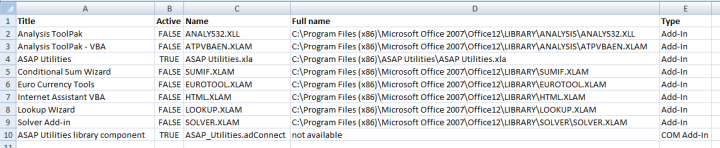
A new workbook is created with the following columns:
- Title - Display name of the add-in
- Active - Whether the add-in is currently enabled (TRUE/FALSE)
- Name - Internal filename or ID of the add-in
- Full Name - Full file path or location
- Type - Add-in type (Excel Add-In or COM Add-In)
The report reflects the add-ins listed under Excel > Options > Add-ins, including both:
- Excel Add-ins (.xla, .xlam, .xll)
- COM Add-ins (.dll)
This tool is helpful for:
- Documenting the add-ins used on a system
- Troubleshooting issues related to missing or disabled add-ins
- Creating consistent add-in configurations across multiple installations
Note:
Office Add-ins (also called Web Add-ins or Office.js add-ins) are not included. Microsoft does not make these accessible through VBA or COM.
These are managed separately under Home > Add-ins or Insert > My Add-ins, depending on your version of Excel.
Starting this tool
Specify a Keyboard Shortcut: ASAP Utilities › My Tools & Shortcuts › Manage My Tools & Shortcuts...
Additional search terms to help you find this tool:
Excel add-in list, list installed Excel add-ins, list COM add-ins, Excel add-in report, get add-in information in Excel, show add-ins in Excel, Excel list of active add-ins, Excel add-in status, document Excel add-ins, Excel add-in overview, audit Excel add-ins, export add-in details, Excel add-in management, view Excel add-ins, Excel AddIns collection, COMAddIns list, installed Excel extensions, Excel add-in location list, Excel add-ins active or inactive, list Excel plugins
Tip:Alt+P for the previous tool.
Tip: Alt+N for the next tool.

Save Time in Excel. The Easy Way.
ASAP Utilities helps you save time and do what Excel alone can't.
You can get started right away. No training needed.
Most users start with a few tools. Many end up using ASAP Utilities daily.
Used by teams in 28,500+ organizations.
Get Started with ASAP Utilities 9
Start saving time in Excel with practical tools you can use right away.
-
No sign-up required.
-
-
Free 90-day trial