


Reload Installed Excel Add-ins (Refresh Menus and Commands)
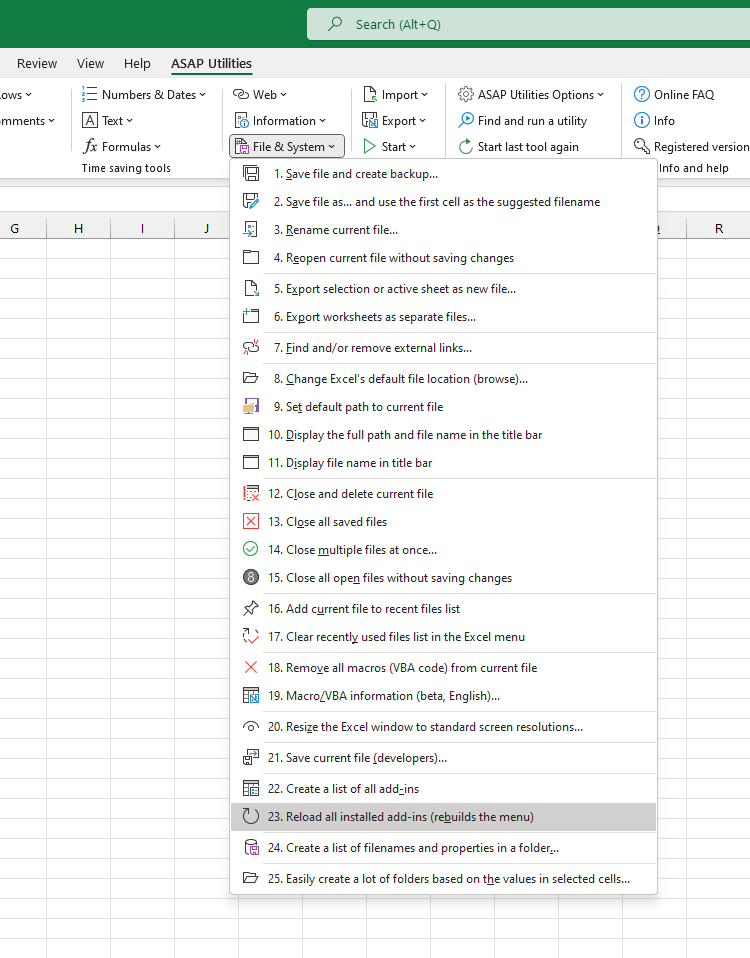
This tool reloads all installed Excel add-ins and refreshes their associated menu commands.
It performs the following steps:
- Resets the legacy worksheet and chart menu bars. Some add-ins still use these to place commands in the Ribbon's Add-Ins tab
- Reloads all active Excel add-ins
Behind the scenes, the tool turns each installed and active Excel add-in off and on. This triggers its startup routines again, such as Auto_Open or Workbook_Open, which helps restore missing menu items, reset the add-in's behavior, and reapply any shortcuts assigned by the add-in.
This is helpful when:
- The add-in menu or commands are missing
- Shortcuts assigned by add-ins are no longer working
- You want to refresh add-ins without restarting Excel
- Add-in behavior or menus didn't load correctly at startup
By default, you can launch this tool using the Control+Alt+B shortcut.
Note:
This tool only reloads Excel Add-ins (.xla, .xlam).
It does not affect COM Add-ins or Office Add-ins (also known as Web Add-ins or Office.js add-ins).
Starting this tool
Specify a Keyboard Shortcut: ASAP Utilities › My Tools & Shortcuts › Manage My Tools & Shortcuts...
Additional search terms to help you find this tool:
reload Excel add-ins, refresh Excel add-ins, restore missing add-in menu, add-in buttons not showing, run auto_open again, reload xlam add-ins, Excel AddIns refresh, Excel add-in shortcuts not working, reload Excel plugins, reload Excel plug-ins, reload Excel add-ons, fix Excel add-in load issues, troubleshoot Excel add-ins, rerun Excel add-in startup, restore add-in menu bar
Tip:Alt+P for the previous tool.
Tip: Alt+N for the next tool.

Save Time in Excel. The Easy Way.
ASAP Utilities helps you save time and do what Excel alone can't.
You can get started right away. No training needed.
Most users start with a few tools. Many end up using ASAP Utilities daily.
Used by teams in 28,500+ organizations.
Get Started with ASAP Utilities 9
Start saving time in Excel with practical tools you can use right away.
-
No sign-up required.
-
-
Free 90-day trial