


Decode URL and HTML Encoded Text in Selected Cells
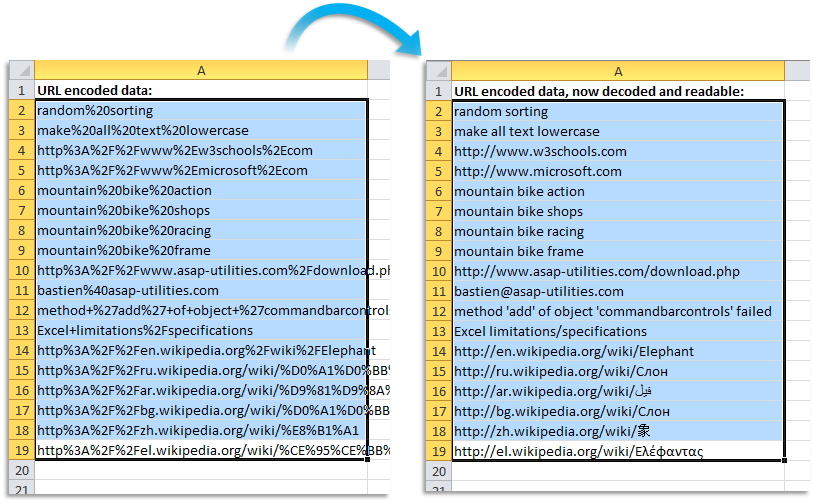
This tool decodes URL-encoded and HTML-encoded text in your selected cells, making the content easier to read and work with.
It's useful when working with reports, website statistics, exported data, or keywords that contain encoded characters.
The tool automatically:
- Replaces "+" with a space
- Decodes %## encoded characters (URL encoding)
- Decodes named HTML entities (such as or €)
- Decodes text with multiple %## sequences (such as %c3%84 or %c3%a7)
- Decodes Unicode characters (HTML numeric codes such as © or “)
For example, this tool converts encoded values often found in website reports, keyword exports, online forms, or raw HTML data:
- https%3A%2F%2Fwww%2Emicrosoft%2Ecom → https://www.microsoft.com
- hello%2Bworld → hello world
- m%C3%BCnchen → münchen
- € 100 → € 100
- © ASAP Utilities → © ASAP Utilities
URL encoding is commonly used in website URLs, tracking links, or form data sent online. It ensures that special characters are correctly interpreted without breaking web addresses.
Note:
If your selection includes cells with formulas, those cells will be skipped automatically.
Starting this tool
Specify a Keyboard Shortcut: ASAP Utilities › My Tools & Shortcuts › Manage My Tools & Shortcuts...
Additional search terms to help you find this tool:
Decode URL encoded text, Decode HTML encoded text, Decode string, Urldecode Excel alternative, Convert html encoded characters, Decode website address, Decode percent-encoding, Decode URL parameters, Decode Google Analytics search keywords, Decode URI in Excel, Decode hyperlink text, URL decode tool, Decode tracking links, Convert URL to readable text, Fix unreadable web links, Decode special characters, Convert encoded links Excel, Clean up website data, Decode Internationalized Resource Identifier, Decode Uniform Resource Locator (URL)
Tip:Alt+P for the previous tool.
Tip: Alt+N for the next tool.

Save Time in Excel. The Easy Way.
ASAP Utilities helps you save time and do what Excel alone can't.
You can get started right away. No training needed.
Most users start with a few tools. Many end up using ASAP Utilities daily.
Used by teams in 28,500+ organizations.
Get Started with ASAP Utilities 9
Start saving time in Excel with practical tools you can use right away.
-
No sign-up required.
-
-
Free 90-day trial