


Add Cell's Value or Formula to Comment...
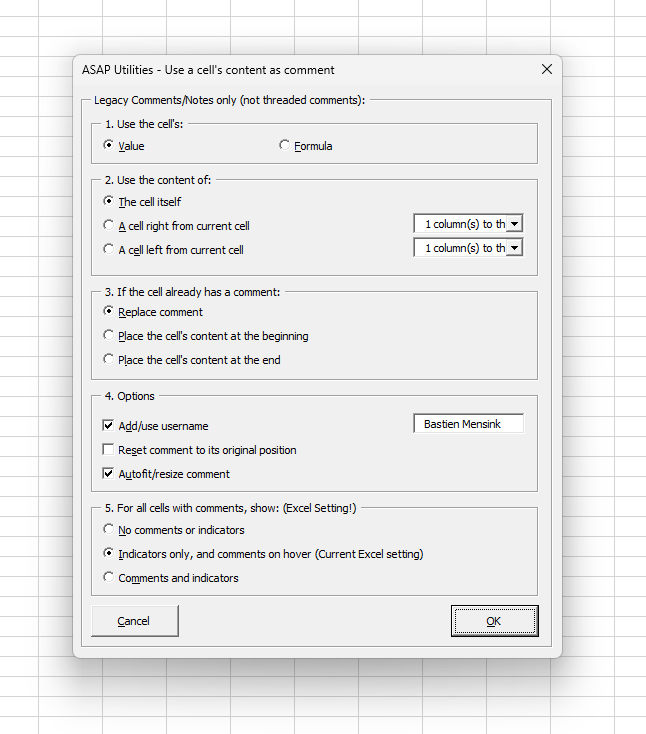
This tool adds each cell's value or formula as a legacy comment (note) in the selected cells.
You can:
- Choose to use the cell's value or formula
- Use the content of the current cell or from a cell to the left or right
- Replace existing comments or insert the content at the beginning or end
- Choose whether to include a username, auto-fit the comment size, or reset the comment's position
- Control how Excel displays comments and indicators (this is a global Excel setting, see note below)
This tool works with legacy comments (called notes in modern Excel), not threaded comments.
It's useful for:
- Documenting formulas directly within the worksheet
- Adding explanations or reminders next to cell values
- Creating annotated reports or templates for others to review
Note:
The display setting refers to the global Excel setting that controls how comments and indicators are shown.
You can find it under:
File > Options > Advanced > Display > For cells with comments, show...
Changing it in the form will immediately update this Excel setting.
Starting this tool
Specify a Keyboard Shortcut: ASAP Utilities › My Tools & Shortcuts › Manage My Tools & Shortcuts...
Additional search terms to help you find this tool:
cell to comment, add formula to comment, add value to comment, insert cell value as note, insert formula as note, comment with cell contents, Excel comment automation, annotate cell values, add notes in Excel cells, auto comment with formula, show formula in note, cell content to sticky note
Tip:Alt+P for the previous tool.
Tip: Alt+N for the next tool.

Save Time in Excel. The Easy Way.
ASAP Utilities helps you save time and do what Excel alone can't.
You can get started right away. No training needed.
Most users start with a few tools. Many end up using ASAP Utilities daily.
Used by teams in 28,500+ organizations.
Get Started with ASAP Utilities 9
Start saving time in Excel with practical tools you can use right away.
-
No sign-up required.
-
-
Free 90-day trial