


Freeze Conditional Formatting as Static Formatting in Selected Cells
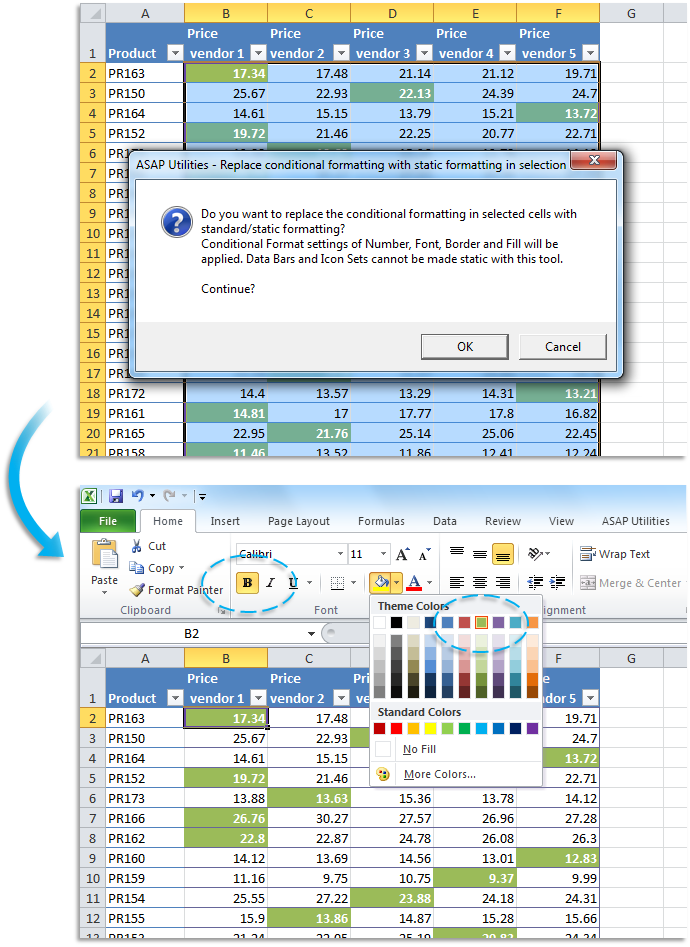
This tool replaces conditional formatting in your selected cells with regular static formatting.
It preserves the appearance created by conditional formatting rules (such as font color, fill color, borders, and number format) and applies that formatting directly to the cells. The underlying rules are then removed, but the visual result stays the same.
This is useful when:
- You want to freeze or convert conditional formatting to fixed formatting
- Clients or colleagues require a workbook without dynamic formatting rules
- You need a static snapshot of the formatting for reporting or export
- You want to improve performance by reducing the number of conditional formatting rules
It works in a similar way to Excel's "Paste as Values" for formulas. In that case, Excel keeps only the result and removes the formula.
This tool does the same thing for conditional formatting: it keeps the visual formatting and removes the underlying rules that applied it.
Note:
Conditional Data Bars and Icon Sets are not supported. These will not be converted to static formatting, and the cells with such rules will remain unchanged.
Starting this tool
Specify a Keyboard Shortcut: ASAP Utilities › My Tools & Shortcuts › Manage My Tools & Shortcuts...
Additional search terms to help you find this tool:
freeze conditional formatting, make conditional formatting permanent, convert conditional formatting to static, remove conditional formatting keep formatting, replace conditional formatting with fixed formatting, convert conditional formatting to standard formatting, flatten conditional formatting, static formatting Excel, lock cell formatting, stop conditional formatting updates, simplify conditional formatting, remove dynamic formatting Excel, keep formatting remove rules, convert rules to regular formatting
Tip:Alt+P for the previous tool.
Tip: Alt+N for the next tool.

Save Time in Excel. The Easy Way.
ASAP Utilities helps you save time and do what Excel alone can't.
You can get started right away. No training needed.
Most users start with a few tools. Many end up using ASAP Utilities daily.
Used by teams in 28,500+ organizations.
Get Started with ASAP Utilities 9
Start saving time in Excel with practical tools you can use right away.
-
No sign-up required.
-
-
Free 90-day trial