


Remove Leading and Trailing Line Breaks
This tool removes line break characters from the beginning and end of the values in your selected cells. Line breaks inside the text remain.
Line breaks can be added unintentionally, for example by pressing Alt+Enter or when copying and pasting data from websites, emails, PDFs, or other programs. These line breaks are sometimes invisible and can cause unexpected results in formulas, sorting, filtering, comparisons, or lookups, or make cells appear misaligned or taller than expected.
Only line breaks at the start and end of the cell are removed.
This helps you clean up imported or pasted data quickly and ensures your text values behave as expected in Excel.
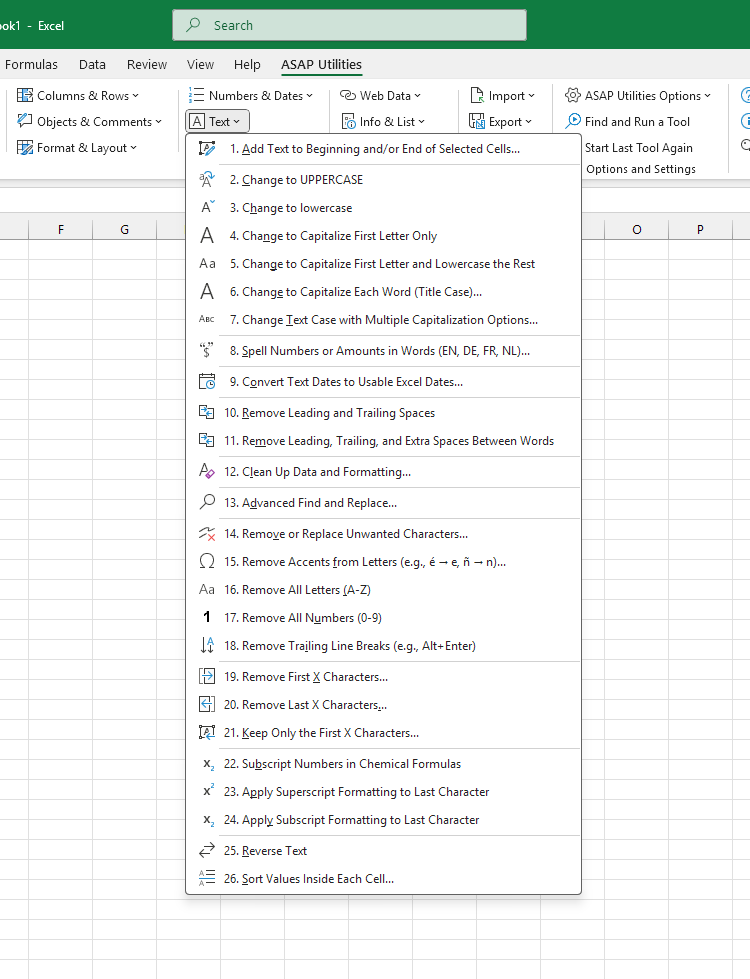
Starting this tool
Specify a Keyboard Shortcut: ASAP Utilities › My Tools & Shortcuts › Manage My Tools & Shortcuts...
Additional keywords to help you find this tool:
remove line breaks, excel remove line breaks, leading line breaks, trailing line breaks, Alt+Enter, remove Alt+Enter, trim line breaks, TRIM not working, invisible line breaks, hidden line breaks, invisible characters, copy paste line breaks, pasted text cleanup, imported data cleanup, extra blank line in cell, cell height too large, text vertically misaligned, lookup fails line breaks
Tip:Alt+P for the previous tool.
Tip: Alt+N for the next tool.

Save Time in Excel. The Easy Way.
ASAP Utilities helps you save time and do what Excel alone can't.
You can get started right away. No training needed.
Most users start with a few tools. Many end up using ASAP Utilities daily.
Used by teams in 28,500+ organizations.
Get Started with ASAP Utilities
Start saving time in Excel with practical tools you can use right away.
-
No sign-up required.
-
-
Free 90-day trial