


删除开头和结尾的换行符
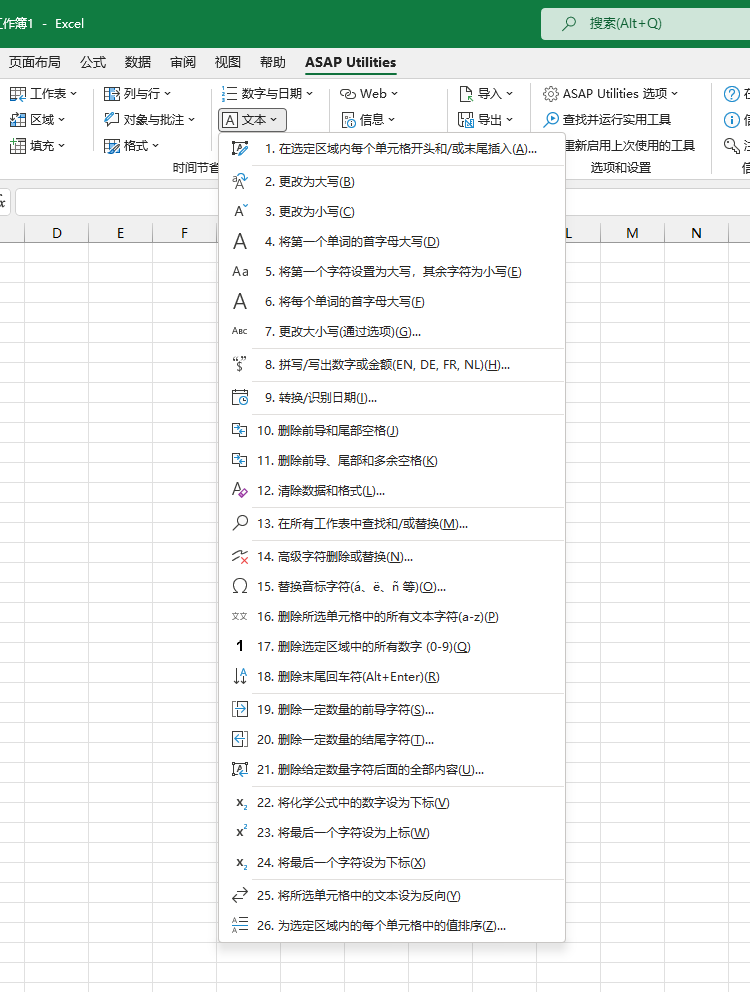
ASAP Utilities › 文本 › 12. 删除开头和结尾的换行符
此工具可删除所选单元格中值的开头和结尾处的换行符。文本内部的换行符将被保留。
换行符可能会在无意中添加,例如按下 Alt+Enter,或从网站、电子邮件、PDF 或其他程序复制和粘贴数据时。这些换行符有时是不可见的,可能会导致公式、排序、筛选、比较或查找出现意外结果,或使单元格看起来未正确对齐或比预期更高。
只会删除单元格开头和结尾的换行符。
这有助于快速清理导入或粘贴的数据,并确保文本值在 Excel 中按预期方式工作。
正在启动此实用工具
单击 › 文本 › 12. 删除开头和结尾的换行符
指定键盘快捷方式: ASAP Utilities › 收藏夹和快捷键 › 编辑您喜欢的工具和快捷键...
帮助您找到此工具的更多关键词:
删除 换行符, Excel 换行符, 开头 结尾 换行符, Alt+Enter, 删除 Alt+Enter, TRIM 不起作用, 不可见 换行符, 隐藏 字符, 复制 粘贴 换行符, 单元格 空白 行, 单元格 高度 过大, 文本 垂直 未 对齐, 查找 失败 换行符
提示:Alt+P 打开上一个工具。
提示:Alt+N 打开下一个工具。

许多 Excel 用户希望 Excel 内置的实用工具
节省 Excel 工作时间,简单高效。
ASAP Utilities 帮助您节省时间,并实现 Excel 本身无法完成的操作。
您可以立即开始使用,无需培训。
大多数用户都会先从几个工具开始。 很多用户后来都会每天使用 ASAP Utilities。
已被超过28,500家组织采用。