


Version 4.2.5 - May 29, 2008
March 31, 2008
Finished
On May 29, 2008 the new version 4.2.5 is released. Download
New
- Fill » Insert before current value...
Fill » Insert after current value...
Contains a new option to skip the empty cells in your selection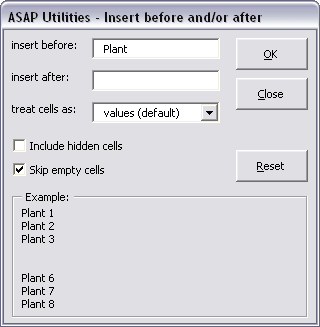
- Formula » Use a significant number of decimals...
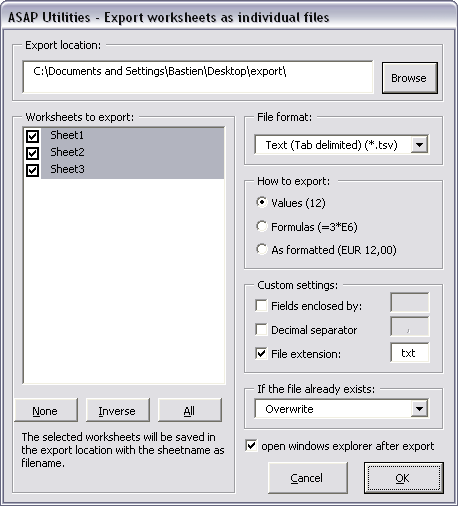
This utility has been moved to the 'numbers' submenu. It is also still listed in the 'Format' submenu. - Export » Export worksheets as separate files...
Improved. You can now choose a custom file extension and with some text files you can choose your own field-enclosers and decimal separator.
- Range » Find / Replace in all sheets...
Besides searching within all worksheets (default) you can also choose to only find/replace on the active worksheet or within the selected ranges.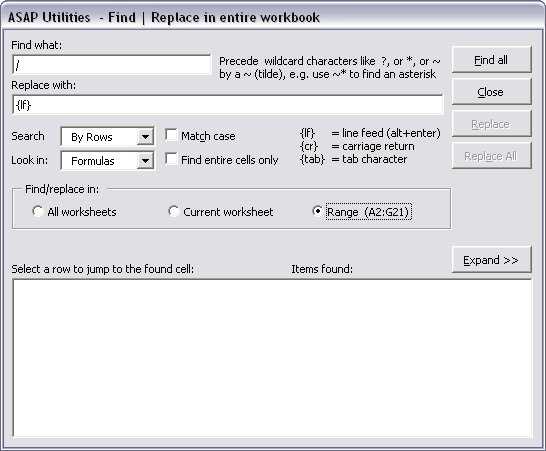
- Web » Convert hyperlinks to =HYPERLINK() formulas
Updated so that it keeps type the hyperlink formatting if set (blue underlined). - Text » Replace accented vowels (á, ë, etc.)...
has been renamed to:
Replace accented characters (á, ë, ñ etc.)...
The utility now works on all accented characters, both vowels and consonants.
Furhermore it will automatically detect lower- and uppercase characters.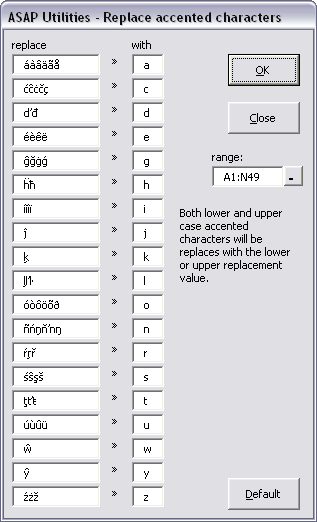
- General
Several minor improvements
Bugs fixed
- Range » Transpose data with formulas...
Fixed a bug that resulted in an error message when you wanted to copy and transpose the data to another worksheet. - Select » Conditional row and column select, hide or delete...
Fixed the bug when you removed the duplicates and keep the first value, instead of keeping the first value of the duplicates the last value was kept.
This bug was (unfortunately) introduced in version 4.2.2 when the procedure to handle duplicates was updated. - Fill » Quick numbering of cells...
Fixed a bug that occured when you entered a number of zeros that was smaller then the length of the starting number. The description "Fill with leading zeros" has been changed to "Fill up with zeros to a length of:" - Range » Paste values and formatting
Fixed the error that caused this utility not to function. - Export » Export worksheets as separate files...
The separator for tab-delimited text files is no longer by default a point (.) but the separator according to your windows-settings. For example in The Netherlands this is a comma (,). - Numbers » Convert negative numbers to positive and vice versa...
Fixed the bug that caused adjacent cells to be changed too when initially only once cell was selected. - Columns & Rows » Merge column data (join cells)...
Fixed a bug that resulted in an error when a cell in the left column started with an equalsign (=). - Export » Export selection or active sheet as new file...
When both the options "How to export > as formulas" and "Format to Export > Excel" were selected the result was an Excel file with the formulas listed as text-values instead of actual formulas. This is now fixed. - Export » Export worksheets as separate files...
When both the options "How to export > as formulas" and "Format to Export > Excel" were selected the result was an Excel file with the formulas listed as text-values instead of actual formulas. This is now fixed. - General
In Excel 2007 when you had all cells selected and you used some tools in ASAP Utilities you could get an overflow error.
This only occurred if you had all the rows and columns selected. (1048576 rows by 16384 columns). This error is now fixed. - General
A few small bug fixes
Get Started with ASAP Utilities
Start saving time in Excel with practical tools you can use right away.
-
No sign-up required.
-
-
Free 90-day trial