


Version 4.5.4 - September 1, 2009
September 1, 2009
Finished
On September 1, 2009 the new version 4.5.4 is released. Download
New features
 German language added
All the tools are also available in the German language (Deutsch) now. If you have the German language of Excel, ASAP Utilities will now start in German.
You can change the language in the options dialogue: ASAP Utilities » ASAP Utilities Options » Settings, language and contact information...
Note: Only ASAP Utilities itself it translated at this moment. The setup is still in English and so is our website.- ASAP Utilities Options » Report the estimated time that is saved by ASAP Utilities
This tool creates a report in a new workbook with in it the tools you have used. It shows how many times you have used those tools and how much time this has approximately saved you.
You can enter your hourly rate to estimate how much money you have saved. (Only completely executed tools are counted.) There is also a link for each of the reported tools to the description on this website.
You can also use this report to show friends/colleagues which tools you use the most.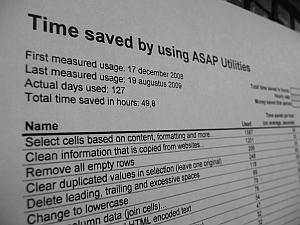
- Columns & Rows » Autofit row height (also for merged cells)
This tool adjusts the rowheight in the selected cells so that you can read or print the entire content of the cells. In addition to the standard functionality in Excel this tool also adjusts the height properly on merged cells (where 'wrap text' is set). (In Excel itself the auto adjusting of the row height often doesn't work properly on merged cells.) - Text » Advanced character remove or replace...
Character code 1 and 2 are added so these can be removed or replaced now too. - Import » Insert Excel file...
Besides the standard Excel files, you can now also (depending on your Excel version) insert HTML, XML and ODC files. - Import » Merge and/or import multiple files...
Besides the standard Excel files, you can now also (depending on your Excel version) insert HTML, XML and ODC files. - Select » Select cells based on content, formatting and more...
Instead of selection a source cell, you can now also select cells based on the font size by entering a number (the font size) instead of a reference to a cell where the font size is read from. - Excel 2010 Protected View
ASAP Utilities will now show a friendly message when you try to use one of the tools on a document that is openend in "Protected View" in Excel 2010 (technical preview).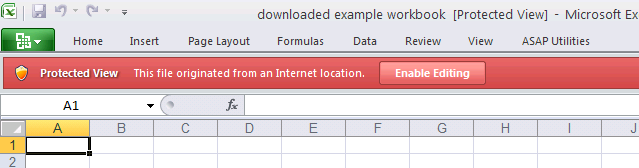
Bugs fixed
- Text » Advanced character remove or replace...
Character code 1 and 2 are added so these can be removed or replaced now too. - Text » Delete leading and trailing spaces
The utility produced an error on values that were not a formula but that did precede with a = character such as for example ' = 919D'. This is now fixed. - Text » Delete leading, trailing and excessive spaces
The utility produced an error on values that were not a formula but that did precede with a = character such as for example ' = 919D'. This is now fixed. - Fill » Quick numbering of selected cells...
The "Increment with" setting was ignored when you choose the option to restart the numbering if a value in a specified column changed. This is now fixed. - Select » Select cells based on content, formatting and more...
With a few options, such as selecting filled cells, the options to select the entire row or entire column were ignored. Only the found cells were selected, despite of the chosen other option. This is now fixed. - Columns & Rows » Remove all empty rows
When the sheet contained merged cells, there was a chance that the utility didn't remove all the empty rows. This is now fixed. This was a bug that was new in 4.5.2. - Objects & Comments » Delete all objects in selected worksheets
When you used this tool in a sheet without any objects, the current selection was deleted. This bug was introduced in version 4.5.3 and is now fixed. - Web » Clean information that is copied from websites...
When you used this tool with the option "Remove all objects/images" checked, in a sheet without any objects, the current selection was deleted.
This bug was introduced in version 4.5.3 and is now fixed. - Objects & Comments » Comment tools...
The utility will now check upfront if it is needed to unprotect the sheet(s) first.
For example prior to Excel 2003 you could resize the comments on a protected sheet. Starting from Excel 2003 that is no longer possible and ASAP utilities will then tell you to unprotect the sheet first. - Fill » Fill empty cells in selection...
We created a workaround for a situation where the range of empty cells consisted of more than 8192 non-contiguous cells. In such a case all the cells were filled instead of only the empty ones. Fortunately you could then undo the operation. We used to use the SpecialCells method from Excel, because it is fast, but that has the 8192 limit: http://support.microsoft.com/kb/832293.
We have now created a workaround so that it always works as expected. - Format » Copy a sheet's page and print settings...
When you used this in Excel 2007 and applied the settings to a hidden sheet you got an error. This is now fixed. Previous Excel versions didn't have this problem. - Range » Count and/or color duplicates in selection...
Produced an error if you had error cells in your selection. This is now fixed by skipping the cells with an error value. - Columns & Rows » Remove unused empty ending rows/columns
Unfortunately in version 4.5.0 a bug was introduced. When you had a hidden row or column at the end of your data, it was removed even if it wasn't empty.
This is now fixed. - Range » Fill cells with their formatted value
The utility now changes the number format in the selected cells to General after the values have been changed. - A few minor updates.
Get Started with ASAP Utilities 9
Start saving time in Excel with practical tools you can use right away.
-
No sign-up required.
-
-
Free 90-day trial