


Version 4.6.1 - August 31, 2010
August 31, 2010
Finished
On August 31, 2010 the new version 4.6.1 is released. Download
Improvements
- Functions
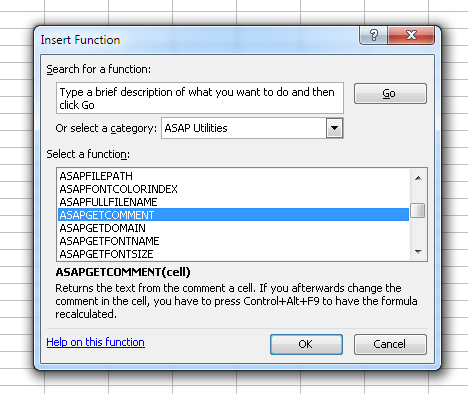
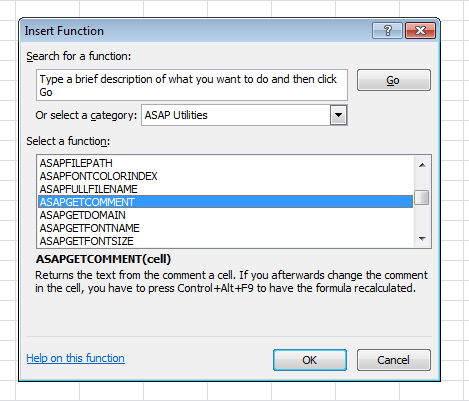
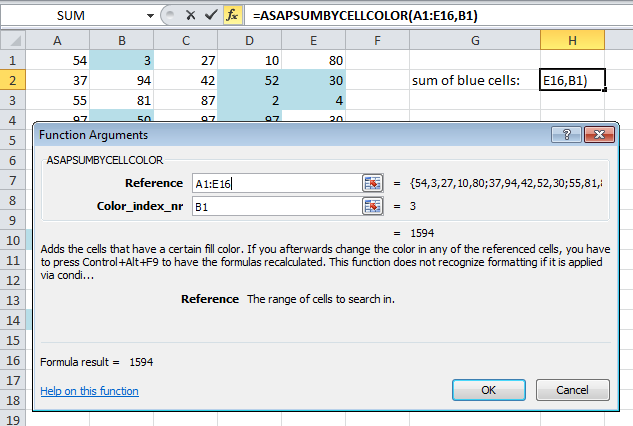
In Excel 2003, 2007 and 2010 the ASAP Utilities functions are now listed in Excel's "Insert Function" Wizard in their own category, called "ASAP Utilities". Furthermore, in Excel 2010 each of the function-arguments has a description in Excel's functions-wizard too.
Excel 2003: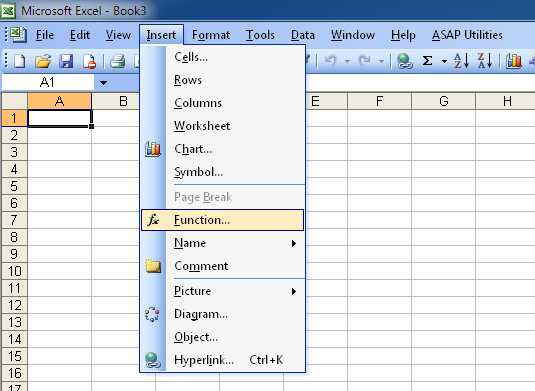
Excel 2010: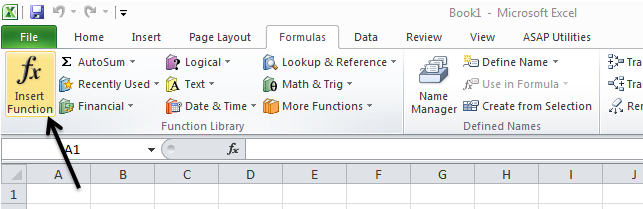
- Web » Clean information that is copied from websites...
The AutoFit column width and row height now have an option to specify a maximum width or height. Especially with columns this is very useful because columns that are too wide are hard to read or mess-up the layout.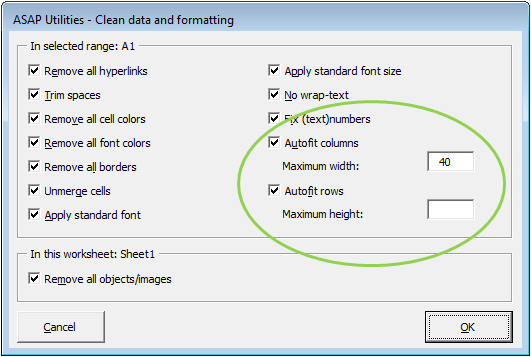
- Export » Put selected range as bitmap-image on the clipboard (as on screen)
This utility can now also be used to copy charts or other objects to the clipboard.
Therefore the utility has been renamed to:
Export » Put the selection as bitmap-image on the clipboard (as on screen) - Export » Put selected range as image on the clipboard (as on screen)
This utility can now also be used to copy charts or other objects to the clipboard.
Therefore the utility has been renamed to:
Export » Put the selection as image on the clipboard (as on screen) - Export » Put selected range as image on the clipboard (as on printer)
This utility can now also be used to copy charts or other objects to the clipboard.
Therefore the utility has been renamed to:
Export » Put the selection as image on the clipboard (as on printer) - General
A few small (speed) improvements.
Bugs fixed
- Excel 2010 (32 bit edition)
Fixed the ASAP Utilities startup error that sometimes occurred.
We created a workaround for a bug in Excel 2010 which prevented ASAP Utilities from starting correct. Despite all the suggestions in some cases if you were administrator and installed ASAP Utilities, the program kept being unable to connect to the ASAP Utilities library DLL. Somehow in Excel 2010 this DLL is registered not only in the LOCAL MACHINE part of the registry, as we have specified it to do, but it also included ASAP Utilities in the LOCAL USER part of the registry, which it shouldn't do and which causes ASAP Utilities to sometimes not work correct and give the DLL startup error. - Select » Select cells based on content, formatting and more...
The option "Number format contains" didn't work (anymore).
This is now fixed and it works again.
You can use it to select cells based on a (part of a) certain number format string. - Columns & Rows » Remove unused empty ending rows/columns
Could sometimes produce an error if your sheet contained a table (Excel 2007/2010: Insert > Table). This is now fixed. - Export » Export worksheets as separate files...
Produced an error if you had a worksheet which as protected and you were using Excel 2000/2002/XP or 2003. This is now fixed.
In version 4.5.9 we updated this utility because cells with more than 255 characters were stripped to the first 255 characters in Excel 2000/2002/XP/2003. However, this gave an error on a protected worksheet. - Formulas » Copy formulas without changing their cell references...
Now works without errors if the target is in another workbook. - Fill » Insert before current value...
Fill » Insert after current value...
Fixed the bug that prevented you from using the same text in another case, such as first in lower case, and then later in upper case.
For example if you added the text 'text', this setting was remembered. However if you later wanted to add the letter 'TEXT' in uppercase, it didn't work because the autocomplete detected that you already added this text before and due to the fact that this comparison is not case sensitive, you couldn't add the same text in other case. This is now fixed by turning autocomplete off, since we can't make autocomplete case-sensitive. You can still quickly choose a previously entered value by using the arrow keys or dropdown with the mouse. - Columns & Rows » Autofit row height (also on merged cells)
The utility didn't work when the combined column width of the merged cells was more than 255. We have created a workaround for this so that it doesn't give the error anymore. However in such as case with long text the row height might not be adjusted correct with long cell values. At this moment we don't have a better solution (for what seems to be a very rare situation anyway). - General
We changed a small thing in the startup of ASAP Utilities which could lead to a problem (an extra empty workbook) when opening a workbook in/via a program called ProSystem fx Engagement. - System » Find and remove external links...
Bug fixed. If a formula with a link to another file was on a protected sheet, this utility produced an error and the calculation mode for that sheet was left in manual calculation mode. This is now fixed and the utility will inform you nicely if a link exists (in a formula) on a protected worksheet. - Format » The paper saver (split columns)...
If you used this utility on a workbook with one or more pivot tables and were using Excel 2007 or 2010, then Excel could crash. We have no explanation for this, theoretically that is impossible. However, we now created an alternative code to set the page breaks for these Excel versions and that has solved the problem.
Excel 2000, 2002/XP and 2003 didn't have this problem. - Export » Export selection or active sheet as new file...
Improved exporting the formulas in text format. The utility now also uses the A1 or R1C1 referencing based on your current settings in Excel. - A few small bugfixes/improvements.
Get Started with ASAP Utilities 9
Start saving time in Excel with practical tools you can use right away.
-
No sign-up required.
-
-
Free 90-day trial