


Version 4.7.2 - April 14, 2011
April 14, 2011
Finished
On April 14, 2011 the new version 4.7.2 is released. Download
New features and improvements
- Sheets » Split the selected range into multiple worksheets...
By request, the utility now also copies the row height. - Web » Activate hyperlinks (create from cell values)...
Now automatically adds http:// in front of the hyperlinks if needed. - ASAP Utilities Options » New tools in development (English only)
By request, the following tools are added:
- Delete range names with bad cell references (#REF!)
Removes all range names with invalid addresses. The utility creates a report that shows which names have been removed.
- Ungroup all grouped columns in the selected worksheets
- Ungroup all grouped rows in the selected worksheets
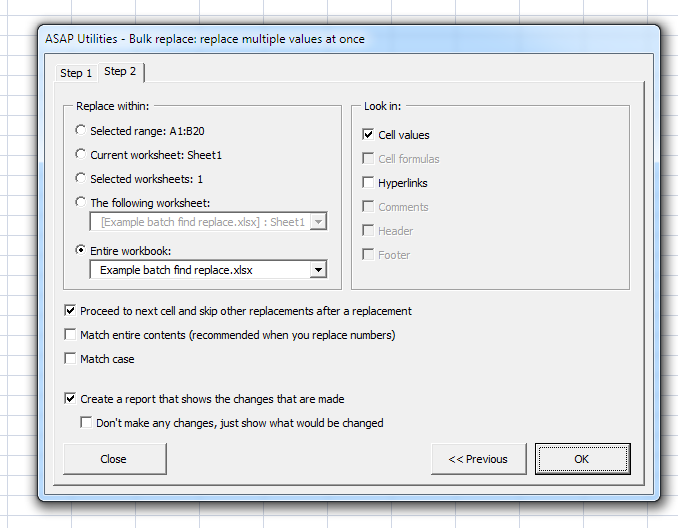
- Bulk replace: replace multiple values at once
You can specify a range with the values to search for and replace, which allows you to do many replacements automatically after each other. The target can be a certain range, your current worksheet, all selected worksheets, or even an entire workbook (that is open in Excel). At this moment the search/replace is done in cell values and hyperlinks. We're working on more items to search/replace in, such as formulas, comments, header/footer, textboxes, etc.
We think this tool can be a huge time saver. Please let me know what you think of it and if we're missing something.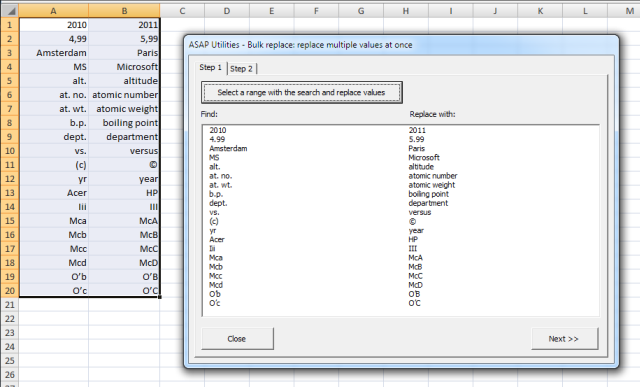
- System » Easily create a lot of folders based on the values in selected cells...
Now supports creating subfolders if a cell value contains a value such as "folder\subfolder1\subfolder2".
Previously the backslash \ in a cell value was changed to an underscore and then the folder was created. Now the backslash is used to create subfolders.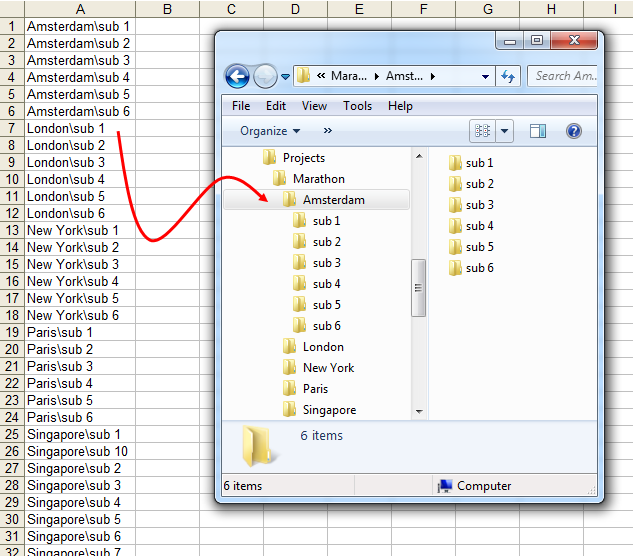
- ASAP Utilities Options » Settings, language and contact information...
Contains a new option: Help improve ASAP Utilities, Allow ASAP Utilities to report anonymous usage statistics. By default this option is turned on.
These usage statistics don't include personal information, such as your name, company name or email address. Usage statistics do include the following information from your computer: Windows version and language, Excel version and language, ASAP Utilities version and language, and the id's of the 10 tools used most often.
This information helps with the further development of ASAP Utilities and its documentation and translations. - General
In the Windows Start menu, two existing options from ASAP Utilities have been renamed to a less technical sentence:
"install ASAP Utilities as a default add-in in Excel" has been renamed to:
"Add ASAP Utilities to the Excel menu"
"uninstall ASAP Utilities as add-in in Excel" has been renamed to:
"Remove ASAP Utilities from the Excel menu"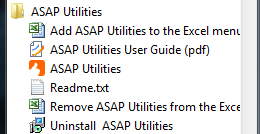
- Several small (speed) improvements.
Bug fixes
- Export » Export selection or active sheet as new file...
The option "Copy to clipboard (tab delimited)" always included hidden cells, even if the option "Do not export hidden cells" was checked. This is now fixed.
The tab-export options used the TSV (Tab Separated Value) file extension name. The TXT extension is now added too, but tsv is still the default. - Columns & Rows » Put together rows or columns from several sheets...
Now accepts a column/row address in R1C1 notation too. - Sheets » Split the selected range into multiple worksheets...
If the data didn't start in column A, then the headers were'nt copied along correctly. This is now corrected. - Export » Export worksheets as separate files...
The option "As displayed" didn't work in combination with delimited text files. This is now fixed. - A few small bug fixes.
Get Started with ASAP Utilities 9
Start saving time in Excel with practical tools you can use right away.
-
No sign-up required.
-
-
Free 90-day trial