


Quickly Insert a Named Worksheet...
Insert a new named worksheet into your workbook in one step.
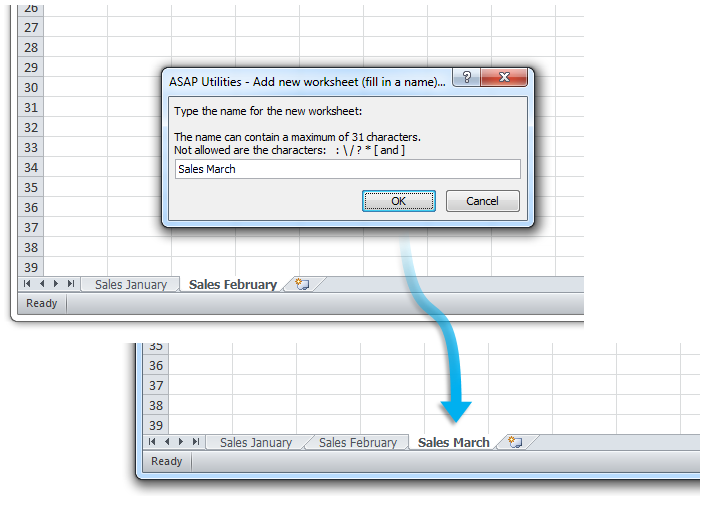
Instead of inserting a new sheet and then renaming it, this tool asks you for a name first and inserts the worksheet at the end of your workbook. This speeds up the process and makes it easier, especially when using a shortcut.
Clear, descriptive worksheet names help keep your workbook organized and make navigation easier, especially in large workbooks.
By default, you can launch this tool using the Control+Alt+N shortcut.
If you need to insert a blank worksheet without specifying a name, use Excel's built-in shortcut Shift+F11.
Starting this tool
Specify a Keyboard Shortcut: ASAP Utilities › My Tools & Shortcuts › Manage My Tools & Shortcuts...
Additional search terms to help you find this tool:
Insert a worksheet with a custom name in Excel, Add a new sheet and name it instantly, Create a new named worksheet, Insert worksheet and set name, Excel shortcut to add a sheet with a name, Quickly add a named worksheet, Sheetname, What is the fastest way to insert and name a sheet in Excel?
Tip:Alt+P for the previous tool.
Tip: Alt+N for the next tool.
Get Started with ASAP Utilities 9
Start saving time in Excel with practical tools you can use right away.
-
No sign-up required.
-
-
Free 90-day trial