


Find and Run a Tool...
Quickly search for and start the tool you need from ASAP Utilities.
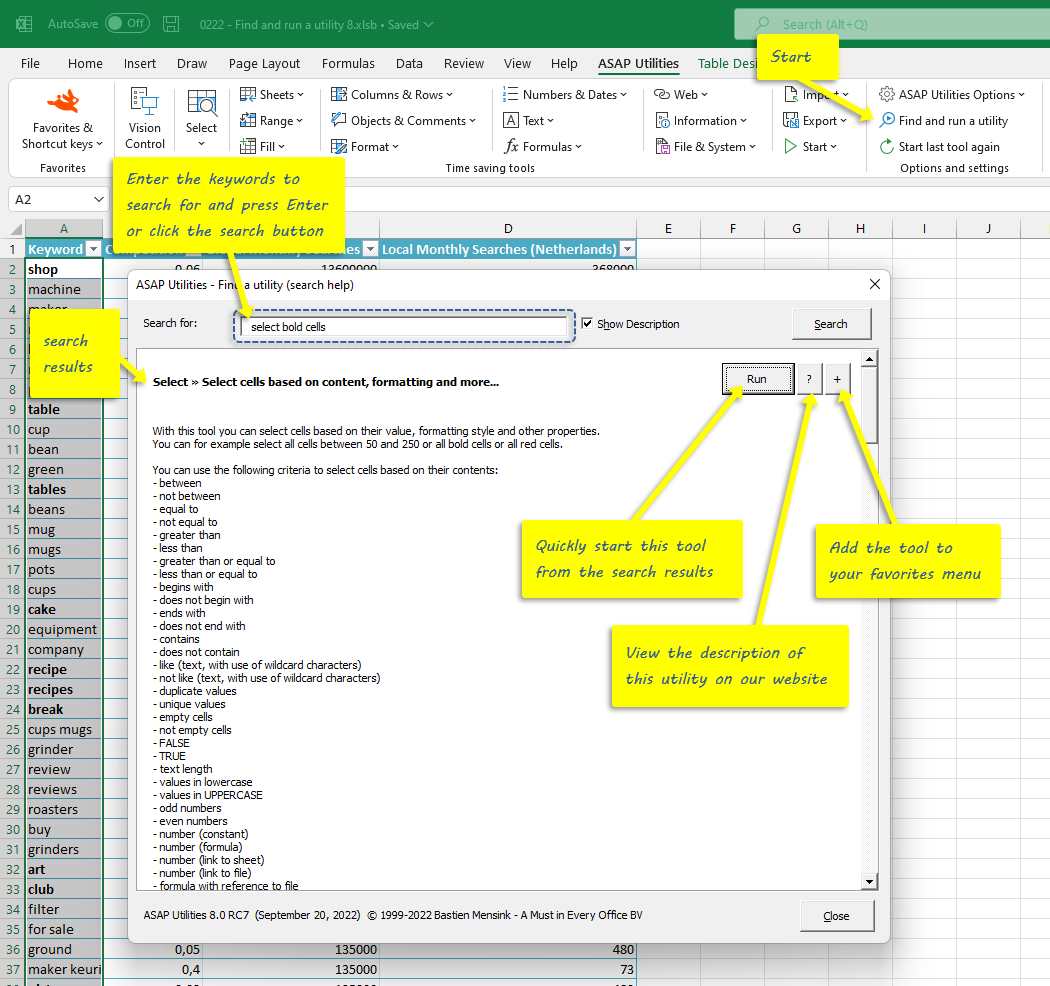
This tool searches the names and descriptions of all available tools for the words you enter. It works best when you type just a few keywords (not complete sentences or questions).
From the search results, you can:
- Click Run to start the selected tool
- Click ? to view its full description and screenshots (if available) on our website
- Click + to add the tool to your My Tools & Shortcuts menu
Note: The search matches only the exact words you enter. It does not recognize synonyms, sentence structure, or similar terms.
You can use the search function on our website for more advanced searching.
Starting this tool
Specify a Keyboard Shortcut: ASAP Utilities › My Tools & Shortcuts › Manage My Tools & Shortcuts...
Additional search terms to help you find this tool:
search tool, run tool by name, search ASAP Utilities, search tools, tool finder, quick tool search, search by description, search utility, find utility, search help, search box ASAP, run tool with keywords
Tip:Alt+P for the previous tool.
Tip: Alt+N for the next tool.
Get Started with ASAP Utilities 9
Start saving time in Excel with practical tools you can use right away.
-
No sign-up required.
-
-
Free 90-day trial