


Import Data From Pipe-Delimited (|) Text File...
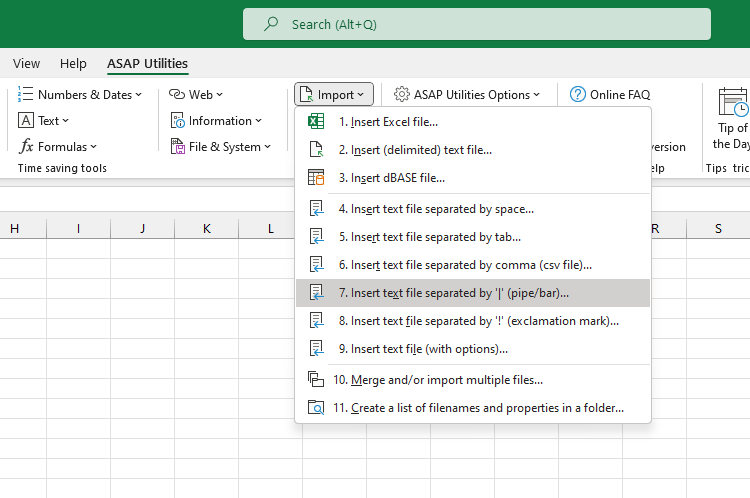
This tool imports the contents of a pipe-delimited (|) text file into your current worksheet, starting at the position of the active cell.
It splits the data into columns at each pipe character (|) and uses your system's regional settings to interpret numbers and dates.
This tool is a faster alternative to manually opening the file and copying the data into your target sheet.
Use it when you want to:
- Open data from structured pipe-delimited files directly in your existing worksheet
- Analyze or convert plain text data exports that use | as the separator
- Reuse text file data for reporting, calculations, or cleanup tasks
Note:
The pipe character (|), also known as the vertical bar, is sometimes used as a delimiter in plain text files, especially when the data may include commas or tabs. It may also be referred to as a bar, pipe, or vertical line, and is still used in legacy systems and certain export formats.
For more advanced import options (such as changing data types or regional settings), consider using Excel's Data > Get & Transform Data tools.
Starting this tool
Specify a Keyboard Shortcut: ASAP Utilities › My Tools & Shortcuts › Manage My Tools & Shortcuts...
Additional search terms to help you find this tool:
pipe-delimited text import, vertical bar separator, import pipe-separated file, load | delimited file, import .txt with pipe separator, text file pipe delimiter, open | delimited data in worksheet, import plain text with vertical bar, legacy system data import, import txt file with | separator, clean up pipe-separated data, analyze | separated file, convert pipe text file to table
Tip:Alt+P for the previous tool.
Tip: Alt+N for the next tool.
Get Started with ASAP Utilities 9
Start saving time in Excel with practical tools you can use right away.
-
No sign-up required.
-
-
Free 90-day trial