


Copy Selection as Picture (As Shown When Printed)
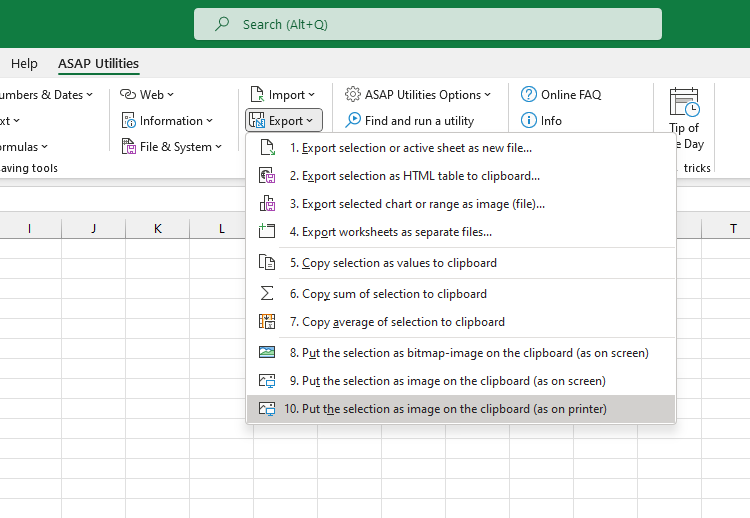
This tool copies your current selection as a picture based on how it would appear when printed, and places it on the clipboard.
Use this when you want to:
- Share a visual version of your data exactly as it would appear on paper
- Paste the image into Word, PowerPoint, or graphic design software
- Create a print-accurate image for documentation or approval
The image is created in metafile format (vector-based), which preserves print quality and scales cleanly in applications like Word or PowerPoint.
It saves a few clicks compared to Excel's built-in method (Home > Copy > Copy as Picture > As shown when printed > Picture), and you can assign your own shortcut for even faster access.
Tips:
- To hide gridlines from your picture, go to View > Show and uncheck Gridlines.
- If you use this frequently, add it to your 'My Tools & Shortcuts' menu and assign a shortcut for faster access.
Starting this tool
Specify a Keyboard Shortcut: ASAP Utilities › My Tools & Shortcuts › Manage My Tools & Shortcuts...
Additional search terms to help you find this tool:
copy print view, excel print layout image, copy as printed, export excel view for printing, print-ready image from Excel, excel to Word print format, save for report layout, copy formatted for printing, copy cells as printed
Tip:Alt+P for the previous tool.
Tip: Alt+N for the next tool.
Get Started with ASAP Utilities 9
Start saving time in Excel with practical tools you can use right away.
-
No sign-up required.
-
-
Free 90-day trial