


Select Cells Containing the Lowest Value
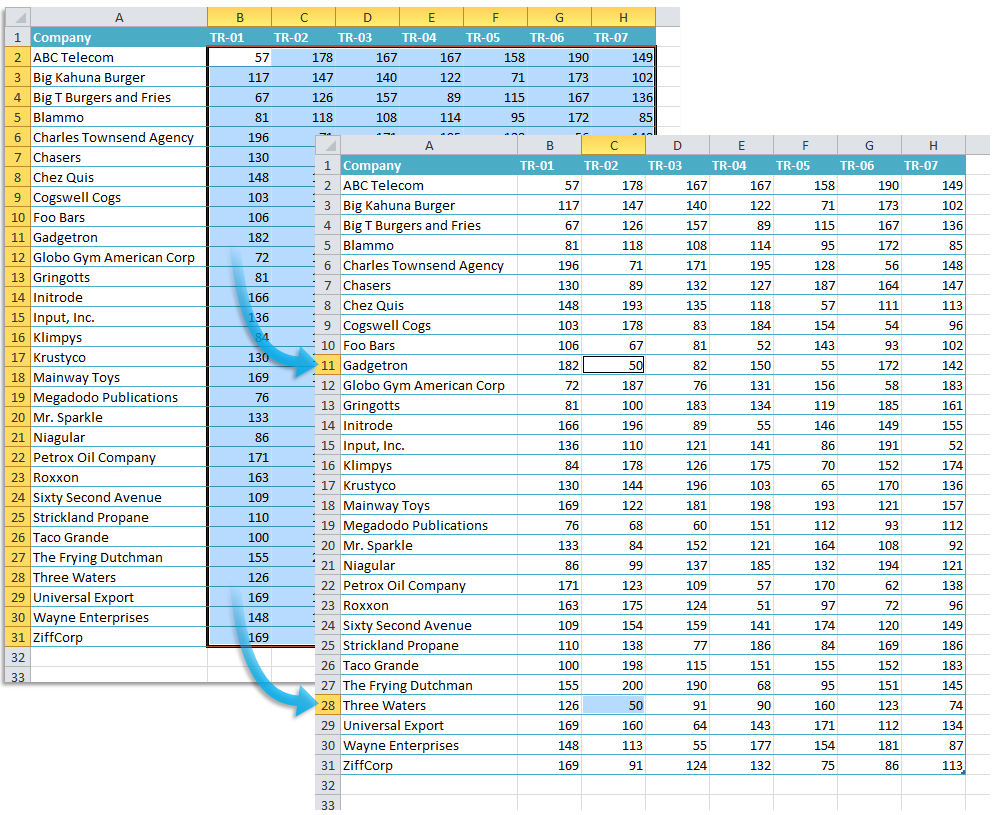
Quickly find and select all cells that contain the lowest value in your selection or across the entire worksheet.
- If multiple cells are selected, the tool finds and selects the cells with the lowest value within your selection.
- If only one cell is selected, it scans the entire worksheet and selects all cells of the lowest value.
This tool uses Excel's =MIN() function to identify the smallest number and select every matching cell.
Starting this tool
Specify a Keyboard Shortcut: ASAP Utilities › My Tools & Shortcuts › Manage My Tools & Shortcuts...
Additional search terms to help you find this tool:
Find lowest value in Excel, Select smallest number, Highlight minimum value, Find and select lowest value, Identify smallest number in a range, Select all cells with the lowest value, Find and highlight the smallest value, How to locate the smallest value in a range
Tip:Alt+P for the previous tool.
Tip: Alt+N for the next tool.
Get Started with ASAP Utilities 9
Start saving time in Excel with practical tools you can use right away.
-
No sign-up required.
-
-
Free 90-day trial