


Insert a Specified Number of Empty Rows at Once...
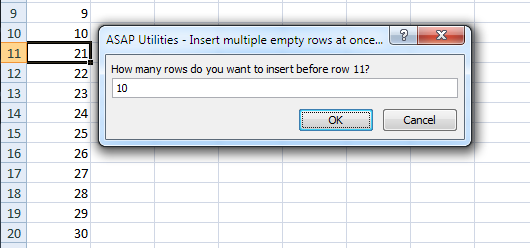
This tool lets you quickly insert a specified number of empty rows above your selection.
For example, to insert 15 rows between A1 and A2 in Excel, you would normally have to manually select rows 2:16 and then insert them.
With this tool, simply select cell A2 and enter 15 to insert 15 blank rows between A1 and A2.
Starting this tool
Specify a Keyboard Shortcut: ASAP Utilities › My Tools & Shortcuts › Manage My Tools & Shortcuts...
Additional search terms to help you find this tool:
Insert multiple empty rows in Excel, Insert blank rows at once, Bulk insert rows, Quickly insert empty rows, Excel insert several rows, Insert multiple rows above active cell, Add blank rows, Insert blank rows in one go
Tip:Alt+P for the previous tool.
Tip: Alt+N for the next tool.
Get Started with ASAP Utilities 9
Start saving time in Excel with practical tools you can use right away.
-
No sign-up required.
-
-
Free 90-day trial