


Set Print Area on Selected Sheets
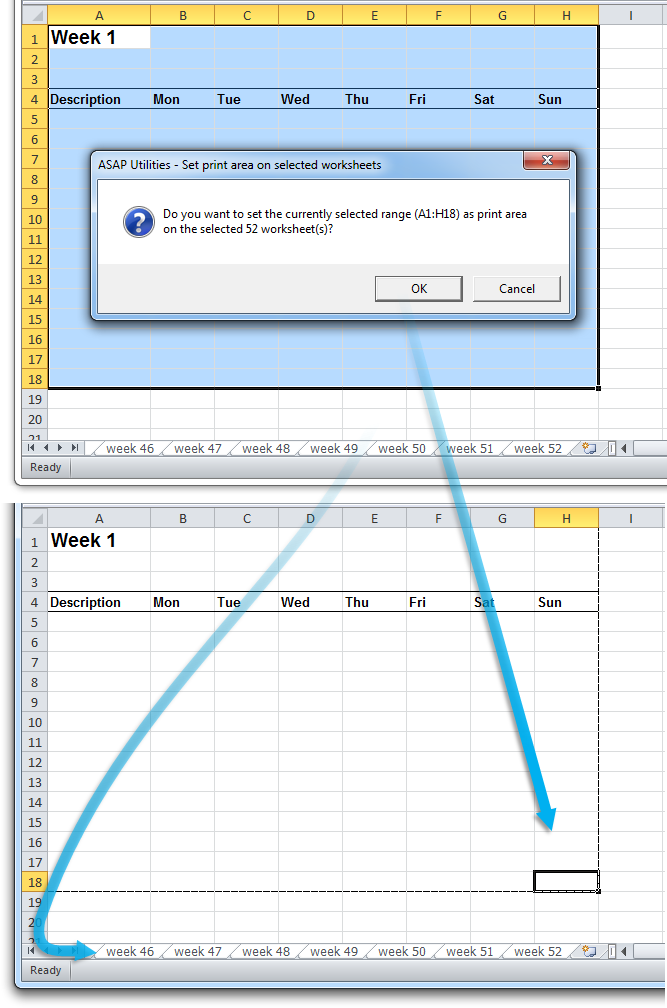
This tool sets the selected range as the print area on all selected sheets.
In Excel, you can only set a print area one sheet at a time, which can be slow and repetitive. This tool automatically applies the selected range as the print area on all selected worksheets, ensuring consistency and saving time.
Starting this tool
Specify a Keyboard Shortcut: ASAP Utilities › My Tools & Shortcuts › Manage My Tools & Shortcuts...
Additional search terms to help you find this tool:
Set print area on multiple sheets in Excel, Apply print area to multiple worksheets, Define print area on selected sheets, Apply the same print area to all sheets, Set print area for all selected sheets in one step, Batch set print area in Excel, How do I set the same print area on multiple sheets in Excel?
Tip:Alt+P for the previous tool.
Tip: Alt+N for the next tool.
Get Started with ASAP Utilities 9
Start saving time in Excel with practical tools you can use right away.
-
No sign-up required.
-
-
Free 90-day trial