


Replace Formula Errors with a Custom Message...
Turn confusing formula errors into helpful messages or hide them completely.
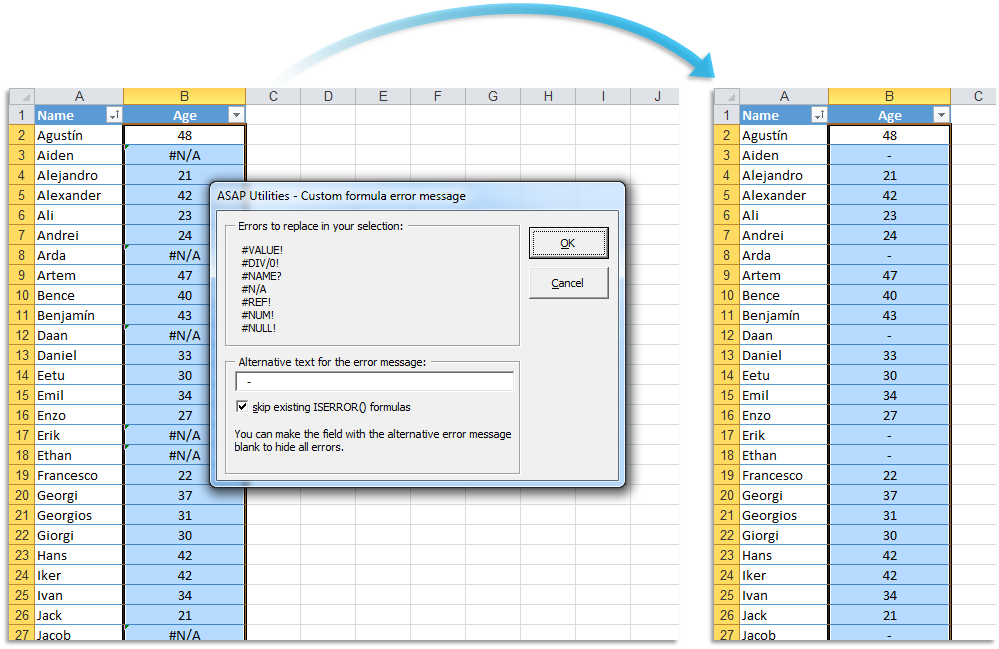
Instead of displaying standard Excel error values like #N/A, #VALUE!, or #DIV/0!, this tool allows you to automatically replace them with your own text or leave them blank.
For example, if a formula like =A1*B1 returns #VALUE! because one of the cells contains text instead of a number, you can replace it with a user-friendly message like "Invalid input" or simply show a blank cell.
You can do this manually, but it is easier and faster with the help of this tool.
This tool:
- Automatically wraps existing formulas with =IFERROR(your_formula, your_custom_message)
- Works on multiple formulas at once, even if they are different
- Avoids manual edits, making formula management easier
Make your spreadsheets cleaner and easier to read by controlling what users see when formulas return errors.
Starting this tool
Specify a Keyboard Shortcut: ASAP Utilities › My Tools & Shortcuts › Manage My Tools & Shortcuts...
Additional search terms to help you find this tool:
Excel IFERROR function, Custom error messages, Handle Excel formula errors, Replace #N/A with custom text, Fix #VALUE! error in Excel, Suppress #DIV/0! error, Excel error handling techniques, Display blank instead of error in Excel, Prevent #REF! error in formulas, Using IFERROR with VLOOKUP, Trap errors in Excel formulas, Error-proofing Excel spreadsheets, Customizing Excel error values
Tip:Alt+P for the previous tool.
Tip: Alt+N for the next tool.
Get Started with ASAP Utilities 9
Start saving time in Excel with practical tools you can use right away.
-
No sign-up required.
-
-
Free 90-day trial