


Change to lowercase
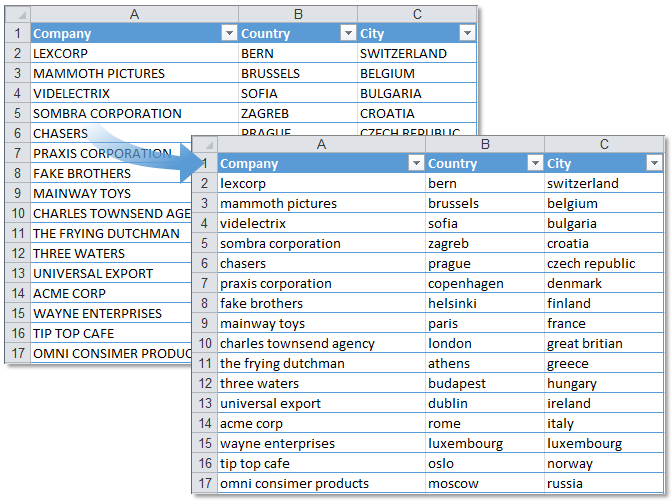
This tool changes all text in your selected cells to lowercase letters.
It works on both plain values and formulas.
For example:
- "Product Name" becomes "product name"
- "ABC123" becomes "abc123"
- A formula like ="Hello World" becomes ="hello world"
This is helpful for standardizing text in things like usernames, email addresses, product codes, file names, or internal notes where consistent lowercase formatting is needed.
Starting this tool
Click › Text › 3. Change to lowercase
Specify a Keyboard Shortcut: ASAP Utilities › My Tools & Shortcuts › Manage My Tools & Shortcuts...
Additional search terms to help you find this tool:
Convert text to lowercase in Excel, Change to lowercase, Shift F3 Excel lowercase, Change case to lowercase, Transform uppercase to lowercase, Convert capital letters to lowercase, Change all caps to lowercase, Lowercase selected cells
Tip:Alt+P for the previous tool.
Tip: Alt+N for the next tool.
Get Started with ASAP Utilities 9
Start saving time in Excel with practical tools you can use right away.
-
No sign-up required.
-
-
Free 90-day trial