


Selecteer alle objecten op het huidige werkblad
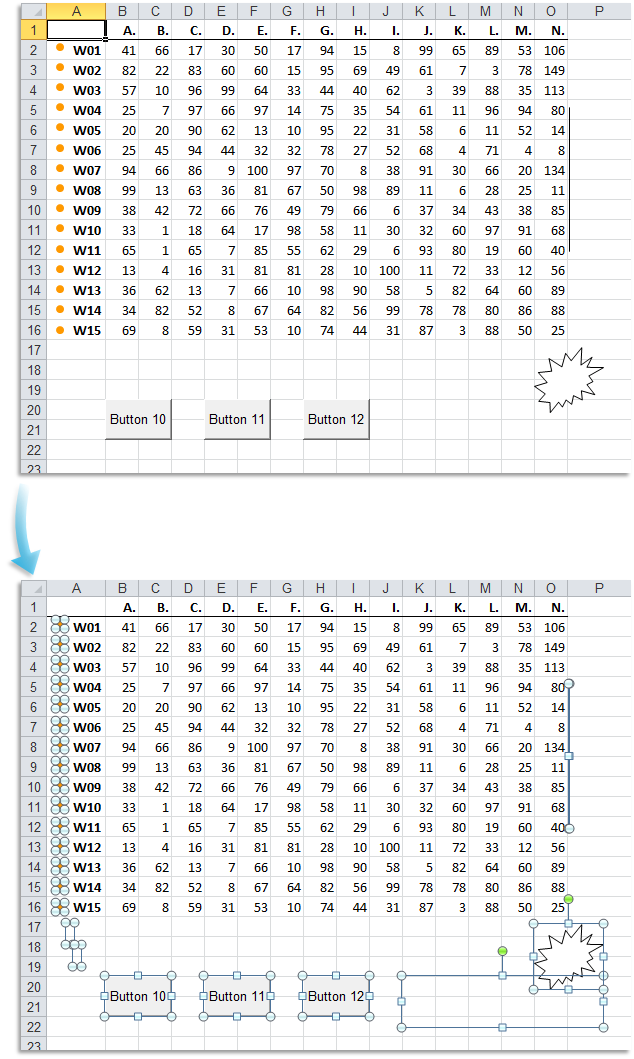
Deze tool selecteert alle objecten op uw huidige werkblad.
Deze objecten zijn bijvoorbeeld vormen, tekstvakken, afbeeldingen, wordart, clipart, grafieken, besturingselementen van de werkbalk formulieren, besturingselementen uit de werkset besturingselementen, etc..
Deze tool starten
Sneltoets opgeven: ASAP Utilities › Favorieten & Sneltoetsen › Uw favoriete tools en sneltoetsen bewerken...
Tip: Alt+P voor de vorige tool.
Tip: Alt+N voor de volgende tool.

Bespaar tijd in Excel. Snel en eenvoudig.
ASAP Utilities helpt je tijd besparen en dingen doen die Excel alleen niet kan.
Je kunt meteen aan de slag. Geen training nodig.
De meeste gebruikers beginnen met een paar tools. Uiteindelijk gebruiken velen ASAP Utilities dagelijks.
Gebruikt door teams in meer dan 28.500 organisaties.
Aan de slag met ASAP Utilities 9
Bespaar direct tijd in Excel met praktische tools die je meteen kunt gebruiken.
-
Geen registratie nodig.
-
-
Probeer 90 dagen gratis