


Activeer hyperlinks (maak van cel waarden)...
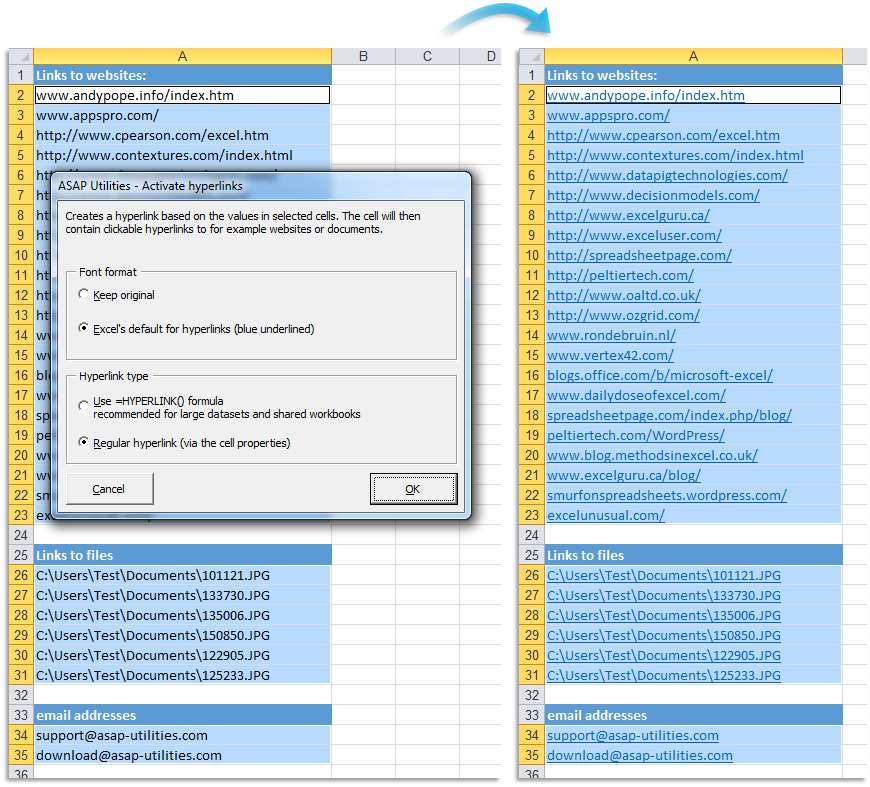
Deze tool voegt een hyperlink to in de geselecteerde cellen op basis van de inhoud van de cel.
U kunt dit bijvoorbeeld gebruiken om alle website- en email adressen snel om te zetten in klikbare hyperlinks.
U kunt de volgende opties instellen:
Tekst opmaak:
- Behoudt de bestaande tekst opmaak in de cellen.
- Gebruik Excel's standaard opmaak voor hyperlinks (blauw onderstreept).
Soort hyperlink
- Gebruik de =HYPERLINK() formule. Dit wordt aangeraden indien u veel hyperlinks in uw bestand heeft of een gedeelde werkmap gebruikt.
- Reguliere hyperlinks (via de cel eigenschappen).
Uw laatst gebruikte instellingen worden onthouden.
Deze tool starten
Sneltoets opgeven: ASAP Utilities › Favorieten & Sneltoetsen › Uw favoriete tools en sneltoetsen bewerken...
Tip: Alt+P voor de vorige tool.
Tip: Alt+N voor de volgende tool.

Bespaar tijd in Excel. Snel en eenvoudig.
ASAP Utilities helpt je tijd besparen en dingen doen die Excel alleen niet kan.
Je kunt meteen aan de slag. Geen training nodig.
De meeste gebruikers beginnen met een paar tools. Uiteindelijk gebruiken velen ASAP Utilities dagelijks.
Gebruikt door teams in meer dan 28.500 organisaties.
Aan de slag met ASAP Utilities 9
Bespaar direct tijd in Excel met praktische tools die je meteen kunt gebruiken.
-
Geen registratie nodig.
-
-
Probeer 90 dagen gratis