


Bereiknamen in formules vervangen door hun celverwijzingen (op geselecteerde bladen)
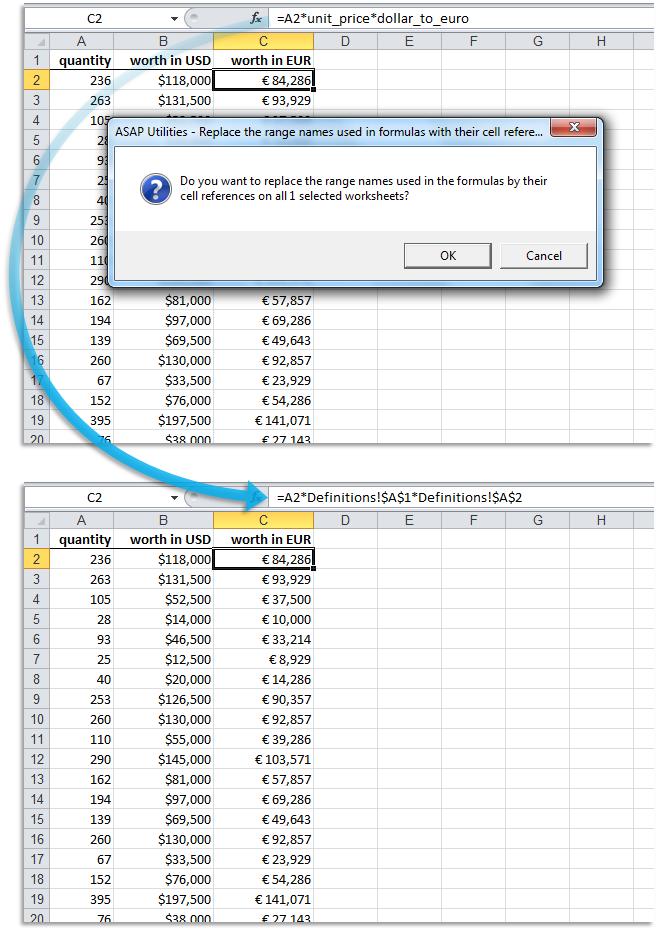
Deze tool vervangt de bereiknamen, die zijn gebruikt in formules in de geselecteerde bladen, door hun celverwijzingen.
Bijvoorbeeld, indien u een waarde heeft in cel C10 met de bereiknaam 'hoeveelheid' en u gebruikte een formule zoals '=A1*hoeveelheid', dan zal deze tool de formule vervangen door '=A1*C10'.
Deze tool starten
Sneltoets opgeven: ASAP Utilities › Favorieten & Sneltoetsen › Uw favoriete tools en sneltoetsen bewerken...
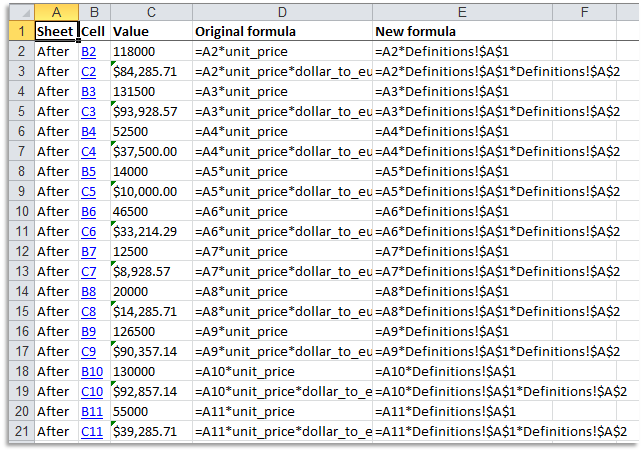
Voorbeeld screenshot: 2 A report with the changes that were made (Dit is de Engelse versie)
Tip: Alt+P voor de vorige tool.
Tip: Alt+N voor de volgende tool.

Bespaar tijd in Excel. Snel en eenvoudig.
ASAP Utilities helpt je tijd besparen en dingen doen die Excel alleen niet kan.
Je kunt meteen aan de slag. Geen training nodig.
De meeste gebruikers beginnen met een paar tools. Uiteindelijk gebruiken velen ASAP Utilities dagelijks.
Gebruikt door teams in meer dan 28.500 organisaties.
Aan de slag met ASAP Utilities 9
Bespaar direct tijd in Excel met praktische tools die je meteen kunt gebruiken.
-
Geen registratie nodig.
-
-
Probeer 90 dagen gratis