


此页面目前仅提供英文版本。
Excel 2016 Users: Microsoft Update KB5002653 Breaks Opening Excel Add-Ins | Excel: "Sorry, we couldn't find... ASAP Utilities.xlam..."
Update: Microsoft has released an update to fix this issue
Microsoft update KB4484305 fixes an issue in which Excel add-ins that were enabled the last time that you used Excel might not load correctly when you open Excel.
Question
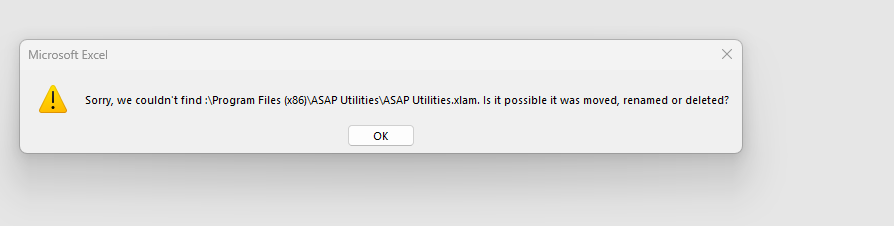
After installing the Excel 2016 update KB5002653, Excel 2016 no longer loads add-ins, including ASAP Utilities.
In the error message, the first character (the drive letter) is missing:
Answer
This is a bug in KB5002653 that was released by Microsoft on November 13th.
It is discussed in the following topics:
- https://answers.microsoft.com/en-us/msoffice/forum/all/unable-to-run-excel-add-ins-after-kb5002653-latest/765e15be-e280-4b3e-9800-18f3bc56a942
- https://techcommunity.microsoft.com/discussions/excelgeneral/xlam-load-error-with-kb-5002653/4295554
- https://www.reddit.com/r/sysadmin/comments/1gqjq6v/office_addins_broken_after_updates/
- https://answers.microsoft.com/en-us/msoffice/forum/all/excel-2016-broken-after-update/501f830f-23b1-4969-a8d1-974c84954922
A (temporary) solution is to either uninstall KB5002653, or open the ASAP Utilities.xlam manually until Microsoft has solved this.
Update 1 - November 14, 22:23
Microsoft has updated its release notes to include additional information and an acknowledgment of the issue. However, a real solution is not yet available.
Microsoft: Known issues in this update
After you install this update, Excel add-ins that were enabled the last time that you used Excel might not load correctly when you open Excel. To work around this issue, open the add-ins manually by double-clicking them or selecting File > Open.
# Description of the security update for Excel 2016: November 12, 2024 (KB5002653)
https://support.microsoft.com/en-us/topic/description-of-the-security-update-for-excel-2016-november-12-2024-kb5002653-189190cb-3ae5-47ac-b85a-ca9815cff793
Update 2 - November 20, Microsoft has released an update to fix this issue
Microsoft update KB4484305 fixes an issue in which Excel add-ins that were enabled the last time that you used Excel might not load correctly when you open Excel.