


How can I transfer the license to a new computer or another employee?
Intro
 Transferring your license is basically as simple as uninstalling/removing it from the old computer and then installing and entering your license details in ASAP Utilities on the new computer.
You don't have to purchase a new license when you switch to a new computer, you can use your existing license.
This procedure can also be used to transfer the licensed version to another user within your organization.
1. Download latest version
As a licensed user you can download the latest version from here.
(To download older versions of ASAP Utilities, you'll need to use the special download link from the email with your full license details.)
2. Optionally: copy Favorites menu settings
If you have made customizations to your favorites menu and you want to take those with you to your new computer, then this article shows how to do this.
3. Remove from the old computer
Remove the license from your old computer using the 'Remove license...' button on the license info screen:
# ASAP Utilities > ASAP Utilities Options > 3. Enter License...
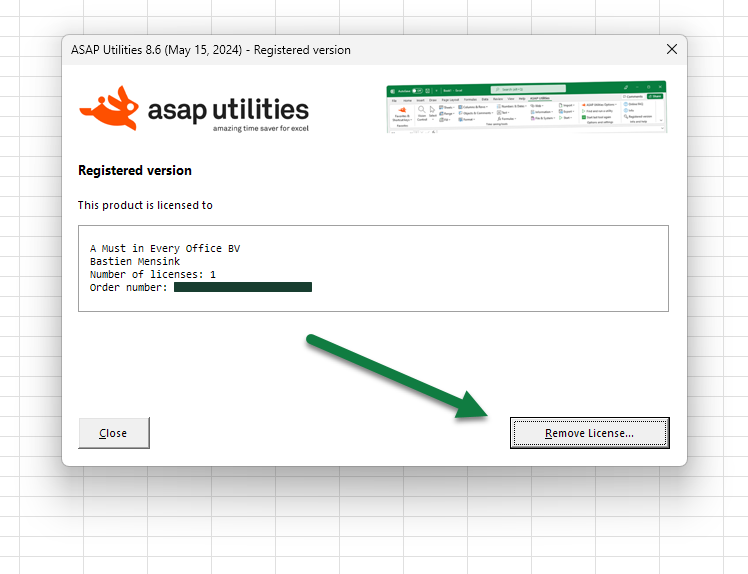
If you don't see this button, for example if you are using an older version, you can simply remove ASAP Utilities by uninstalling it. In managed IT environments, this is typically handled automatically when a computer is reimaged or prepared for a new user.
4. Install and enter the license details on your new computer
For reference: Step by step installation:
https://www.asap-utilities.com/installation-step-by-step.php
The license entry part:
https://www.asap-utilities.com/installation-step-by-step.php#license
move license, transfer key, old laptop, new laptop, new colleague, new user, user left the company, purchase