


Version 8.4 - January 3, 2024
December 29, 2023
Finished
On January 3, 2024 the new version 8.4 has been released.
Supported Excel versions
ASAP Utilities 8.4 works with:
- Excel 365 (both 32- and 64-bit version)
- Excel 2021 (both 32- and 64-bit version)
- Excel 2019 (both 32- and 64-bit version)
- Excel 2016 (both 32- and 64-bit version)
- Excel 2013 (both 32- and 64-bit version)
- Excel 2010 (both 32- and 64-bit version)
On any Windows system that matches the Excel system requirements.
Free upgrade if you purchased version 7.x and 8.x
If you purchased a license in 2016 or later (version 7.x) then you get version 8 free of charge. You can use the same license details.
If you purchased a license in 2015 or longer ago, then please contact us for a 50% discount to upgrade to version 8.
To upgrade to a newer version of ASAP Utilities that is covered by your license, just install the new version "on top" of the existing version on your computer.
ASAP Utilities will then automatically recognize your settings and license information if you have already entered that previously.
New/improved
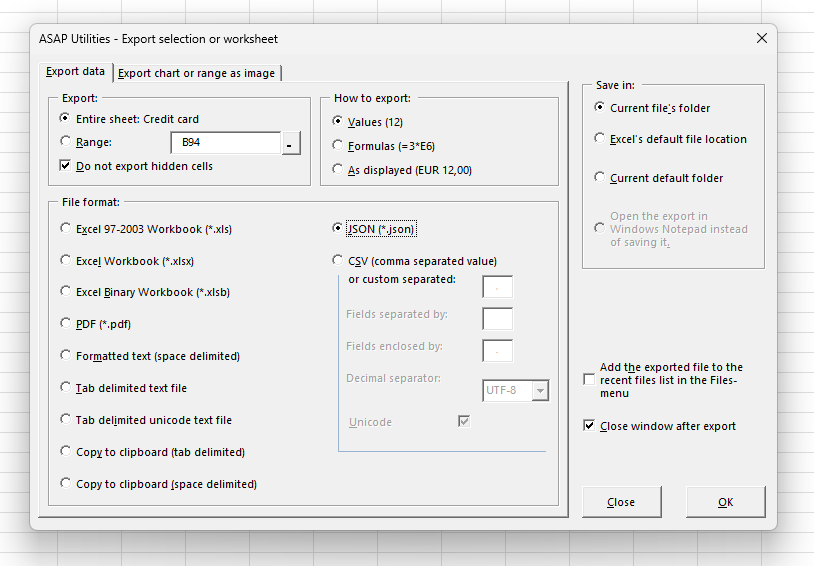
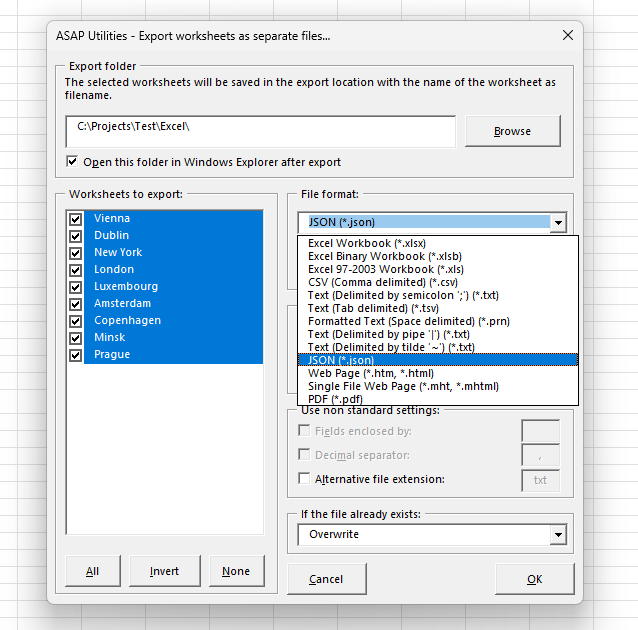
Export in JSON format
While Excel can import data in JSON format, it cannot natively save in this format.
Now, with ASAP Utilities, you can export to JSON.
JSON, or JavaScript Object Notation, is a lightweight format for storing and transporting data, often used in web applications for data exchange.
Saving your data in JSON-format has been added to the following tools:
- Export › Export selection or active sheet as new file...
- Export › Export worksheets as separate files...
Import data from copied Word Table without splitting cells at line breaks
Via ASAP Utilities › ASAP Utilities Options › 11. New tools in development (English only)
When you copy a table from Word to Excel, Excel splits cells with line breaks into separate cells.
This tool helps you transfer your table to Excel while maintaining its original structure.
General
Fixed some known issues and made a few small improvements.
Bug fixes
Sheets › Reset Excel's last cell
Fixed a bug that was introduced in version 8.3 where, if your dataset didn't begin in row 1 or column A, it could give an error message and mistakenly delete one or more rows or columns of data at the end of your dataset.
Get Started with ASAP Utilities 9
Start saving time in Excel with practical tools you can use right away.
-
No sign-up required.
-
-
Free 90-day trial