


Esta página actualmente solo está disponible en inglés.
Version 4.2.4 - March 11, 2008
February 25, 2008
Finished
On March 11, 2008 the new version 4.2.4 is released. Download
Update information
At this moment there are a few known bugs in version 4.2.2 and 4.2.3. Most of these bugs are related to Excel 2007 or other add-ins.
These have been fixed in version 4.2.4 which I'm currently developing and of which you can download a pre-release:
ASAPUtilities_setup_4-2-4-RC4_NoManual.exe 1.9 MB (March 10, 2008)
New
- Export » Export selection or active sheet as new file...
The default file extension for tab separated files is now tsv instead of txt (tsv stands for tab separated value) - Export » Export worksheets as separate files...
The default file extension for tab separated files is now tsv instead of txt (tsv stands for tab separated value) - Formula » Convert formulas to their values
Improved so that it now works on filtered data too.
Normally the utility changes the formulas to their calculated values in all selected cells (hidden or not). If you have selected cells in a filtered list only the visible cells are affected. - Web » Activate hyperlinks (create from cell values)...
Improved, you can now choose to use the "regular" hyperlink or to use the =HYPERLINK() formula to create the hyperlinks. The formula-method is preferred for shared workbooks and when it involves a large amount of hyperlinks.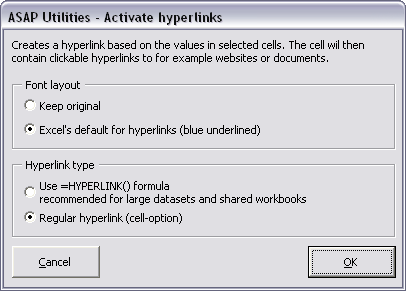
- Columns & Rows » Put together rows or columns from several sheets...
The column width of the original data is now copied too. - Export » Export selected chart or range as image (file)...
You can now choose whether you want to have the utility automatically closed after the export is created.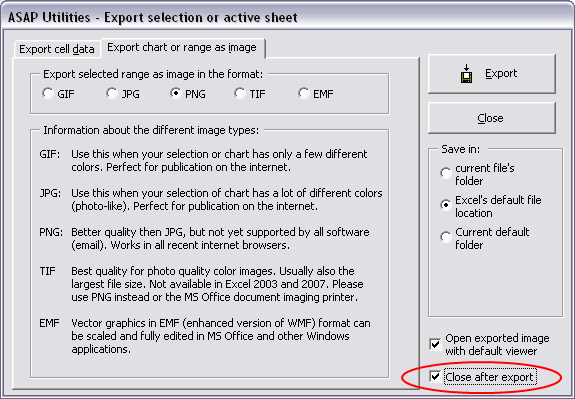
- Fill » Insert before current value...
Fill » Insert after current value...
You can now choose to skip empty cells in your selection. There is also a 'reset' button added that will clear the insert before and after values and reset the options to their defaults. Because your previous settings are always remembered this can be handy.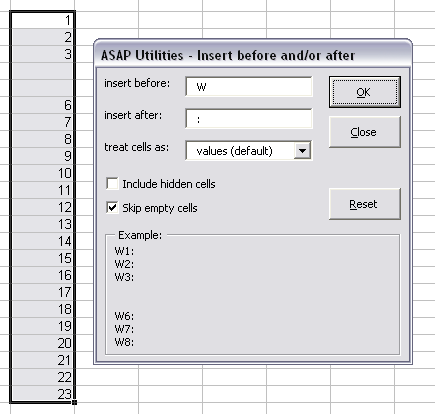
- Web » Extract hyperlinks...
Your last used settings are remembered.
Bugs fixed
- Format » Copy a sheet's page and print settings...
In Excel 2007 this utility could make Excel crash.
This is now fixed by creating a workaround for Excel 2007. - Format » Empty all headers and footers
In Excel 2007 this utility could make Excel crash.
This is now fixed by creating a workaround for Excel 2007. - Export » Export worksheets as separate files...
Improved so that it ignores other applications/add-ins during the process.
This solves a problem the add-in XLplus could cause when also installed.
A few other minor bugs have been solved too. - Export » Export selection or active sheet as new file...
Improved so that it ignores other applications/add-ins during the process.
This solves a problem the add-in XLplus could cause when also installed. - Select » Conditional row and column select, hide or delete...
The progress indicator when searching for duplicates wasn't properly shown, this is now fixed (and improved for removing duplicate) - Import » Insert Excel File...
Fixed the incorrect message that the file was opened instead of imported. Further improved so that if you just started Excel with a blank workbook, the file is imported in stead of opened. - General
If your worksheet contained wrong macro code (for example plain text instead of proper code) you got the error that a worksheet wasn't selected. This is because due to the bad macro code in the sheet certain actions cannot be done.
The message is now updated so that it will inform you properly about this and suggest that you reopen your workbook without enabling the macros.
Empieza con ASAP Utilities 9
Empieza a ahorrar tiempo en Excel con herramientas prácticas que puedes usar de inmediato.
-
No se requiere registro.
-
-
Prueba gratuita de 90 días