


此页面目前仅提供英文版本。
Version 4.5.2 - May 1, 2009
May 4, 2009
Finished
On May 4, 2009 the new version 4.5.2 is released. Download
Improved
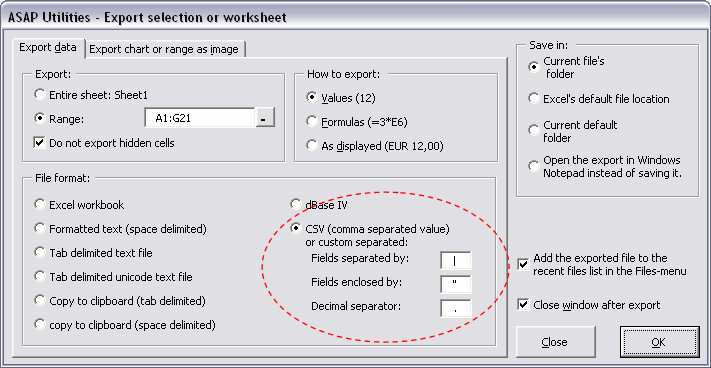
- Export » Export selection or active sheet as new file...
Improved to better reflect the possibility to create a custom separated text file, such as for example a pipe delimited file. If you specify a comma (,) as delimited, the file will be saved as a .csv file. If you specify a different delimiter you can use your own file extension.

Bugs fixed
- Sheets » Create an index page with links to all sheets (clickable)...
Didn't work to index charts, you then got the following error: "Sorry, something unexpected went wrong at code line 620: Type mismatch". This bug is now fixed. - Web » Extract hyperlinks...
Didn't extract the hyperlinks from cells. This is now fixed.
Sheets » Unprotect multiple sheets at once...
If you choose the option "selected sheets" you got an error: "Sorry, something unexpected went wrong at code line 350: Object variable or With block variable not set". This bug is now fixed. - System » Macro/VBA information (beta, English)...
Produced an error when it tried to read any "Property Let" code. This is because it treated it as a procedure and wanted to count the number of code lines in it. - Columns & Rows » Remove all empty rows
The utility used to rely on Excel's method of detecting blank cells. However sometimes Excel doesn't recognize empty cells correctly and it thinks the empty cells are not empty. You can replicate this when the function =ISBLANK() returns false for an empty cell.
We have now fixed this by using our own method of detecting truly empty cells. - Columns & Rows » Remove all empty columns
The utility used to rely on Excel's method of detecting blank cells. However sometimes Excel doesn't recognize empty cells correctly and it thinks the empty cells are not empty. You can replicate this when the function =ISBLANK() returns false for an empty cell.
We have now fixed this by using our own method of detecting truly empty cells. - Information » File and selection info...
This utilityt only counted the errors in cells with constants. Now it counts the errors in formula cells as well. - Select » Select cells based on content, formatting and more...
If you had less then 20 cells and choose the option to select the duplicate or unique values, the utility produced an error: "Sorry, something unexpected went wrong at code line 880: show the progress bar, Error 11: Devision by zero". This bug is now fixed. - Sheets » Unprotect multiple sheets at once...
The utility didn't work if you wanted to unprotect the selected sheets. In such a case you got an error message. This is now fixed. The option to unprotect all sheets worked without problems. - Columns & Rows » Put together rows or columns from several sheets...
Fixed a bug when you got an incorrect warning to choose fewer columns or rows because ASAP Utilities thought the available amount of rows or columns in your worksheet was 0. - Columns & Rows » Delete all hidden rows and columns
The utility was unable to remove hidden columns in an autofilter, because Excel cannot delete a column in an autofilter if it is hidden. If you had this then the utility produced an error: "Sorry, something unexpected went wrong: Delete method of Range class failed". This bug is now fixed. However if you use Excel 2000 and want to remove hidden columns you first have to turn off the autofilter. Removing hidden rows with autofilter turned on works in all Excel versions. - General
A few people got the following question when they closed Excel: "Do you want to save the changes made to 'ASAP Utilities.xla'?". In theory that should not be possible because the file is opened as read-only and the program doesn't make any changes to it itself. But still, in practice, some people got this question. We've made a few changes to be sure that Excel doesn't ask this anymore. - Sheets » Hide selected sheets
Didn't work and gave an error message if you workbook contained other sheets than just worksheets. This is now fixed. - Sheets » Hide selected sheets extra (xlVeryHidden)
Didn't work and gave an error message if you workbook contained other sheets than just worksheets. This is now fixed. - Formula » Change formulas to their calculated values
If you used this on filtered data (such as in an autofilter) the utility put the calculation mode for your workbook to manual. This is now fixed, the utility puts the calculation state back into the state it was before the utility ran (as it was supposed to do). - ASAP Utilities Options » Options and settings for ASAP Utilities...
When you used the file size toolbar and had it set to automatically update automatically every x seconds, you could get an error if you removed the toolbar manually without first turning the automatic update off. "Sorry, something unexpected went wrong at code 30: Procedure GetFileSize". We have now updated this tool to first check if the toolbar is still available.