


此页面目前仅提供英文版本。
Version 4.8.0 - October 26, 2011
October 26, 2011
Finished
On October 26, 2011 the new version 4.8.0 is released. Download
New features and improvements
- Filters and AutoFilters: Mimic Excel's behavior
Excel skips certain operations on hidden cells (cells in hidden rows or columns) if your worksheet contains filtered data (a Filter or AutoFilter). For example if you select range A1:A10 and rows 2 till 9 are hidden and you apply a color, then the color is only applied to the visible cells (A1 and A10).
However, Excel only skips these cells if your worksheet has and autofilter, otherwise the color is applied to both the visible and the hidden cells.
ASAP Utilities now mimics that behavior. If your worksheet contains a Filter or AutoFilter and your selection contains hidden cells, then these hidden cells are skipped by the following tools: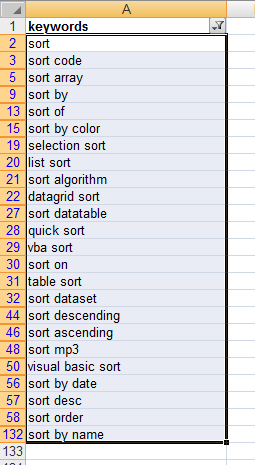 . Activate hyperlinks (create from cell values)...
. Advanced character remove or replace...
. Apply standard format to selected cells
. Change formula reference style (e.g. A1 to $A1 etc.)...
. Change negative numbers to positive and vice versa...
. Change not recognized numbers (text?) to numbers
. Change to lowercase
. Change to UPPERcase
. Change values to text values (adding ' in front)
. Convert percentages to numbers (e.g. 5% to 5)
. Convert/recognize dates...
. Copy values to empty cells below filled cells in selection
. Decode all URL and HTML encoded text
. Delete all after a given number of characters...
. Delete all numbers in selection
. Delete all text characters (a-z) in selected cells
. Delete leading and trailing spaces
. Delete leading, trailing and excessive spaces
. Delete number of ending characters...
. Delete number of leading characters...
. Extract hyperlinks...
. Fill cells with their formatted value
. Fill empty cells in selection...
. Fill up with leading zeros...
. Make first character Uppercase, the rest lowercase
. Make last character subscript
. Make last character superscript
. Move minus sign from back to front (e.g. 65- to -65)
. Overwrite filled cells in selection...
. Quick numbering of selected cells...
. Rebuild array formulas
. Remove all hyperlinks in selected cells
. Remove ending carriage return (alt+enter character)
. Replace accented characters (á, ë, ñ etc.)...
. Reverse text in selected cells
. Round numbers (not formatting, but changing)...
. Spell/write out numbers or amounts (EN, DE, NL)...
. Start Each Word With Uppercase
. Start first word with Uppercase
. Unwrap text
. Use a significant number of decimals...
. Wrap text
. New: Add cell's value or formula to comment
. New: Change text case (with options)
. New: Change julian dates to normal dates in selected cells
. New: Subscript the numbers in chemical equations
. New: Change conditional formatting to static formatting
For your information, in previous versions of ASAP Utilities, you had to first use Excel to selected only the visible cells in your selection as a workaround (Excel, F5 > Special... > Visible cells only) if you only wanted the tools to affect the visible cells in your selected range. - ASAP Utilities Options » New tools in development (English only)
The following tools are added by request:
. Change conditional formatting to static formatting
This tool will change the conditional formatting in selected cells to static formatting.
It verifies the formatting that has been applied via conditional formatting (font, color and borders) and then apply that as standard formatting.
Settings of font, color and borders will be applied. Data Bars and Icon Sets cannot be made static with this tool.
This tool only works with Excel 2000, 2000/XP, 2003 and 2010 (Excel 2007 is not supported).
Don't hesitate to experiment with this tool, it has and undo.
A practical example on when this can be useful:
'We work a lot with conditional formatting (in Excel 2003), but our client wants us to “freeze” the format (Yes, that means no more “conditional”...) in order to have a classical Excel format (mainly cell and font colours).
The idea is to do the same thing as we do with formulas or calculations "copy/paste in value" but for conditional formatting.'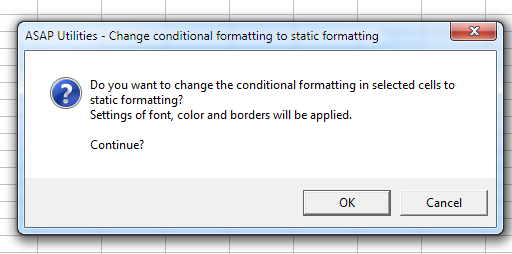
- ASAP Utilities Options » New tools in development (English only)
The following tools are added by request:
. Add cell's value or formula to comment
Add the value formula as comment. You can choose replace existing comments or add the value at the beginning of the end of an existing comment.
You can also specify to read the value of a cell to the left or right and use that value or formula as comment.
Don't hesitate to experiment with this tool, it has an undo.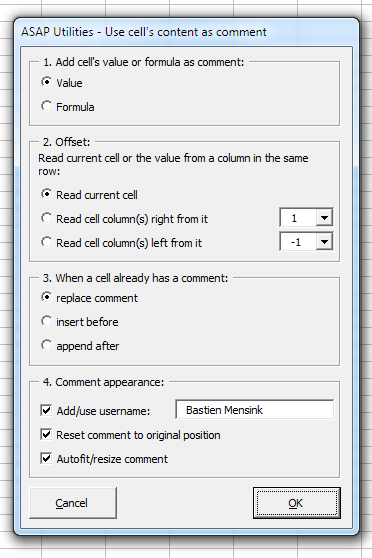
. Insert an apostrophe (') in front of each formula in your selection - ASAP Utilities Options » New tools in development (English only)
. Change julian dates to normal dates in selected cells
This tool has been updated so that besides the yyddd and yyyyddd now the JD Edwards (AS/400) cyyddd format is also supported. Their system adds a 0 or 1 in front of the year representing the century (0 = 1900, 1 = 2000, Jan 15, 1910 is 010015, Jan 15, 2010 is 110015). - Export » Copy selection as values to clipboard
Skipped the confirmation at the end "The data has been copied to the clipboard". This was removed by request from users who used this utility a lot. - Import » Merge and/or import multiple files...
New, when you merge the data you can now choose to have the filename listed in column A.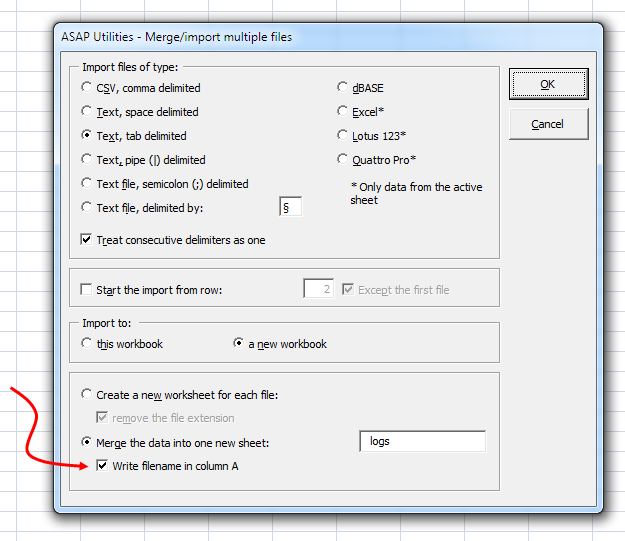
- Columns & Rows » Delete all hidden rows and columns
This utility used to delete all hidden rows and columns together.
You can now choose to either delete all hidden rows, all hidden columns or both.
Between brackets the tool shows how many rows and columns are hidden on your worksheet: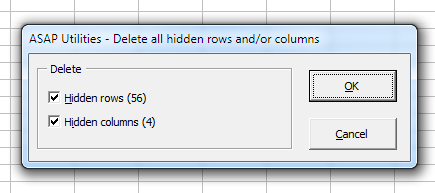
- Export » Export worksheets as separate files...
Has a new option to choose; "Do not export hidden cells", just like the utility
"Export selection or active sheet as new file..."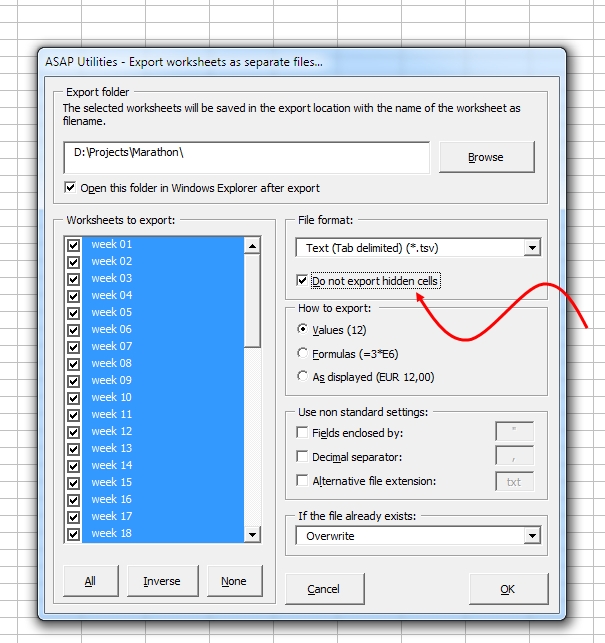
We also added the Excel Binary7 Workbook-format (xlsb) if you have Excel 2007 or newer: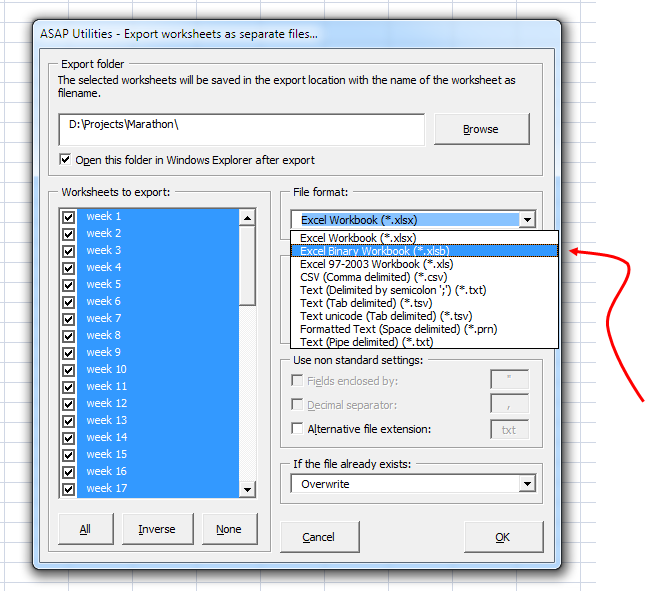
- General
A few small improvements
Bug fixes
- ASAP Utilities » Columns & Rows » Drawing paper
With French regional settings in Windows this tool gave an error. This is now fixed.
In Excel 2007 and 2010 when you had selected the entire sheet and started this utility it raised an error. That is now fixed. - Sheets » Freeze panes on multiple sheets at once
When you have only selected one single sheet, ASAP Utilities selects them all for you, but that gives an error if you have any hidden sheets in your workbook. This is now fixed by automatically selecting only the visible sheets. - Web » Activate hyperlinks (create from cell values)...
In version 4.7.2 we have updated this tool so that it automatically adds http:// in front of hyperlinks if needed. However if you link to a file and the link doesn't start with a drive or folder letter, it is treated by the tool as an internet hyperlink and http:// is automatically placed in front of it.
We've have now updated the tool by using a better detection for internet hyperlinks. - Format » Detect and visualize adjacent data/group changes...
Didn't work if your selection contained cells with an error. This is now fixed. - Range » Count and/or color duplicates in selection...
Could produce an error if you had selected multiple non-adjacent columns. This is now fixed. - Columns & Rows » Put together rows or columns from several sheets...
Fixed the bug that caused your chosen range to expand if your given columns or rows included merged cells. - Select » Select cells based on content, formatting and more...
"When using "Select cells based on content, formatting and more..." and finding no cells matching the search criteria, I expect no cells to be selected.
But in fact all cells from A1 to End-of-Sheet are selected!"
If you have a single cell selected and then start the utility, the tool then assumes that you want to search in the entire workbook and pre-selects that. However, if no matching cells are found the entire sheet was still selected. This is now fixed. - Sheets » Split the selected range into multiple worksheets...
Fixed the following bug:
"When I use the tool Sheets->Split the selected range into multiple worksheets to split selection by number of rows (option: For every so many rows) and my selection doesn’t start in the first row of the sheet there is an error:
The first newly created worksheet doesn’t contain the first couple of selected rows (depending on how far the selection is from the top of the sheet).
For example, if I want to split range A3:A12 (10 rows) into two sheets with 5 rows each, the first two rows are lost." - Export » Export selection or active sheet as new file...
Fixed the bug that caused the export to the clipboard as TAB delimited to be empty. - Export » Export worksheets as separate files...
Fixed the bug that could sometimes appear with very large files:
"Sorry, something unexpected went wrong at code line 800: Error 6: Overflow". - Undo
Fixed two bugs that we found (but so far have never been reported).
Improved reliability for the undo when your worksheet/selection was filtered.
If the worksheet contained an autofilter and frozen panes then the freeze pane settings could become altered in some cases due to an Excel bug. This is now fixed.